Directory
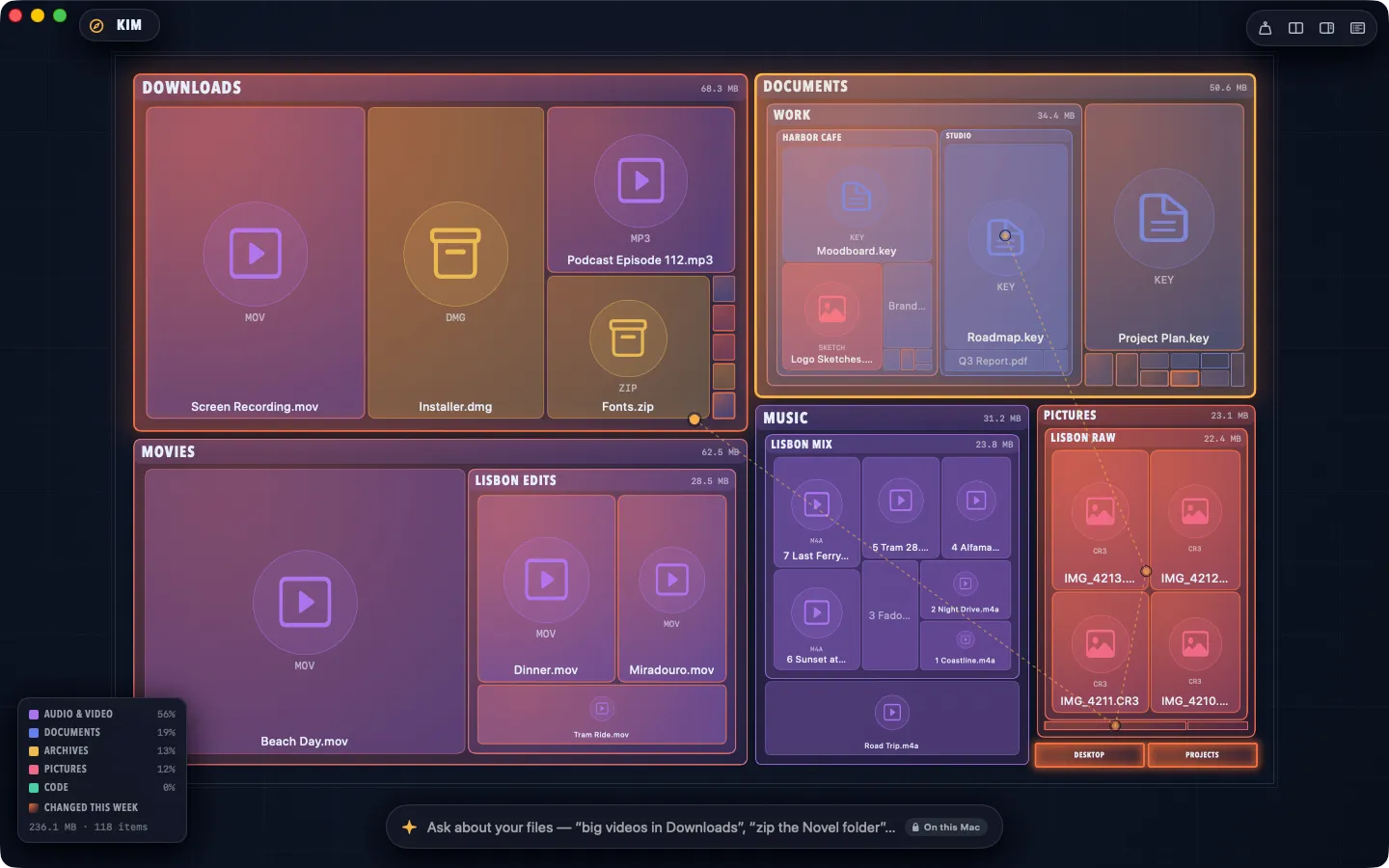
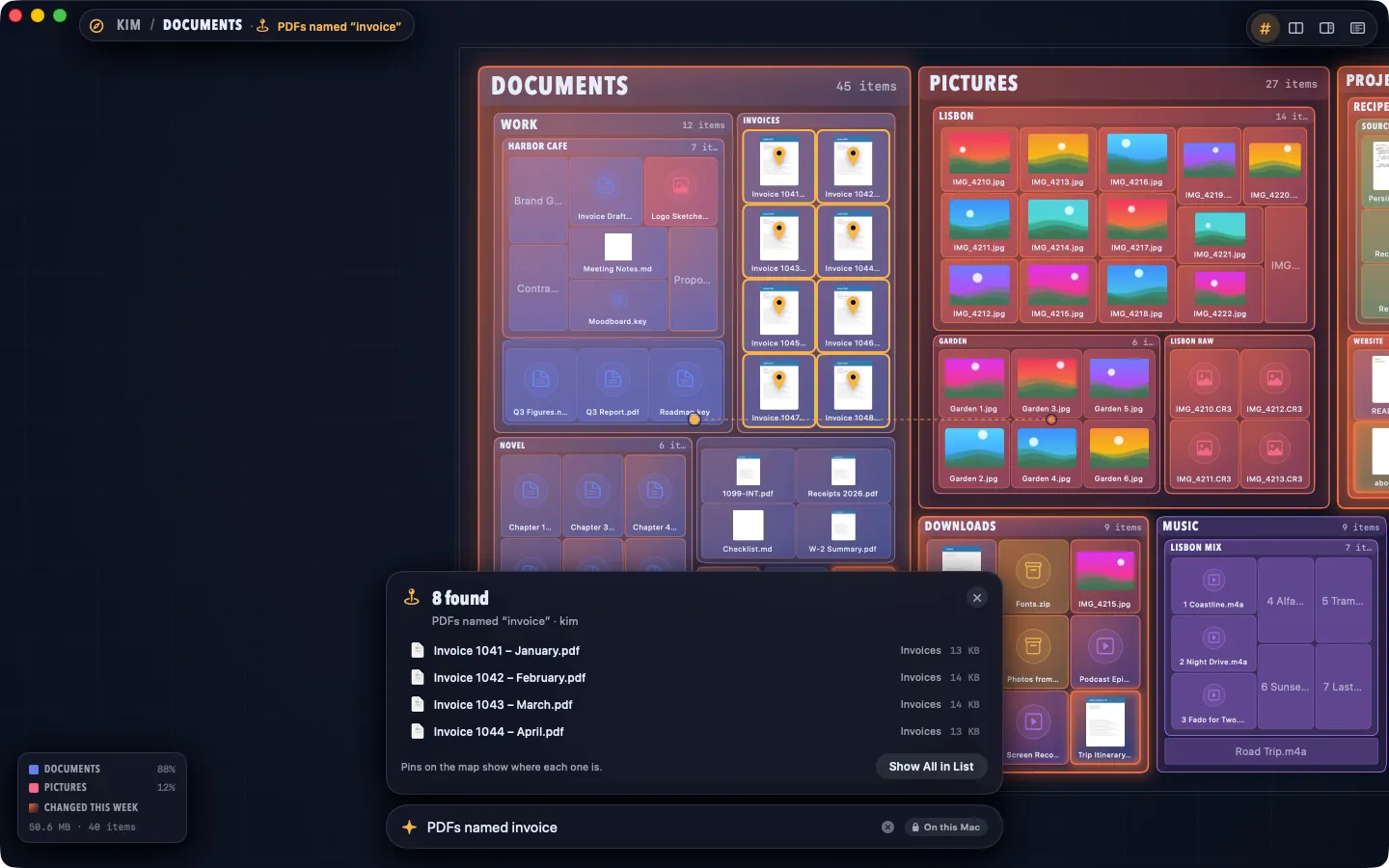
What it does: See your files as a map: folders are districts sized by what they hold and colored by kind, and recent changes glow. Scroll or pinch to fly in. Ask for what you want in plain English, and every move, copy or trash becomes a plan you approve first, with one undo for all of it.
- Checkout by Gumroad
- Notarized by Apple
- No FitzTopPicks account needed
Free to use without a key: the map of your whole Mac with folder sizes, Ask in plain English, “What’s Taking Space?”, plans you approve with undo, the list drawer, previews and Shortcuts.
Buy a license key to unlock Pro: split view and workspaces, batch rename, the duplicate finder, zip archives, the shelf, checksums, Git badges, Vim keys, coding leftovers, cold storage and shrink big videos.
macOS 14 Sonoma or later · Version 2.0 · 5.7 MB disk image · Notarized by Apple
One-time $19.99 for the app with Pro: split view and workspaces, batch rename, the duplicate finder, zip archives, the shelf, checksums, Git badges, Vim keys, coding leftovers, cold storage and shrink big videos. No subscription. One license key works on up to 3 of your Macs.
Download: The download (a signed, notarized .dmg) comes with your purchase in your Gumroad receipt, together with your license key. Updates install from inside the app.
Buy now opens Gumroad's checkout on this page; Gumroad is the seller and handles payment, sales tax and your receipt.
Screenshots
5 pictures: swipe or scroll sideways.
What you get
- Directory for Mac: macOS 14 Sonoma or later
- The signed, notarized .dmg download and your license key, in your Gumroad receipt
- One license key for up to 3 of your Macs
- Updates that install from inside the app
- A one-time price: no subscription
Features
- Your whole Mac as a zoomable map: folders sized by bytes or item count, colored by kind, recent changes glowing
- Ask in plain English: “big videos in Downloads”, “the lease from July”, “zip the Novel folder”
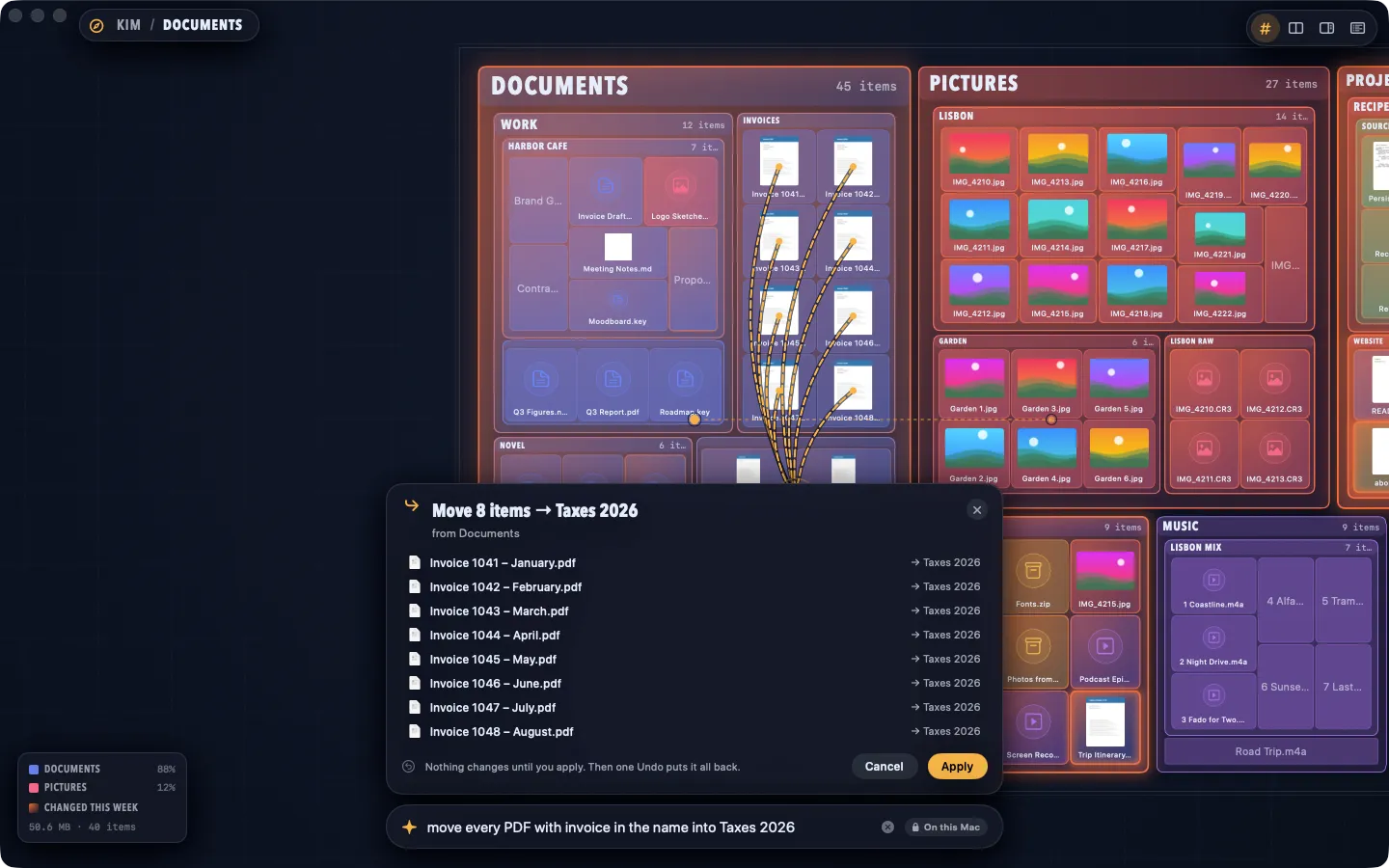
- Every change is a plan first, drawn on the map, with each item and conflict listed; Apply, and one undo puts it all back
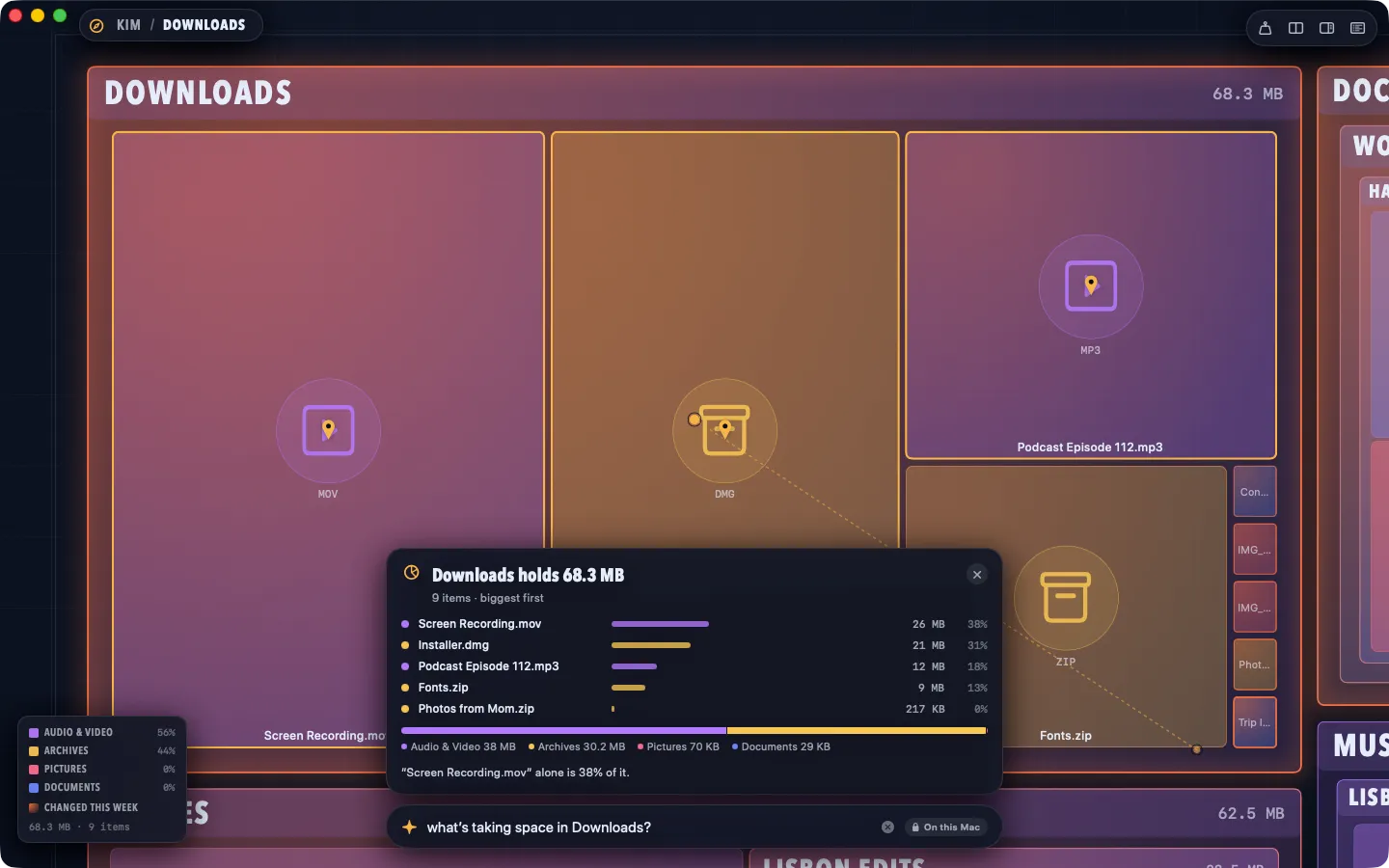
- “What’s Taking Space?” for any folder, biggest first
- A list drawer for precise work, Quick Look previews, the ⌘K palette and Go to Folder
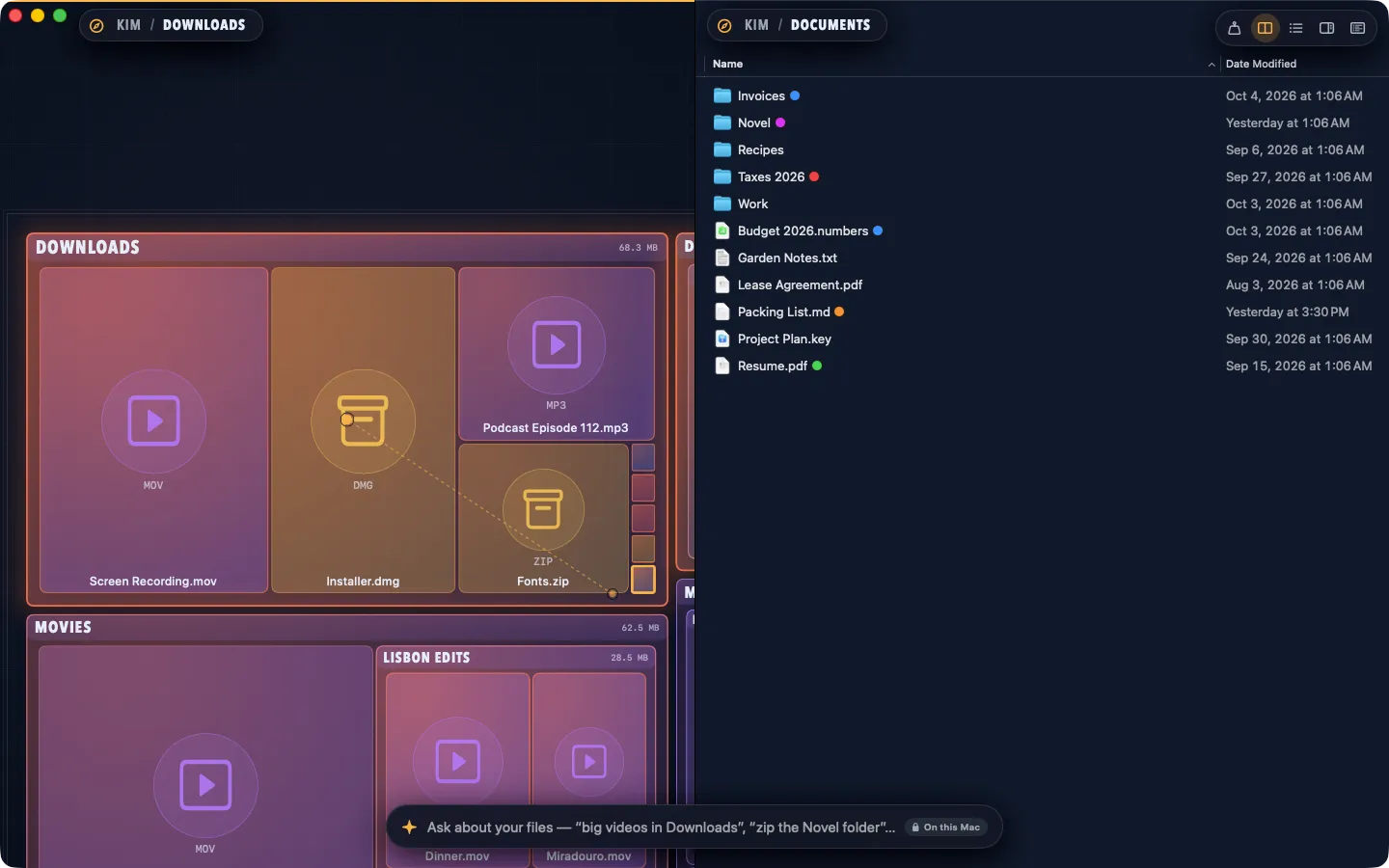
- Split view (two maps, or a map and a list) and saved workspaces
- Batch rename, the duplicate finder, zip archives, the shelf, checksums, Git badges and Vim keys
- Coding leftovers: node_modules, build folders, DerivedData and stale git worktrees in old projects, cleared in one plan you can undo
- Cold storage: move old project folders to an external drive, every file checked before the original goes to the Trash
- Shrink big videos: smaller HEVC copies that keep their dates and places; originals go to the Trash only when you approve
- Safe by design: deleting always means the Trash, copies are checked, and macOS’s own folders, disks, app insides and your Library folder are read-only
- Opens your whole Mac, not just folders you pick; Full Disk Access is optional, for the places macOS keeps private
Free vs Pro
| Feature | Free | Pro |
|---|---|---|
| What you can do | The map of your whole Mac with folder sizes, Ask in plain English, “What’s Taking Space?”, plans you approve with undo, the list drawer, previews and Shortcuts | Everything free, plus split view and workspaces, batch rename, the duplicate finder, zip archives, the shelf, checksums, Git badges, Vim keys, coding leftovers, cold storage and shrink big videos |
| Price | Free download | $19.99 one-time |
Questions
Does Directory need Full Disk Access?
No, it’s optional. Directory opens your home folder, disks and Applications right away. macOS keeps a few places private (Mail, Messages, Safari, other apps’ data and Time Machine backups) and asks once before an app opens Desktop, Documents or Downloads. To see everything without being asked, open System Settings › Privacy & Security › Full Disk Access and turn on Directory (Directory’s Settings › Safety has a button that goes there).
Can Directory replace the Finder?
You can use it for everything you do with files. macOS keeps the Finder for the desktop and some system tasks, so it stays running in the background.
What can I ask?
Finding (“big videos in Downloads”, “the lease from July”), acting (“move every PDF with invoice in the name into Taxes 2026”, “zip the Novel folder”) and explaining (“what’s taking space in Downloads?”). Every change is shown as a plan first, and nothing happens until you click Apply.
Can I get something back?
Yes. Deleting always moves items to the Trash, and Edit › Undo reverses any change, including copies, moves and a whole plan. Replacing a file moves the old one to the Trash first.
What’s free, and what does Pro add?
Free: the map with folder sizes, Ask, “What’s Taking Space?”, plans with undo, the list drawer, previews and Shortcuts. Pro adds split view and workspaces, batch rename, the duplicate finder, zip archives, the shelf, checksums, Git badges, Vim keys, Coding Leftovers (clear rebuildable build folders in old projects), Cold Storage (move old projects to an external drive, checked file by file) and Shrink Big Videos (smaller HEVC copies, originals to the Trash only when you approve). It’s a one-time purchase, with no subscription.
Where do I enter my license key?
Choose Directory › License… in the menu bar (or open Directory Pro), paste the key from your Gumroad receipt and click Activate.
From the Directory help page.
Requirements
- macOS
- macOS 14 Sonoma or later
- Processor
- Apple silicon and Intel
- Languages
- English, Spanish
- Download
- 5.7 MB disk image
- Version
- 2.0
Ask with Apple’s on-device model needs macOS 26 and Apple Intelligence.
What's new
Version 2.0
- A new design: your files as a map you can talk to. Folders are districts sized by what they hold and colored by kind, recent changes glow, and you scroll or pinch to fly in.
- Ask in plain English (“big videos in Downloads”, “move every PDF with invoice in the name into Taxes 2026”). Every change becomes a plan drawn on the map that you approve first, with one undo for all of it.
- Now sold directly at fitztoppicks.com: one license key works on up to 3 of your Macs, and updates come from inside the app (Directory › Check for Updates…).
- Opens your whole Mac without asking folder by folder; Full Disk Access is optional, with a short guide.
- Cold storage (Pro): move old project folders to an external drive to free space. Directory checks every file against the original before the original goes to the Trash, and leaves a small note where each folder was saying which drive it's on, where, when, how many files and a checksum. One undo puts it all back.
- Shrink big videos (Pro): from “What’s Taking Space?”, make smaller HEVC copies of large videos that keep their dates and places, see how much space they save, and only then choose to move the originals to the Trash. Videos that are already HEVC or wouldn’t get smaller are skipped.
- Coding leftovers (Pro): Tools > Coding Leftovers… finds the folders old projects can make again (node_modules, .build, Xcode’s DerivedData, Pods, Rust’s target, Python virtual environments, build output and framework caches) and git worktrees whose branch is merged or gone, with their sizes and when each project was last used. Pick what to clear and it becomes a plan to approve on the map: everything goes to the Trash, never deleted, and one undo puts it all back. Projects with changes Git hasn’t committed, folders Git tracks files in, locked worktrees and protected places are left alone, and the list says why.
Version 1.0.1
- More Mac apps: see our other small Mac apps in a new More Apps tab in Settings.
- A few small fixes and improvements.
Version 1.0
- First release: Your files, as a living map. Tabs, dual panes, previews, batch rename, a disk map and Command-K for everything, in a file manager that’s safe by design.
From Directory's release notes. Updates install from inside the app.
Privacy
Nothing about your files leaves your Mac. Ask uses Apple’s on-device model (macOS 26 with Apple Intelligence on) or Directory’s built-in reader, both on your Mac. Your settings, saved searches, measured folder sizes and your license key (in your Keychain) stay on your Mac. The only network requests are the license check with Gumroad (your license key, when you enter it and about once a week) and checking for updates at fitztoppicks.com; neither sends anything about your files.
Questions about your purchase or license key? Reply to your Gumroad receipt or contact us.