Ejectwise
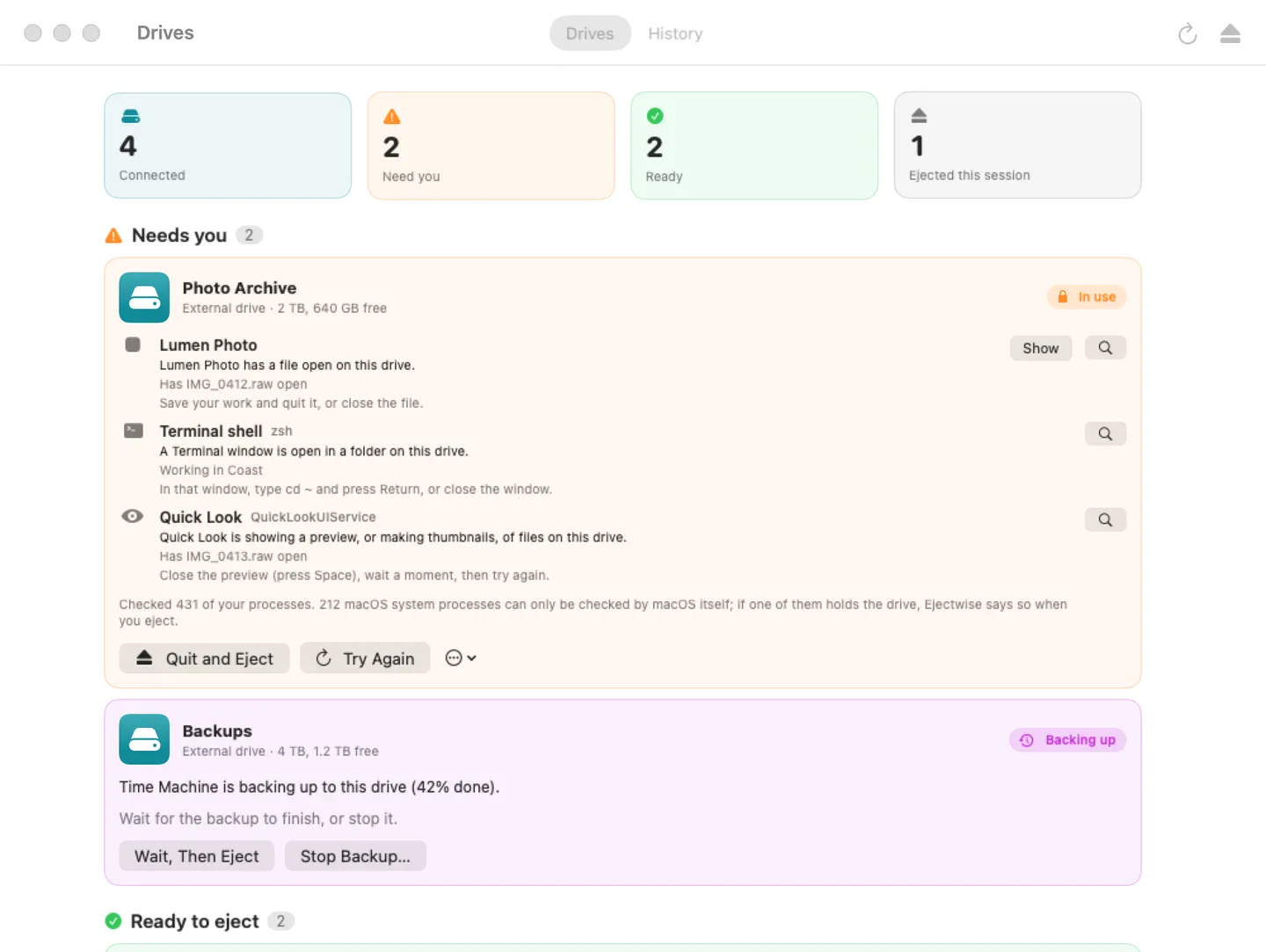
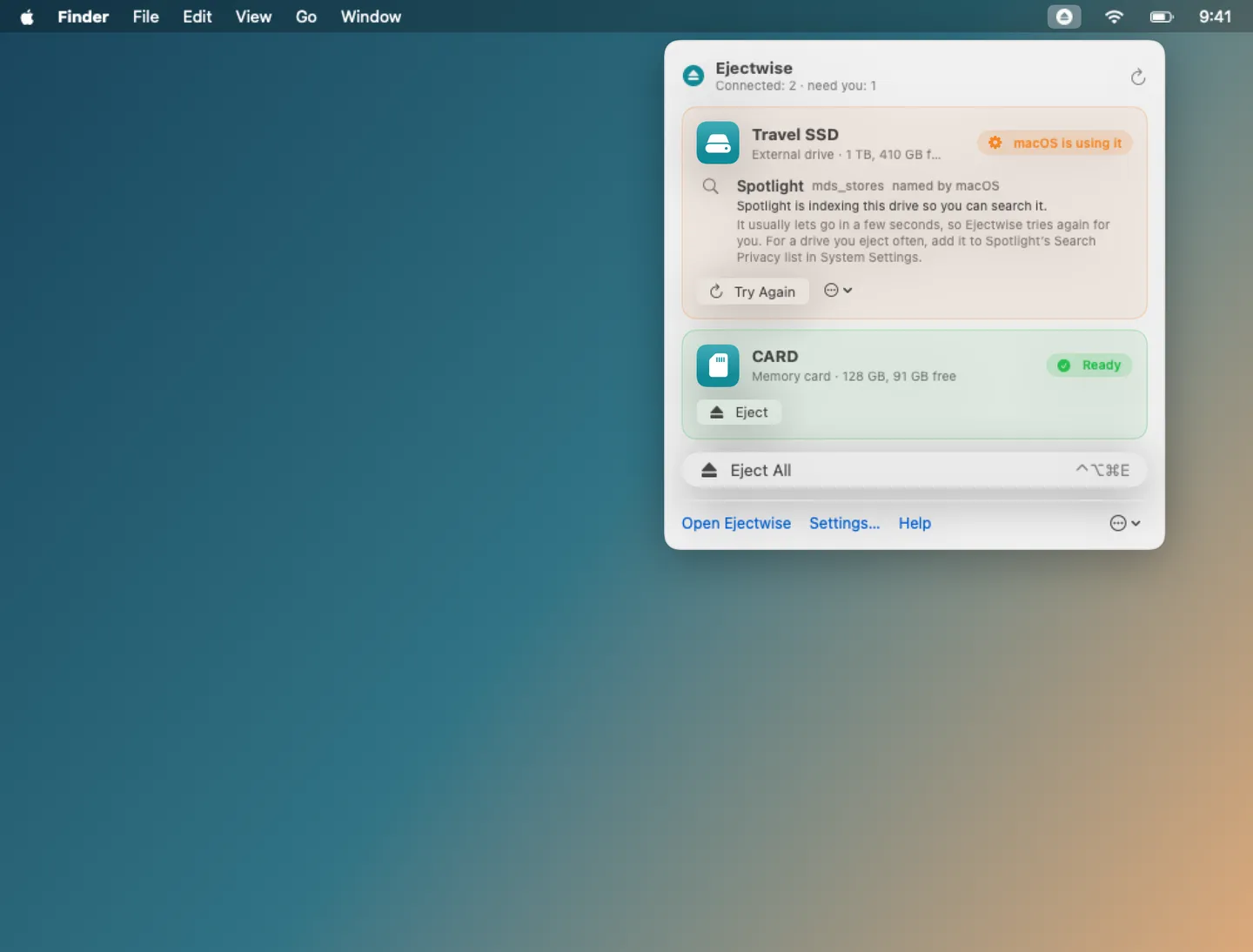
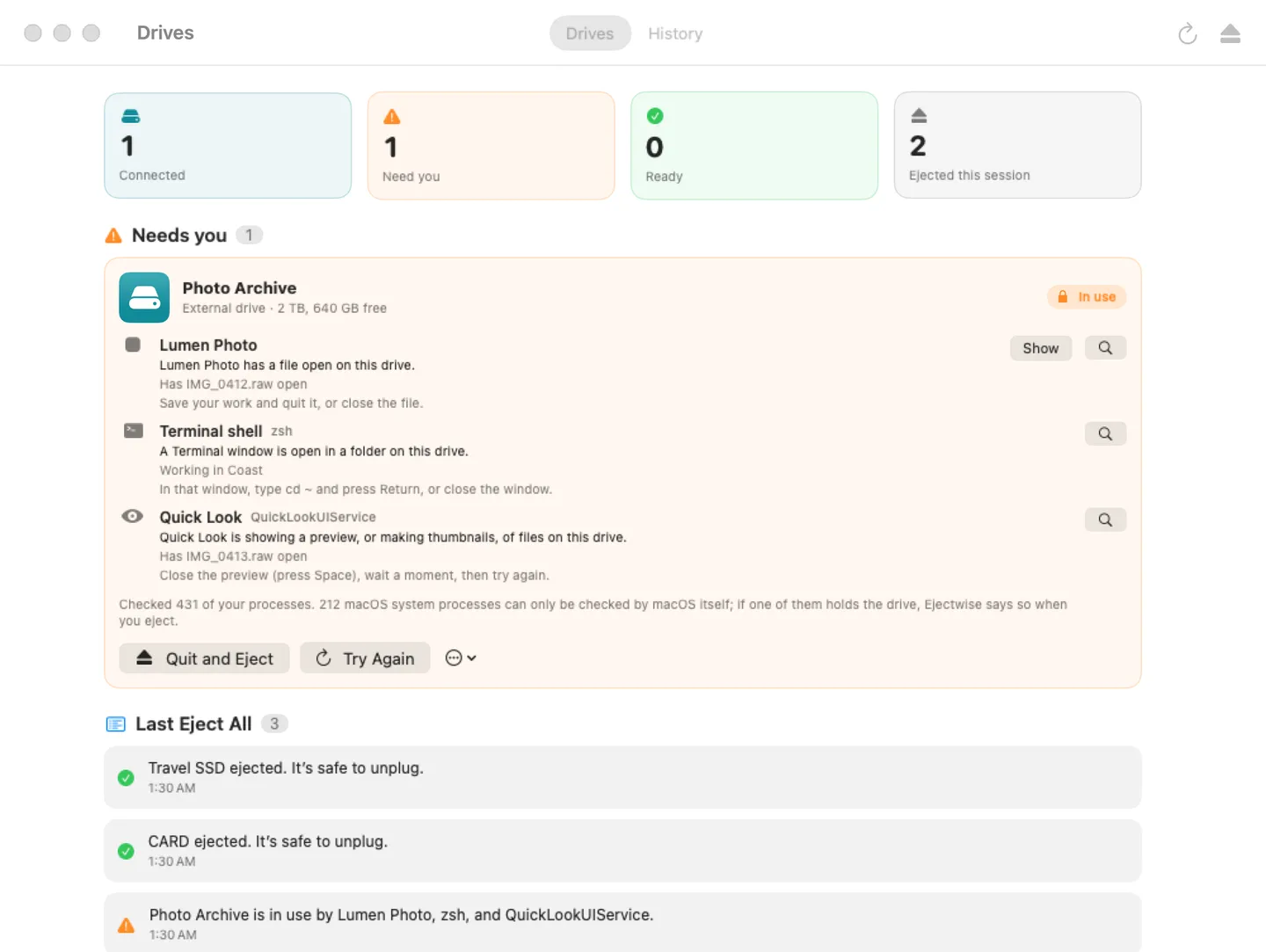
What it does: Ejectwise is a menu bar app that names what's keeping a drive from ejecting: the app with a file open, a Terminal window sitting in a folder on the drive, Quick Look making thumbnails, Spotlight indexing, Time Machine backing up. Then it ejects the drive, asking apps to quit politely first if you want. No admin password and no Full Disk Access; it says so when a macOS service is the holder.
- Checkout by Gumroad
- Notarized by Apple
- No FitzTopPicks account needed
Free to use without a key: see what holds each drive and eject drives one at a time.
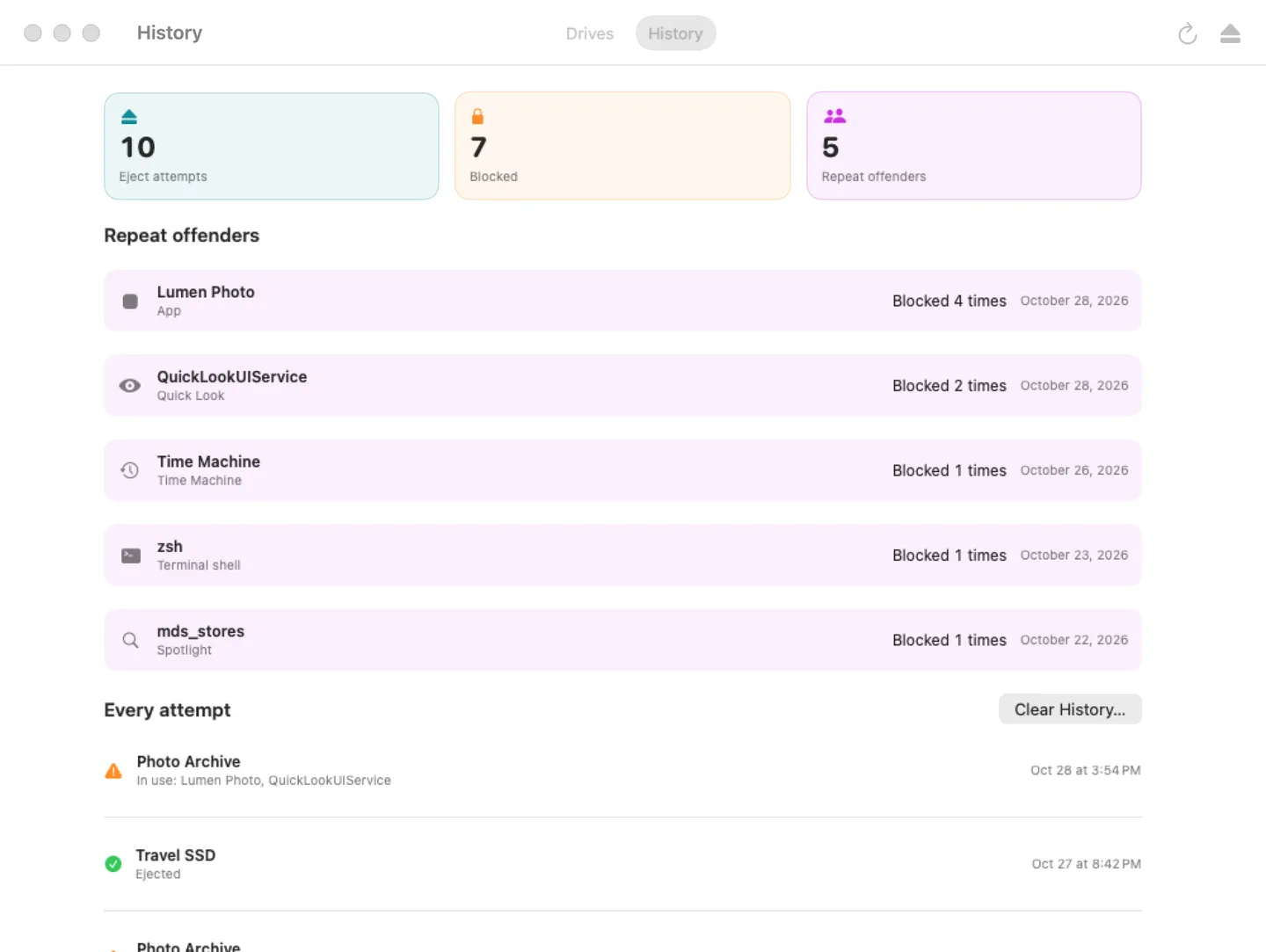
Buy a license key to unlock Pro: Quit and Eject, Eject All with a result for each drive, waiting for or stopping a Time Machine backup, the "why it wouldn't eject" history, the ⌃⌥⌘E shortcut, Shortcuts actions and ejectwise:// links.
macOS 14 Sonoma or later · Version 1.0 · 3.0 MB disk image · Notarized by Apple
One-time $9.99 for the app with Pro: Quit and Eject, Eject All, Time Machine wait or stop, the history and the shortcuts. No subscription. One license key works on up to 3 of your Macs.
Download: The download (a signed, notarized .dmg) comes with your purchase in your Gumroad receipt, together with your license key. Updates install from inside the app.
Buy now opens Gumroad's checkout on this page; Gumroad is the seller and handles payment, sales tax and your receipt.
Screenshots
4 pictures: swipe or scroll sideways.
What you get
- Ejectwise for Mac: macOS 14 Sonoma or later
- The signed, notarized .dmg download and your license key, in your Gumroad receipt
- One license key for up to 3 of your Macs
- Updates that install from inside the app
- A one-time price: no subscription
Features
- Names what holds each drive: open files, programs run from it, shells sitting in a folder on it
- macOS helpers in plain words with advice: Quick Look, Spotlight, Time Machine, Photos, iCloud and backup tools
- A deeper pass for memory-mapped files when the quick scan finds nothing
- Eject never pulls a drive your apps are using; it looks deeper and tries once more when macOS refuses
- Quit and Eject: a polite quit (never forced); an app with unsaved work comes to the front
- Never quits Finder, the Dock or macOS services; Force Eject only after a warning
- Eject All, the history with repeat offenders, ⌃⌥⌘E and Shortcuts actions
- English and Spanish
Free vs Pro
| Feature | Free | Pro |
|---|---|---|
| What you can do | See what holds each drive and eject drives one at a time | Everything free, plus Quit and Eject, Eject All with a result for each drive, waiting for or stopping a Time Machine backup, the "why it wouldn't eject" history, the ⌃⌥⌘E shortcut, Shortcuts actions and ejectwise:// links |
| Price | Free download | $9.99 one-time |
Questions
Why does it say a macOS service is using my drive?
Services like Spotlight and Time Machine run as the system, and macOS doesn’t let any app list their files without an admin password. Ejectwise names them from macOS’s own refusal and tells you what usually helps (for Spotlight, adding the drive to its Privacy list).
Does Quit and Eject lose my work?
No. It asks each app to quit the normal way, so an app with unsaved changes shows its save sheet and Ejectwise brings it to the front. It never force-quits. Command-line programs are stopped only if you tick them.
Is Force Eject safe?
Only when nothing is writing to the drive. Ejectwise warns you first, with an extra warning when something is writing; use it as a last resort.
What’s free, and what does a key add?
Without a key you can see what holds each drive and eject drives one at a time, for as long as you like. A key adds Quit and Eject, Eject All, Time Machine wait or stop, the history, the ⌃⌥⌘E shortcut and Shortcuts actions, on up to 3 Macs. It’s a one-time purchase on Gumroad, with no subscription.
Where do I enter my license key?
Choose Ejectwise › Settings…, open the Pro tab, paste the key from your Gumroad receipt and click Activate.
How do I get updates?
Ejectwise checks for updates on its own; you can also choose Check for Updates… from the Ejectwise menu. Updates are free.
From the Ejectwise help page.
Requirements
- macOS
- macOS 14 Sonoma or later
- Processor
- Apple silicon and Intel
- Languages
- English, Spanish
- Download
- 3.0 MB disk image
- Version
- 1.0
macOS services that run as root (Spotlight, Time Machine) can't be listed by any app without admin rights; Ejectwise says when one of them is the holder.
What's new
Version 1.0 ·
- See every external drive in the menu bar, whether it's ready, and what's keeping it from ejecting, in plain words: the app with a file open, a Terminal window in a folder on it, Quick Look, Spotlight, Time Machine and more.
- Eject never touches a drive your apps are using; when only a macOS service holds it, Ejectwise says so, names it when macOS does, and tries again.
- Pro: Quit and Eject (apps are asked to quit and can ask you to save; nothing is force-quit), Eject All with a result per drive, wait for or stop a Time Machine backup, the eject history with repeat offenders, ⌃⌥⌘E from any app, Shortcuts actions and ejectwise:// links.
- No Full Disk Access, no Accessibility, no administrator password. English and Spanish.
From Ejectwise's release notes. Updates install from inside the app.
Privacy
Ejectwise looks only at your own user's apps and programs, and its history stays on your Mac. The only network requests are the license check with Gumroad (your license key, when you enter it and about once a week) and checking for updates at fitztoppicks.com; neither sends anything about your drives or files.
Questions about your purchase or license key? Reply to your Gumroad receipt or contact us.