Ledgerpull: Bank and card statement PDFs to CSV, QuickBooks or Xero
Free version Free to use without a key. What's free
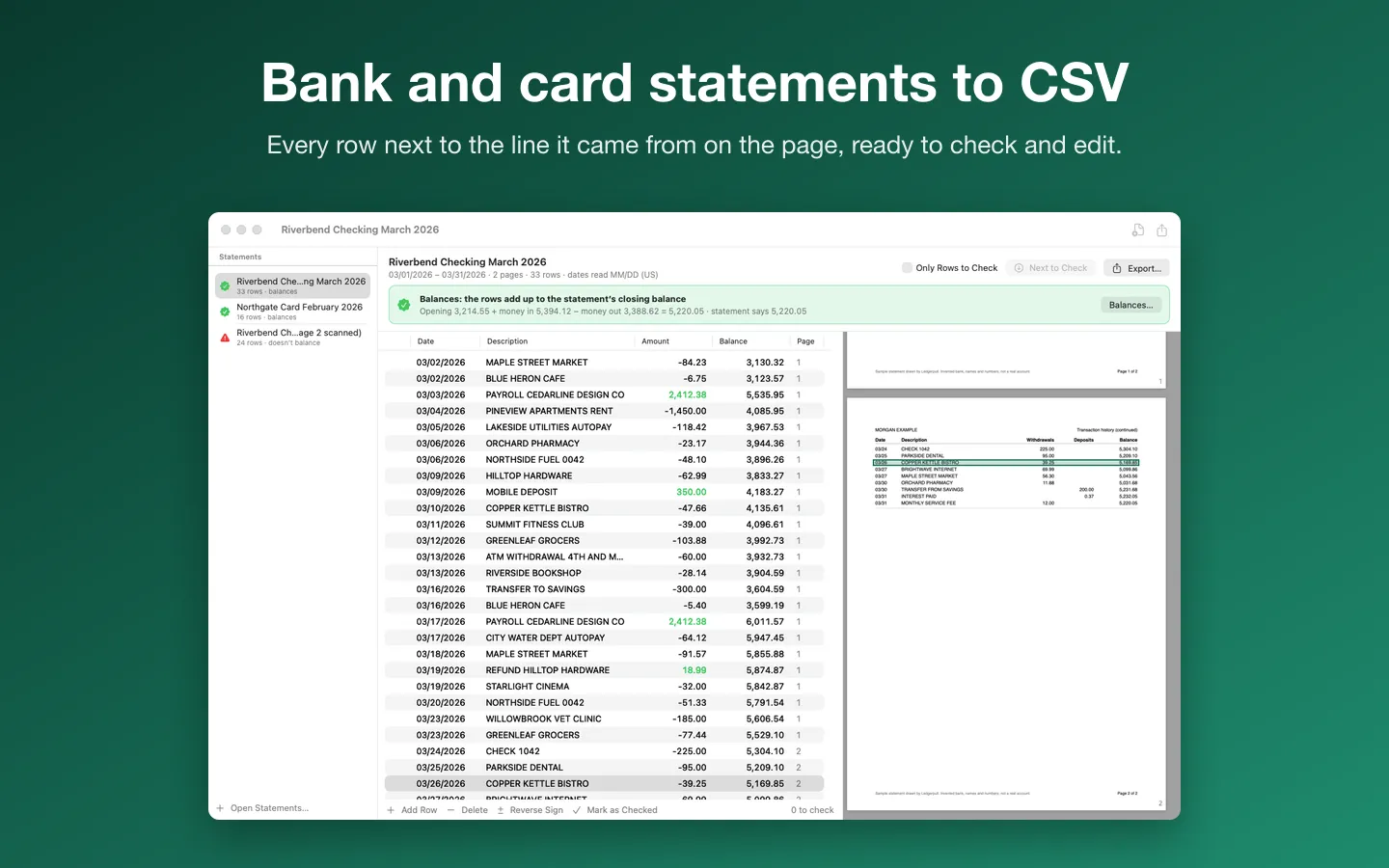
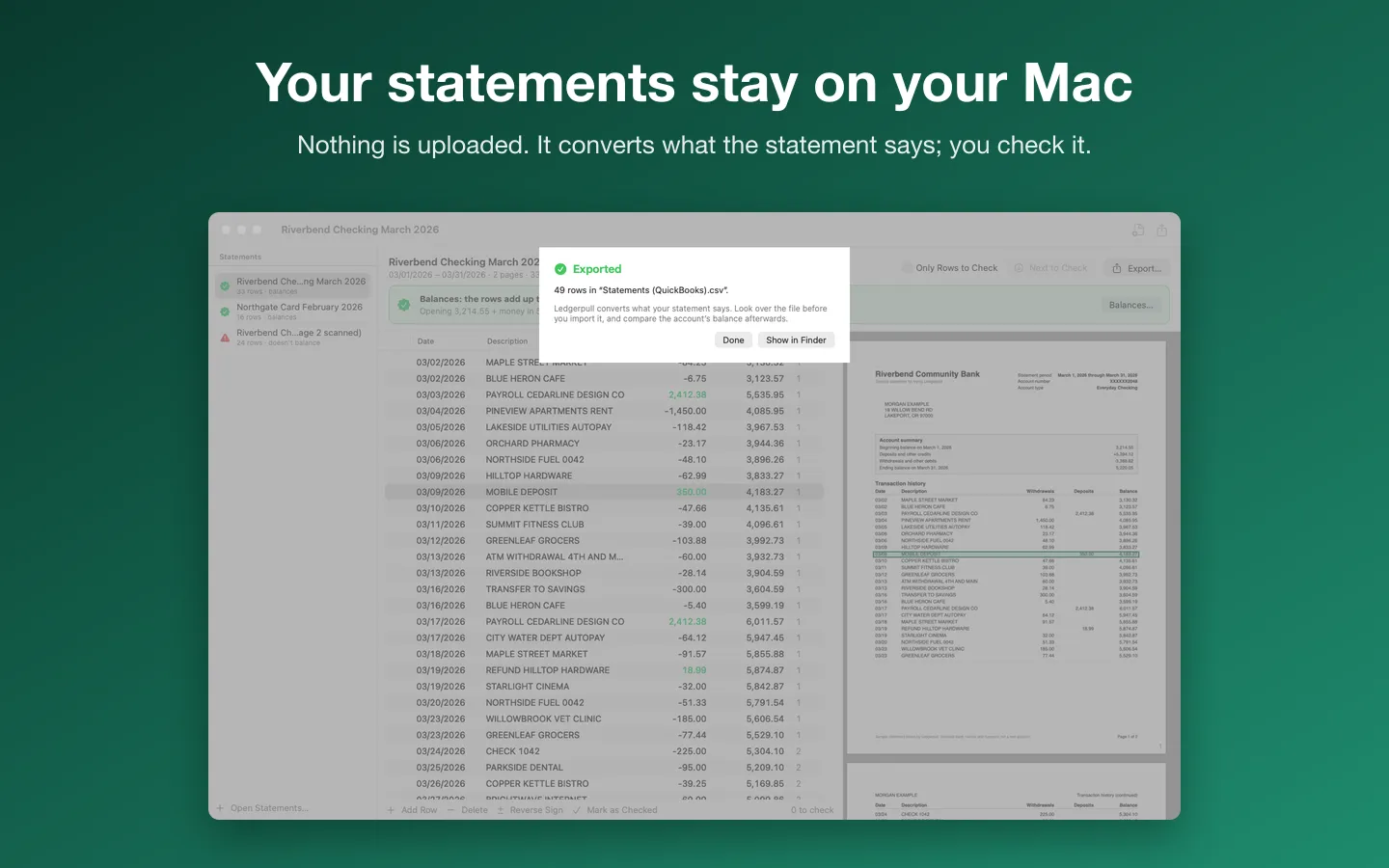
What it does: Ledgerpull reads the transactions from bank and card statement PDFs (the ones you download from your bank) and turns them into CSV, QuickBooks Online, Xero or OFX files. Every row sits next to the line it came from on the page, so you can check and edit it, and each statement is checked against its own balances: opening balance plus the rows must equal the closing balance. When it doesn't, Ledgerpull shows the gap and the rows to look at first, and asks before it exports. Statements never leave your Mac.
- Checkout by Gumroad
- Notarized by Apple
- No FitzTopPicks account needed
Free to use without a key: every feature, exporting 2 different statements (as often as you like, in any format); reading and checking have no limit.
Buy a license key to unlock Pro: export any number of statements.
macOS 14 Sonoma or later · Version 1.0 · 3.4 MB disk image · Notarized by Apple
One-time $39 for the app with Pro: export any number of statements. No subscription. One license key works on up to 3 of your Macs.
Download: The download (a signed, notarized .dmg) comes with your purchase in your Gumroad receipt, together with your license key. Updates install from inside the app.
Buy now opens Gumroad's checkout on this page; Gumroad is the seller and handles payment, sales tax and your receipt.
Screenshots
5 pictures: swipe or scroll sideways.
What you get
- Ledgerpull for Mac: macOS 14 Sonoma or later
- The signed, notarized .dmg download and your license key, in your Gumroad receipt
- One license key for up to 3 of your Macs
- Updates that install from inside the app
- A one-time price: no subscription
Features
- Drop one statement or many; checking accounts, savings and credit cards
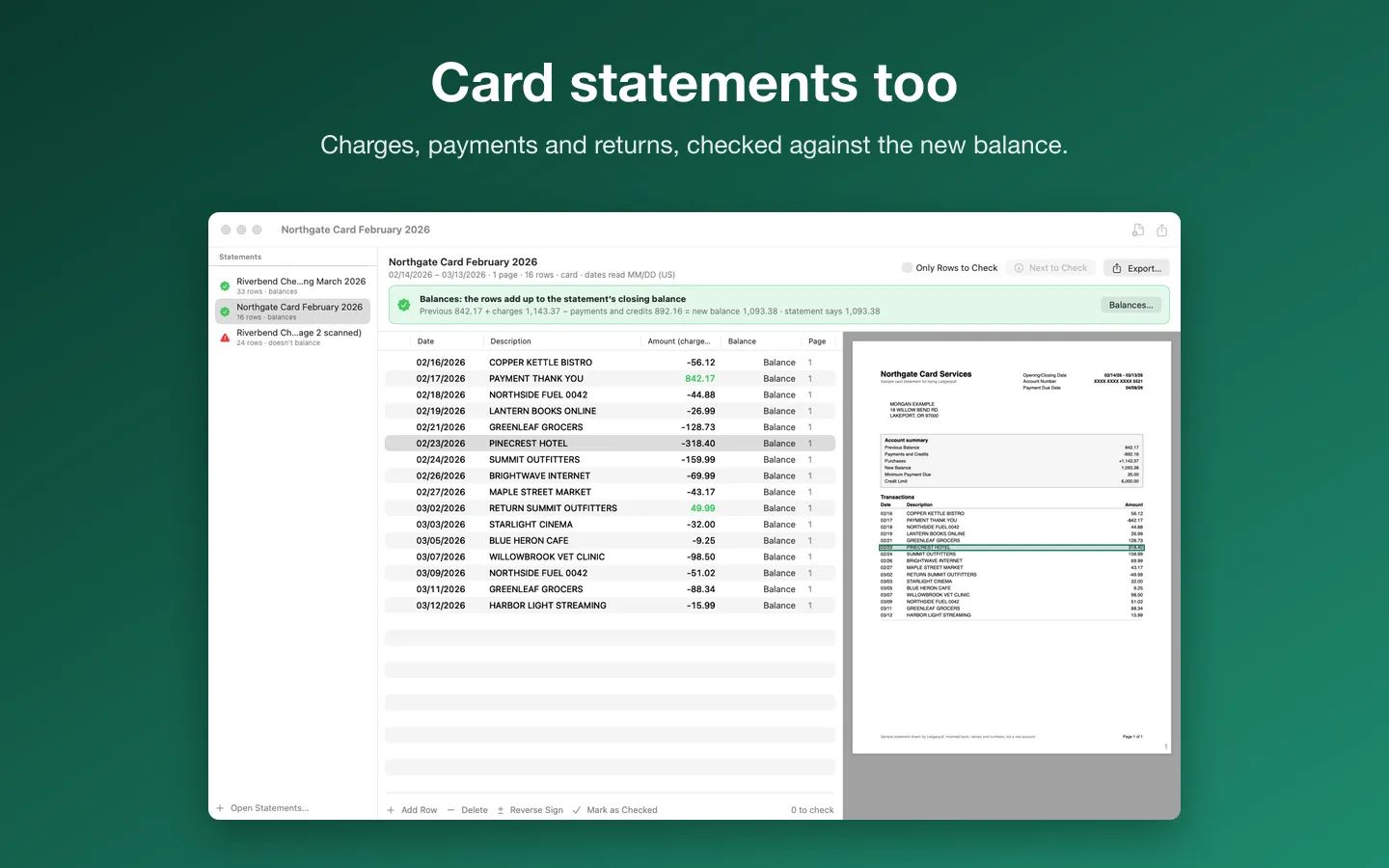
- A review grid with date, description, amount and running balance; edit any cell, add, delete or reverse a row
- The page beside it, with the selected row highlighted where it's printed
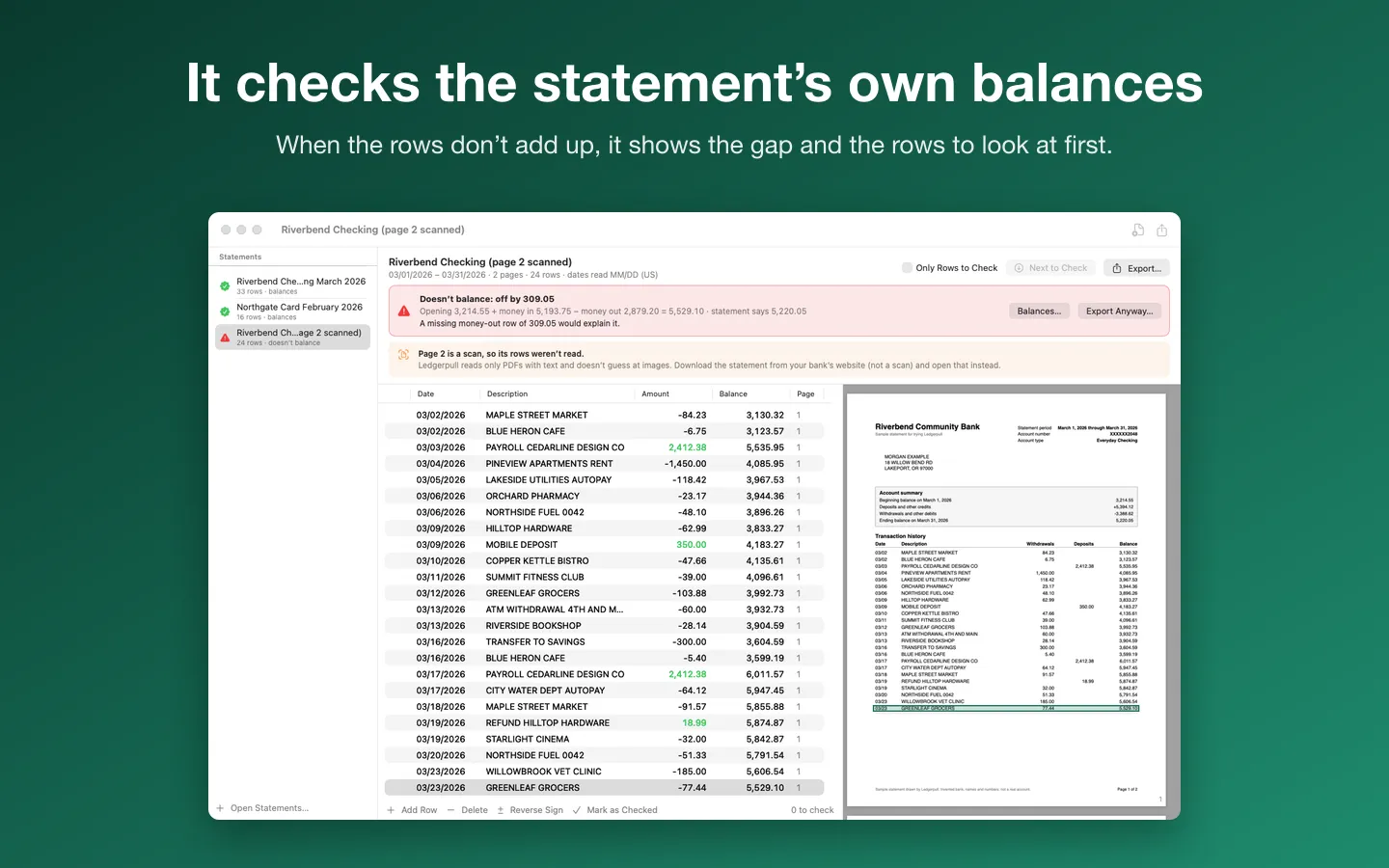
- A balance check for each statement: green when the rows add up to the closing balance; otherwise the gap, the likely rows, and an explicit OK before export
- Flags for anything uncertain: unclear signs, dates outside the period, amounts between columns
- Dates read MM/DD (US) or DD/MM, with a warning when a statement doesn't look like a US one
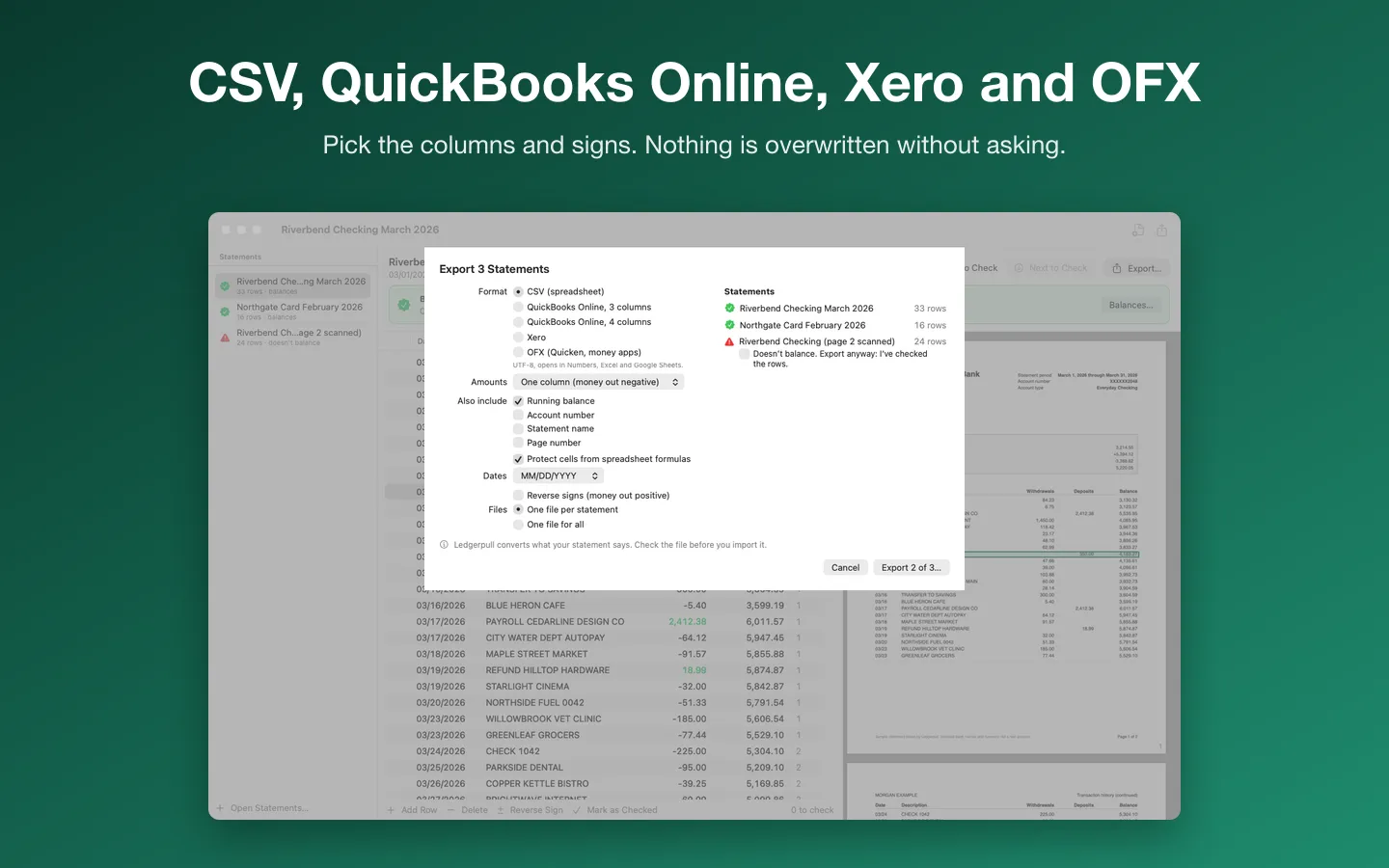
- Export CSV (choose the columns and the sign convention), QuickBooks Online CSV (3- or 4-column), Xero CSV and OFX
- One file per statement or one merged file; nothing is overwritten without asking
- Statements that are scans aren't read (no guessing): it says so plainly
- English and Spanish
Free vs Pro
| Feature | Free | Pro |
|---|---|---|
| What you can do | Every feature, exporting 2 different statements (as often as you like, in any format); reading and checking have no limit | Everything free, plus export any number of statements |
| Price | Free download | $39 one-time |
How it compares
| How it compares | Ledgerpull | Bank Statement Conversion | Bank Statement Converter: XLSX | pdf2csv |
|---|---|---|---|---|
| Price | $39 one-time | See its site | See its site | Free |
| How you pay | Free version, then one-time | Free version, paid upgrade | Free version, paid upgrade | Free |
| Statements stay on this Mac (nothing uploaded) | Yes | Partly | Partly | Yes |
| Balance check against the closing balance before export | Yes | No | No | No |
| QuickBooks Online CSV, Xero CSV and OFX export | Yes | No | No | No |
| Editable review grid beside the page image | Yes | No | No | No |
Prices and features are from each app's own website or store listing on the date checked; "No" means we didn't find it listed there. Prices change, so check each site before you buy. Names belong to their owners.
Sources: Bank Statement Conversion () · Bank Statement Converter: XLSX () · pdf2csv ()
Questions
Which statements work?
Statement PDFs you download from your bank or card provider, with a text layer (you can select the text in Preview). Scanned or photographed pages aren’t read in this version; Ledgerpull says which pages are scans instead of guessing.
What does the balance check do?
For each account it adds the rows to the opening balance and compares the result with the closing balance printed on the statement (for cards: previous balance, charges and payments against the new balance). If they don’t match, it shows the gap and the rows most likely to explain it, and asks you to confirm before you export.
Some dates are orange or show????.
A date that can’t exist in the current date order, or one printed without a year, is flagged and blocks export until you set it. Use Set Year, edit the cell, or switch the date order in Settings › Reading.
Which formats can I export?
CSV (one amount column or money in and money out), QuickBooks Online bank upload CSV (3 or 4 columns), Xero bank statement CSV, and OFX for other apps that import it. Each account gets its own file.
What’s free, and what does a key add?
Every feature works without a key, and you can export 2 different statements, as often as you like and in any format; reading, checking and editing have no limit. A key exports any number of statements on up to 3 Macs. It’s a one-time purchase on Gumroad, with no subscription.
Where do I enter my license key?
Choose Ledgerpull › Settings…, open the License tab, paste the key from your Gumroad receipt and click Activate.
From the Ledgerpull help page.
Setting it up
How to open a newly downloaded Mac app the first time
Step by step, with what to do if your Mac asks a question.
Requirements
- macOS
- macOS 14 Sonoma or later
- Processor
- Apple silicon and Intel
- Languages
- English, Spanish
- Download
- 3.4 MB disk image
- Version
- 1.0
Needs statement PDFs with text (downloaded from your bank, not scanned). Ledgerpull converts what your statement says; check the result before you import it. It isn't financial, tax or accounting advice.
What's new
Version 1.0 ·
- Customer-test fixes: closing the window with edits that weren't exported asks first (Cancel keeps the window and the edits; it no longer loops), quitting asks once, and Cancel is the default button in every "lose your edits" question; File › Close Window (⌘W); the review fits the window from its 1100×700 minimum (buttons wrap or show as icons, the page and grid share the width); empty cells no longer show "Balance" as grey text; Escape cancels a cell edit; with DD/MM reading, US check-grid rows are kept and flagged instead of dropped; a dated row more than 20 days outside the statement period is flagged (as documented); a CSV that holds several accounts gets the Account (and Statement) columns; the Spanish export sheet wraps its checkbox text; VoiceOver names the grid's columns and no longer says "No flags" on every row; clearer wording for a missing year and for "Export Anyway" with no highlighted rows; the export button counts what the free version can export; the toolbar's button says "Export All…" when several statements are open and the header's says "Export Statement…"; card and Spanish column headers fit; opening or dropping a folder opens the PDFs inside it.
- Review fixes before release: export waits for flagged rows, reading notes and the date-order warning unless you confirm them, and for dates that weren't read (no year, or impossible in the date order) until they're set; one balance confirmation per account; no green seal unless nothing is open; balances worked out from the running balance shown as a weaker check; Undo/Redo for edits and deleted rows, and a question before closing or quitting with edits that weren't exported; merged QuickBooks/Xero files never mix accounts; "Reverse signs" isn't saved; sample statements don't use the free allowance, and the same statement downloaded again counts once; OFX account type, currency, name length and stable IDs; formula guard in QuickBooks/Xero descriptions; no crash on very long numbers; typed dates get the right year on statements across a year end; "credit line" no longer makes a bank statement a card statement; Reduce Motion and VoiceOver fixes.
- First version: bank and card statement PDFs (with text) to CSV, QuickBooks Online CSV (3- and 4-column), Xero CSV and OFX; a review grid with every cell editable and the page beside it, the selected row highlighted; a balance check for each statement (opening + rows = closing) with the gap, the likely rows and an explicit OK before exporting one that doesn't balance; MM/DD or DD/MM dates with a warning for non-US statements; scanned pages reported, not guessed; nothing overwritten without asking; English and Spanish.
From Ledgerpull's release notes. Updates install from inside the app.
Privacy
Your statements never leave your Mac. Ledgerpull reads only the PDFs you open and writes only the files you export, where you choose; the originals are never changed and no copies of your statements are kept. It keeps your settings, a one-way fingerprint of each exported statement (for the free limit) and your license key (in your Keychain) on your Mac. The only network requests are the license check (when you enter a key, then each time the app opens and about once a week: Gumroad gets your key, and our license page, licence.fitztoppicks.com, gets a fingerprint of the key, not the key itself, to see whether it was reset; both get the app’s product ID), checking for updates at fitztoppicks.com and downloading the list of our other Mac apps from fitztoppicks.com when you open it (at most once a day; the same file for everyone); none sends anything about your statements.
Questions about your purchase or license key? See Help and FAQ, reply to your Gumroad receipt or contact us.