Rowfill: Fill PDF forms from CSV and Excel rows
Free version Free to use without a key. What's free
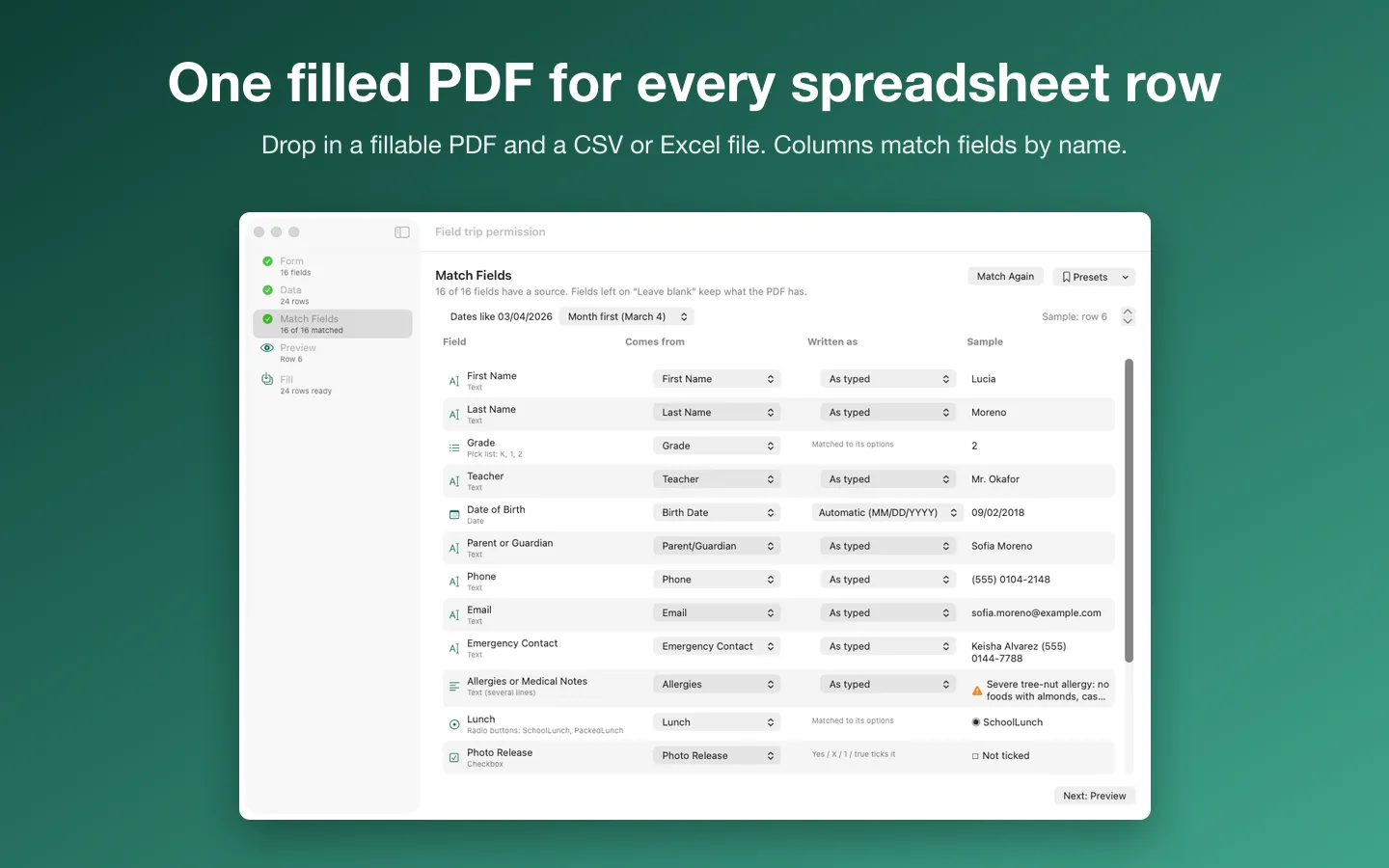
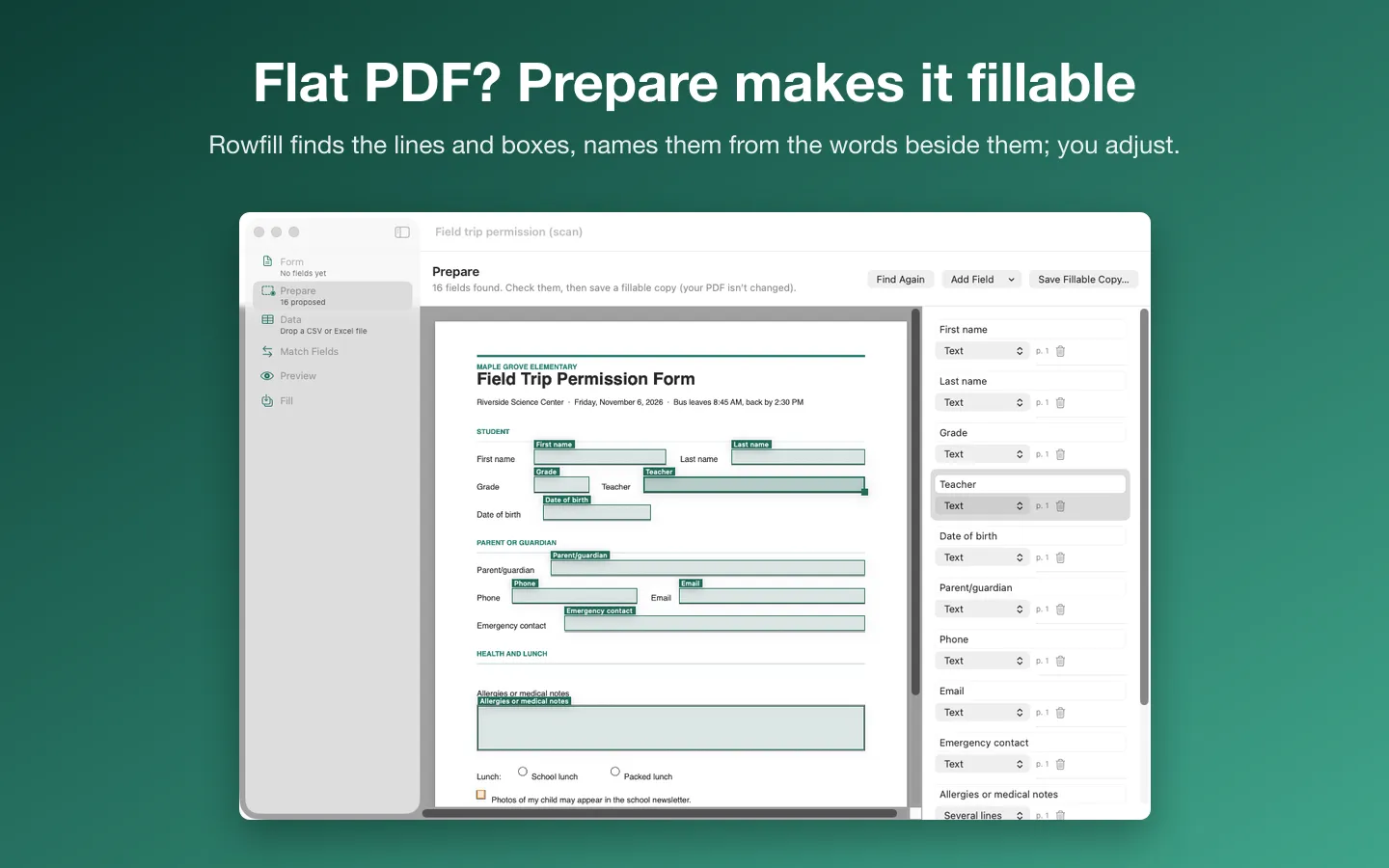
What it does: Drop in a fillable PDF and a CSV or Excel file, and Rowfill writes one filled PDF per row: enrollment forms, permission slips, W-9s, waivers, certificates. Columns match fields by name, dates and checkboxes are filled the way the form expects, and each file is named from your columns. A flat PDF? Prepare finds its blanks and makes it fillable.
- Checkout by Gumroad
- Notarized by Apple
- No FitzTopPicks account needed
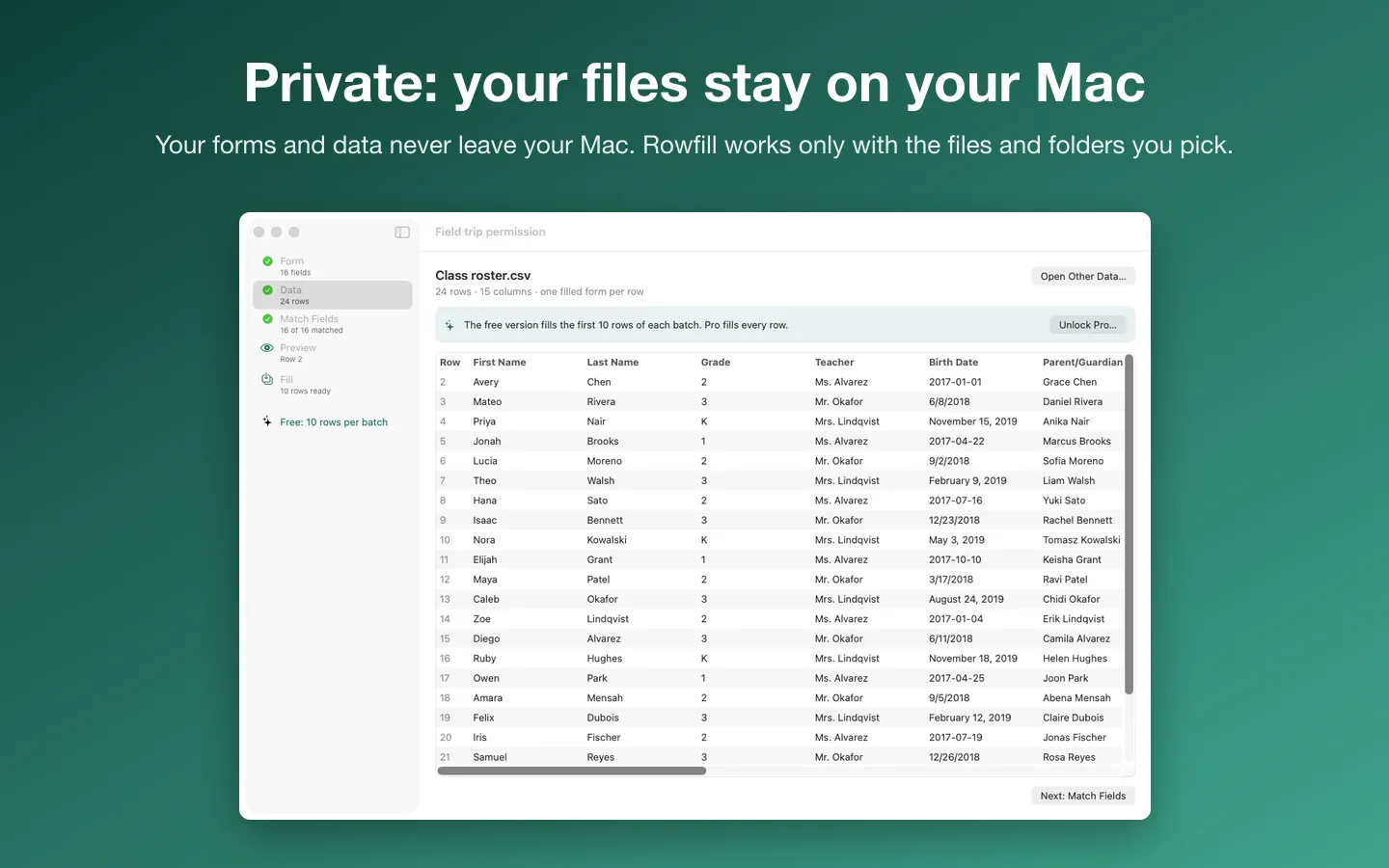
Free to use without a key: everything works, for the first 10 rows of each batch.
Buy a license key to unlock Pro: fill every row, however long the spreadsheet.
macOS 14 Sonoma or later · Version 1.0 · 4.1 MB disk image · Notarized by Apple
One-time $29 for the app with Pro: every row of every batch. No subscription. One license key works on up to 3 of your Macs.
Download: The download (a signed, notarized .dmg) comes with your purchase in your Gumroad receipt, together with your license key. Updates install from inside the app.
Buy now opens Gumroad's checkout on this page; Gumroad is the seller and handles payment, sales tax and your receipt.
Screenshots
5 pictures: swipe or scroll sideways.
What you get
- Rowfill for Mac: macOS 14 Sonoma or later
- The signed, notarized .dmg download and your license key, in your Gumroad receipt
- One license key for up to 3 of your Macs
- Updates that install from inside the app
- A one-time price: no subscription
Features
- Reads a fillable PDF's text boxes, checkboxes, radio buttons, pick lists and date fields
- Reads CSV and Excel (.xlsx) files, any sheet
- Matches columns to fields by name, with an editor for the rest: a column, fixed text, or columns combined
- Saves the matching as a preset, picked up the next time you open the same form
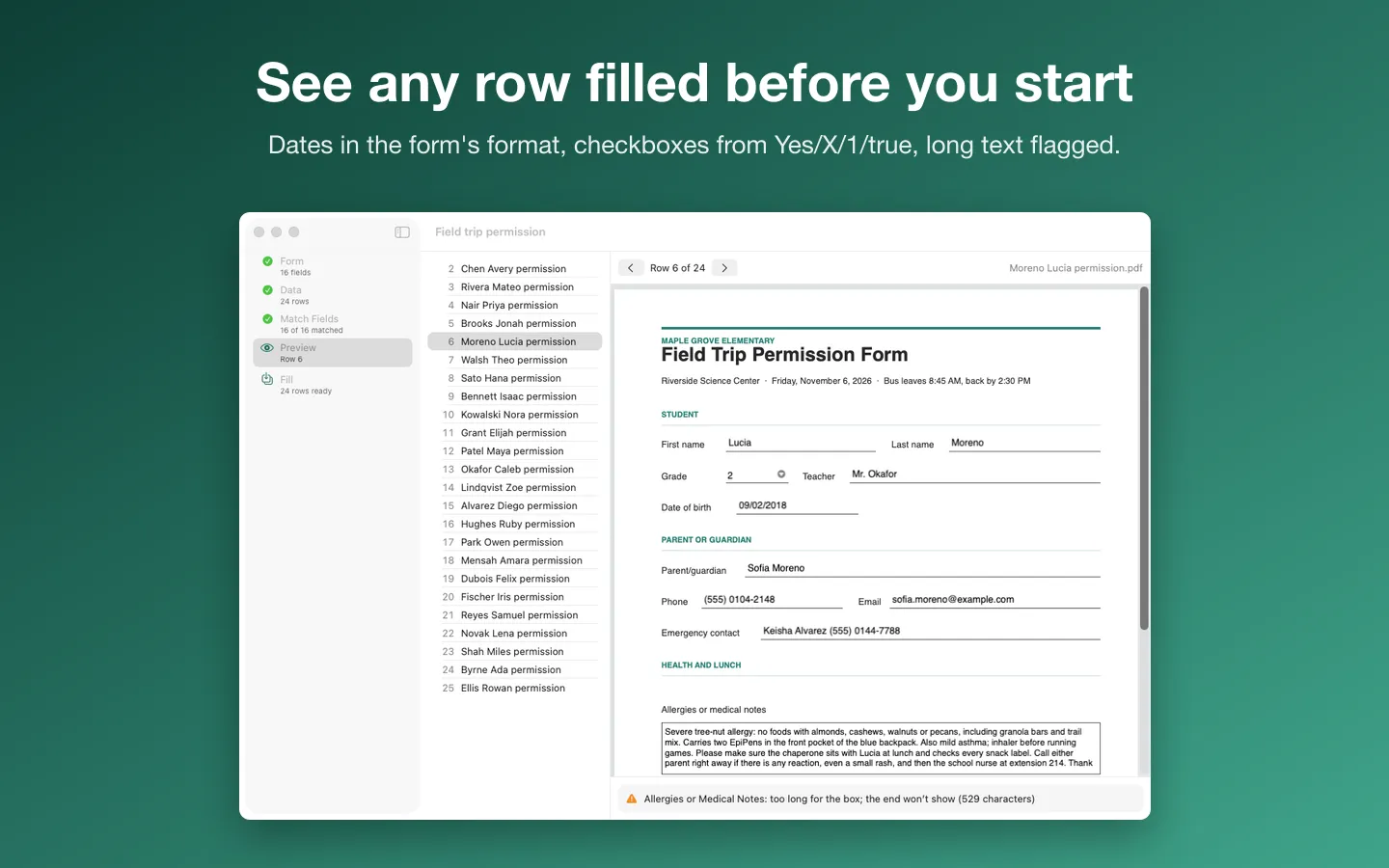
- Preview any row filled before writing anything
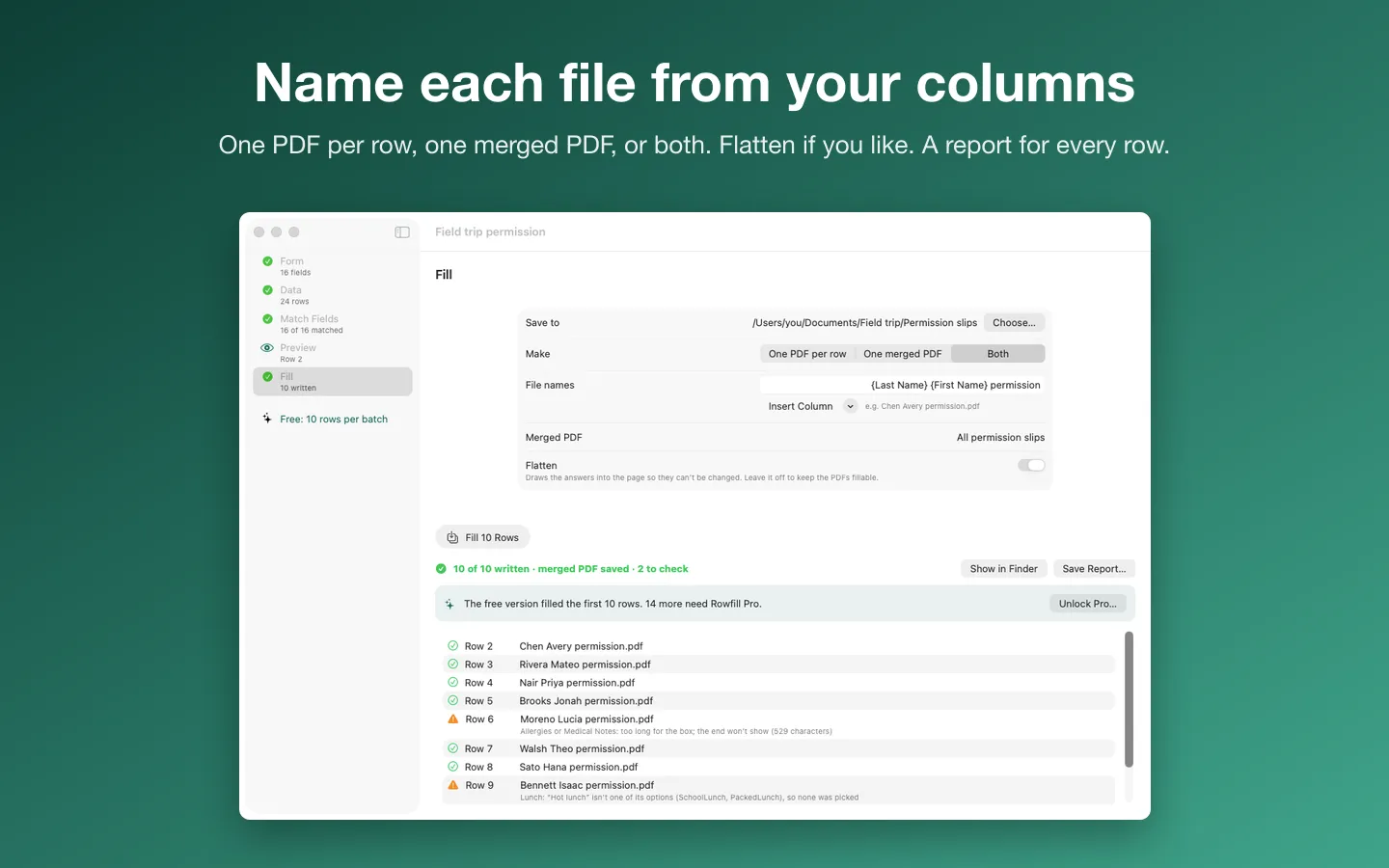
- File names from your columns, like “{Last Name} {First Name} enrollment.pdf”, never replacing a file that's already there
- One PDF per row, one merged PDF, or both; flatten the answers if they shouldn't be changed
- Checkboxes from Yes, X, 1 or true; dates in the form's format; text too long for its box flagged
- Progress, Stop, and a report for every row (save it as CSV)
- Prepare: finds the lines and boxes on a flat PDF, names each blank from the words beside it, and saves a fillable copy
Free vs Pro
| Feature | Free | Pro |
|---|---|---|
| What you can do | Everything works, for the first 10 rows of each batch | Everything free, plus fill every row, however long the spreadsheet |
| Price | Free download | $29 one-time |
How it compares
| How it compares | Rowfill | pdf-FieldMerge (Universe Software) | MailMergic | pdfFiller |
|---|---|---|---|---|
| Price | $29 one-time | See its site | See its site | See its site |
| How you pay | Free version, then one-time | One-time purchase | Subscription | Subscription |
| One filled PDF per spreadsheet row | Yes | Yes | Yes | No |
| Prepares a flat PDF into a fillable one | Yes | No | No | Partly |
| Preview a row before writing | Yes | Partly | Partly | Yes |
| Offline, nothing uploaded | Yes | Yes | No | No |
Prices and features are from each app's own website or store listing on the date checked; "No" means we didn't find it listed there. Prices change, so check each site before you buy. Names belong to their owners.
Sources: pdf-FieldMerge (Universe Software) () · MailMergic () · pdfFiller ()
Questions
What kind of PDF does it need?
A fillable PDF (an AcroForm, the kind Acrobat, Preview and most form makers create): text boxes, checkboxes, radio buttons, pick lists and dates. A flat PDF works too: Prepare finds its lines and boxes and saves a fillable copy. XFA forms (made in LiveCycle or AEM Designer) can’t be filled on a Mac.
What data can it read?
CSV (comma, semicolon or tab) and Excel.xlsx files, any sheet, with column names in the first row. Each row becomes one filled PDF. Older.xls and Numbers files need saving as.xlsx or CSV first.
How are checkboxes, dates and numbers filled?
Yes, X, 1, true or ✓ ticks a box; blank, No, 0 or false leaves it clear. Dates are written in the format the form asks for (or the one you pick), and numbers in its number format. Anything it can’t read is filled as written and listed in the row’s report.
What if text is too long for a field?
The row is still written, and its report says which field is too long so you can check it.
What’s free, and what does Pro add?
Everything works without a key for the first 10 rows of each batch. Pro fills every row. It’s a one-time purchase on Gumroad, with no subscription.
Where do I enter my license key?
Choose Rowfill › Settings…, open the Pro tab, paste the key from your Gumroad receipt and click Activate.
From the Rowfill help page.
How-to guide
How to fill a PDF form from a spreadsheet on a Mac
The free and built-in ways first, where they stop, and how Rowfill does it.
Setting it up
How to open a newly downloaded Mac app the first time
Step by step, with what to do if your Mac asks a question.
Requirements
- macOS
- macOS 14 Sonoma or later
- Processor
- Apple silicon and Intel
- Languages
- English
- Download
- 4.1 MB disk image
- Version
- 1.0
Fillable PDFs (AcroForms) or flat PDFs through Prepare; XFA forms can't be filled on a Mac.
Privacy
Your forms and spreadsheets never leave your Mac. Rowfill works only with the files and folders you pick, never changes the form or spreadsheet you open, and saves results as new files where you choose. Your settings, saved matching presets and your license key (in your Keychain) are kept on your Mac. The only network requests are the license check (when you enter a key, then about once a week: Gumroad gets your key, and our license page, licence.fitztoppicks.com, gets a fingerprint of the key, not the key itself, to see whether it was reset; both get the app’s product ID) and checking for updates at fitztoppicks.com; neither sends anything about your forms or data.
Questions about your purchase or license key? See Help and FAQ, reply to your Gumroad receipt or contact us.
More Mac apps
 LevelMarkLoudness checks for every file, and a live scope and spectrum for your audio interface · $19.99
 Label Printer StudioPrice tags, barcode and seller labels from your spreadsheet, printed through your Mac’s print dialog · $12.99
 TreeTidyFind and fix the mistakes in your family tree file · $19.99