How to fill a PDF form from a spreadsheet on a Mac
UpdatedShort answer
Preview and Acrobat Reader fill a form one copy at a time. To fill it once per spreadsheet row, rebuild the form in Pages and use Mail Merge, write a small script around the free pdftk tool, or use a batch form-filling app.
The free ways
By hand in Preview
- Open the fillable PDF in Preview and click into each field to type the answers from one row.
- Choose File › Duplicate and save the copy under a new name, so the blank form stays blank.
- Repeat for each row.
Pages Mail Merge, if you can rebuild the form
Recent versions of Pages include Mail Merge, which fills a Pages document from a Numbers spreadsheet or from Contacts.
- Recreate the form as a Pages document (or start from your own form, if it's already a Pages or Word file), with a merge field where each answer goes.
- Click Document in the toolbar (in a word-processing document, then the Document tab) and click Mail Merge. Use Add Merge Field › Add from Spreadsheet to pick the Numbers spreadsheet; its column headers become the fields.
- Click Merge: Pages makes a new document with one filled-in copy for each row. Export it with File › Export To › PDF.
This only works when you're allowed to retype the form. Official forms (tax forms, an agency's enrollment form) usually have to be the original PDF.
Free, with a script: pdftk
pdftk fills a fillable PDF from a data file. It's free (install it with Homebrew: brew install pdftk-java) and runs in Terminal. For a spreadsheet you also need a small script that writes one data file per row, so this suits people who already script.
- List the form's field names with
pdftk form.pdf dump_data_fields. - For each spreadsheet row, write an FDF or XFDF data file with those field names and the row's values.
- Fill one PDF per row with
pdftk form.pdf fill_form row1.fdf output row1.pdf(addflattenat the end to lock the answers).
brew install pdftk-java
pdftk form.pdf dump_data_fields
pdftk form.pdf fill_form row1.fdf output row1.pdf
Where the free ways stop
- Filling by hand is fine for five forms and slow for fifty, and typing mistakes creep in.
- Mail Merge needs a form you can rebuild; it can't fill the original PDF's fields.
- Pages' merge makes one new document with every copy in it, so you get one long PDF, not a separate file per row.
- With a script you match column names to field names yourself, format dates and checkboxes the way the form expects (checkboxes often want a value such as "Yes" or "On") and name each file.
- Flat PDFs (lines to write on, but no fields) can't be filled by any of these until fields are added.
- XFA forms, made with Adobe's older form designer, need Adobe Acrobat or Acrobat Reader; Preview and most other tools can't fill them.
How Rowfill does it
Rowfill is a Mac app we make: fill a PDF form once for every spreadsheet row.
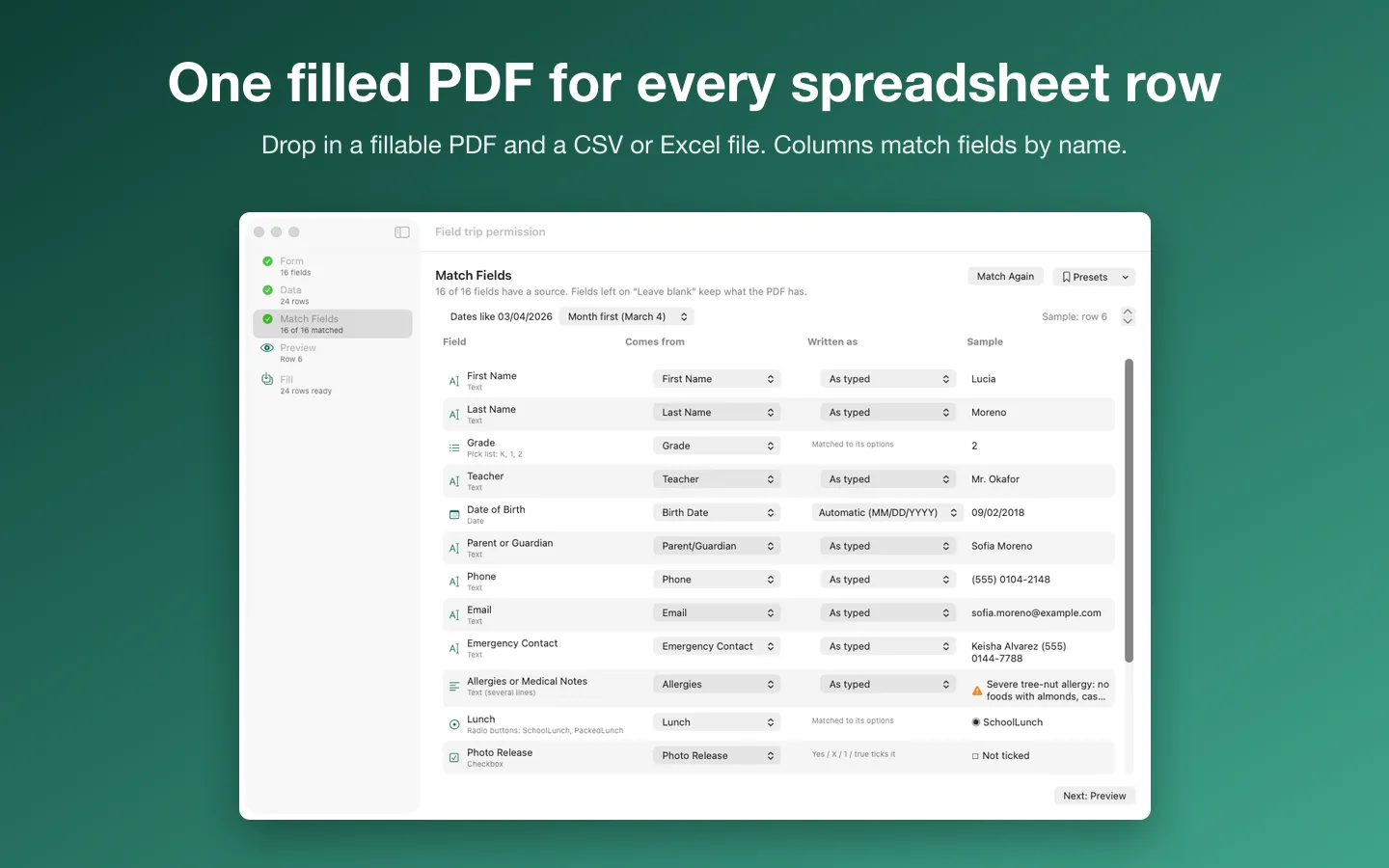
- Drop in the fillable PDF and a CSV or Excel file.
- Columns are matched to fields by name; set the rest to a column, fixed text or columns combined, and save the matching as a preset.
- Preview any row filled, with answers that are too long for their box flagged.
- Write one PDF per row, named from your columns, one merged PDF, or both. For a flat PDF, Prepare finds the blanks and makes a fillable copy first.
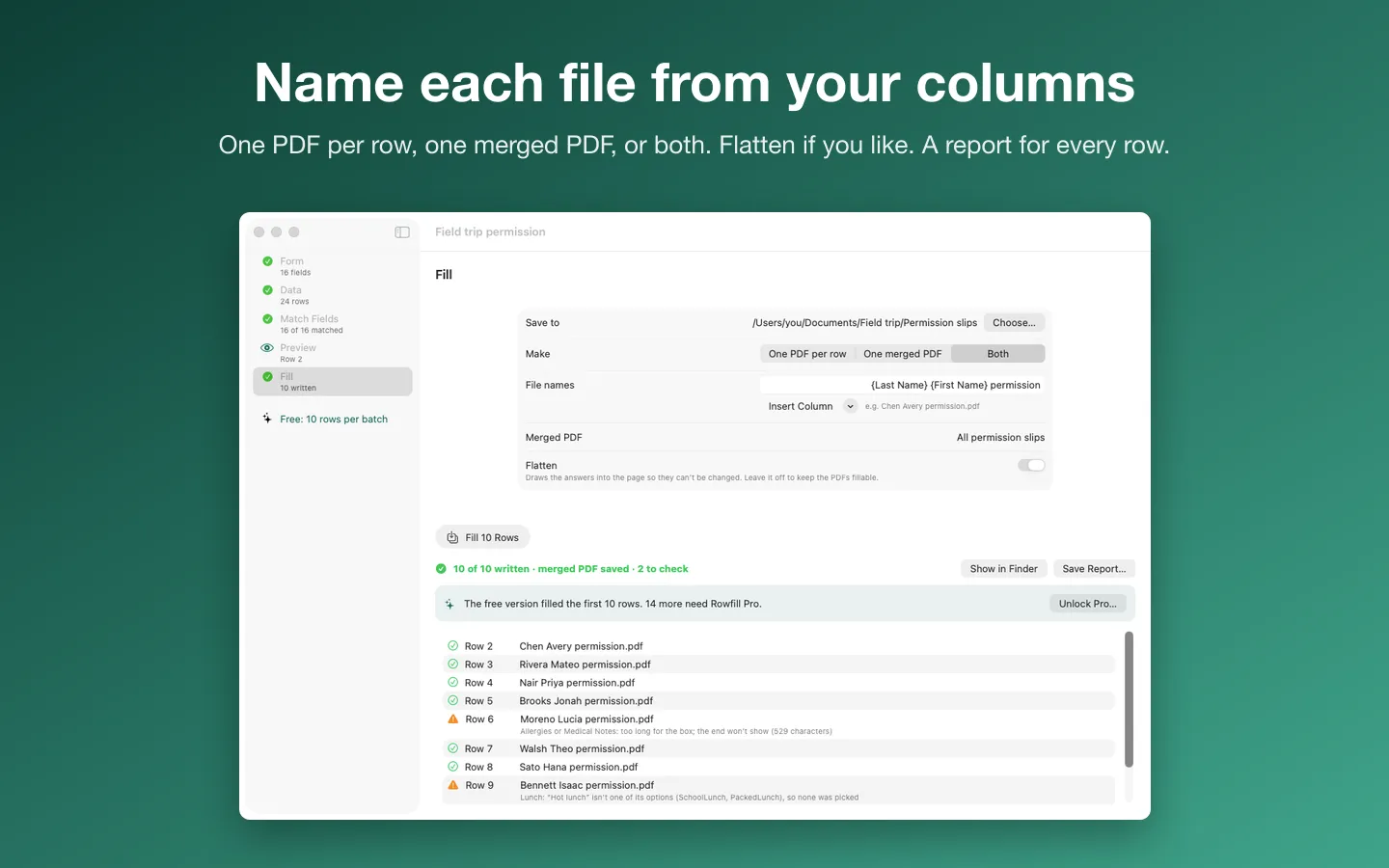
Free to use without a key: everything works, for the first 10 rows of each batch.
$29 one-time for Pro, no subscription. Buy a license key to unlock Pro: fill every row, however long the spreadsheet.
macOS 14 Sonoma or later. Apple silicon and Intel. Fillable PDFs (AcroForms) or flat PDFs through Prepare; XFA forms can't be filled on a Mac.
Questions
How can I tell whether a PDF is fillable?
Open it in Preview and click where an answer goes. If you can type straight into a box, it has form fields. If you can only add text with the Markup tools, it's flat.
Can I fill an XFA form on a Mac?
Generally only in Adobe Acrobat or Acrobat Reader. Preview can't, and Rowfill can't either.
Should I flatten the filled forms?
Flatten when the answers shouldn't change afterwards, such as certificates or records you send on. Keep the fields when someone still has to edit or sign the form.
Is my spreadsheet uploaded anywhere?
Not with Preview, Pages, pdftk or Rowfill: they all work on your Mac. Think twice before using an online form-filling service when the data is personal, such as names, addresses or tax numbers.