Tickwright
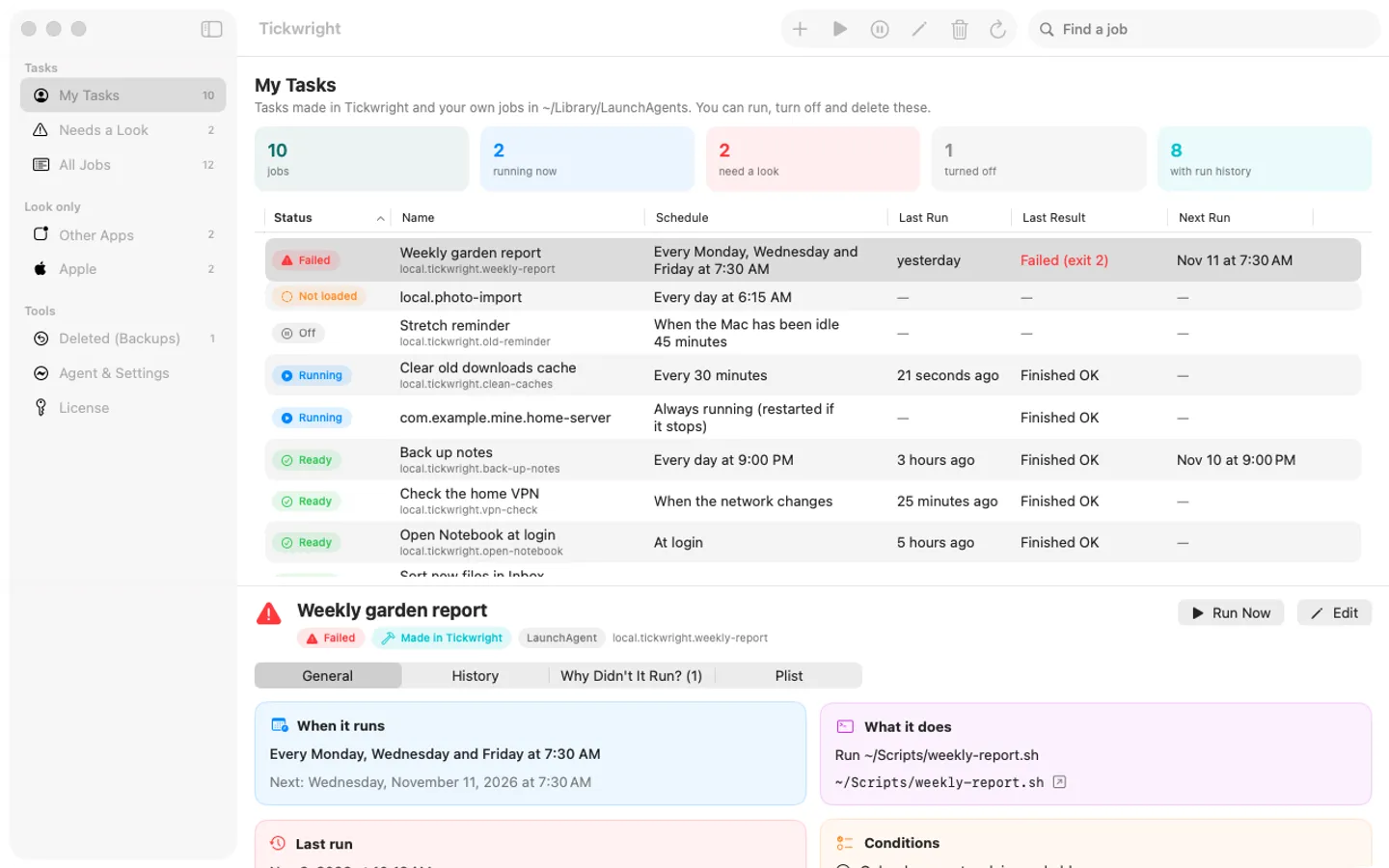
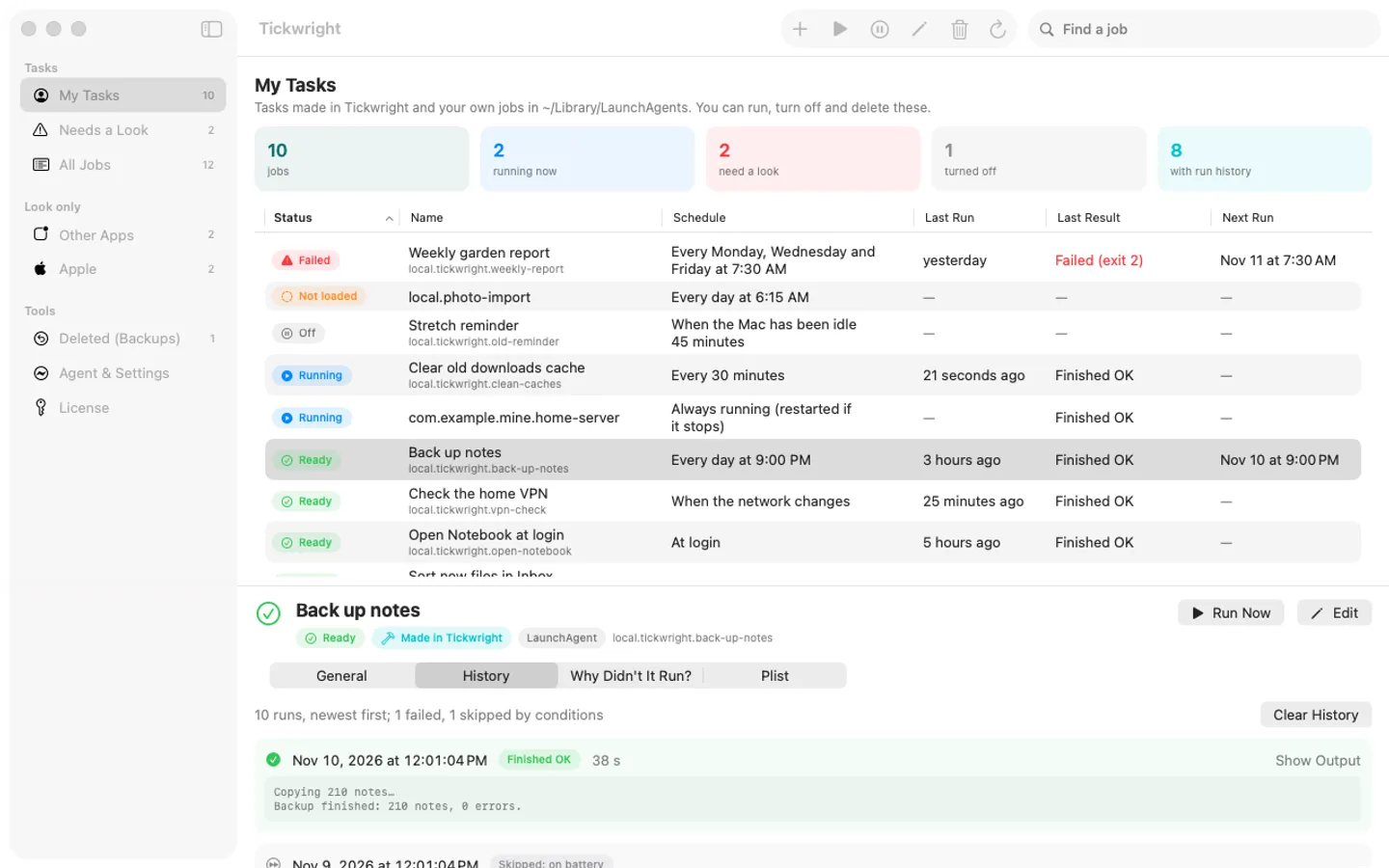
What it does: Tickwright shows every launchd job on your Mac in one list, makes new scheduled tasks without a plist (times, login, folder changes, wake, network, idle), adds conditions and retries, records every run, and explains in plain words why a job didn't run. Your tasks are plain launchd jobs that keep running without the app.
- Checkout by Gumroad
- Notarized by Apple
- No FitzTopPicks account needed
Free for 7 days from the first time you open it: every feature, nothing held back.
Buy a license key to unlock making, editing and importing tasks after the trial. Your tasks keep running, and seeing them and their history, Run Now, Turn Off and On, Delete, Restore and Export always work, with or without a key.
macOS 15 Sequoia or later · Version 1.2 · 4.1 MB disk image · Notarized by Apple
One-time $14.99. No subscription. One license key works on up to 3 of your Macs.
Download: The download (a signed, notarized .dmg) comes with your purchase in your Gumroad receipt, together with your license key. Updates install from inside the app.
Buy now opens Gumroad's checkout on this page; Gumroad is the seller and handles payment, sales tax and your receipt.
Screenshots
5 pictures: swipe or scroll sideways.
What you get
- Tickwright for Mac: macOS 15 Sequoia or later
- The signed, notarized .dmg download and your license key, in your Gumroad receipt
- One license key for up to 3 of your Macs
- Updates that install from inside the app
- A one-time price: no subscription
Features
- Every LaunchAgent and LaunchDaemon in one list: status, schedule in words, last run, last result, next run
- New Task: daily, weekly, monthly, once, every few minutes, at login, on folder changes, on wake, on network change or when idle
- Run an app, a file, a script, a shell command or a Shortcut
- Conditions: only on AC power, only with a network, only when idle, only between certain hours
- Retries: try again up to 10 times; History records every try with its output
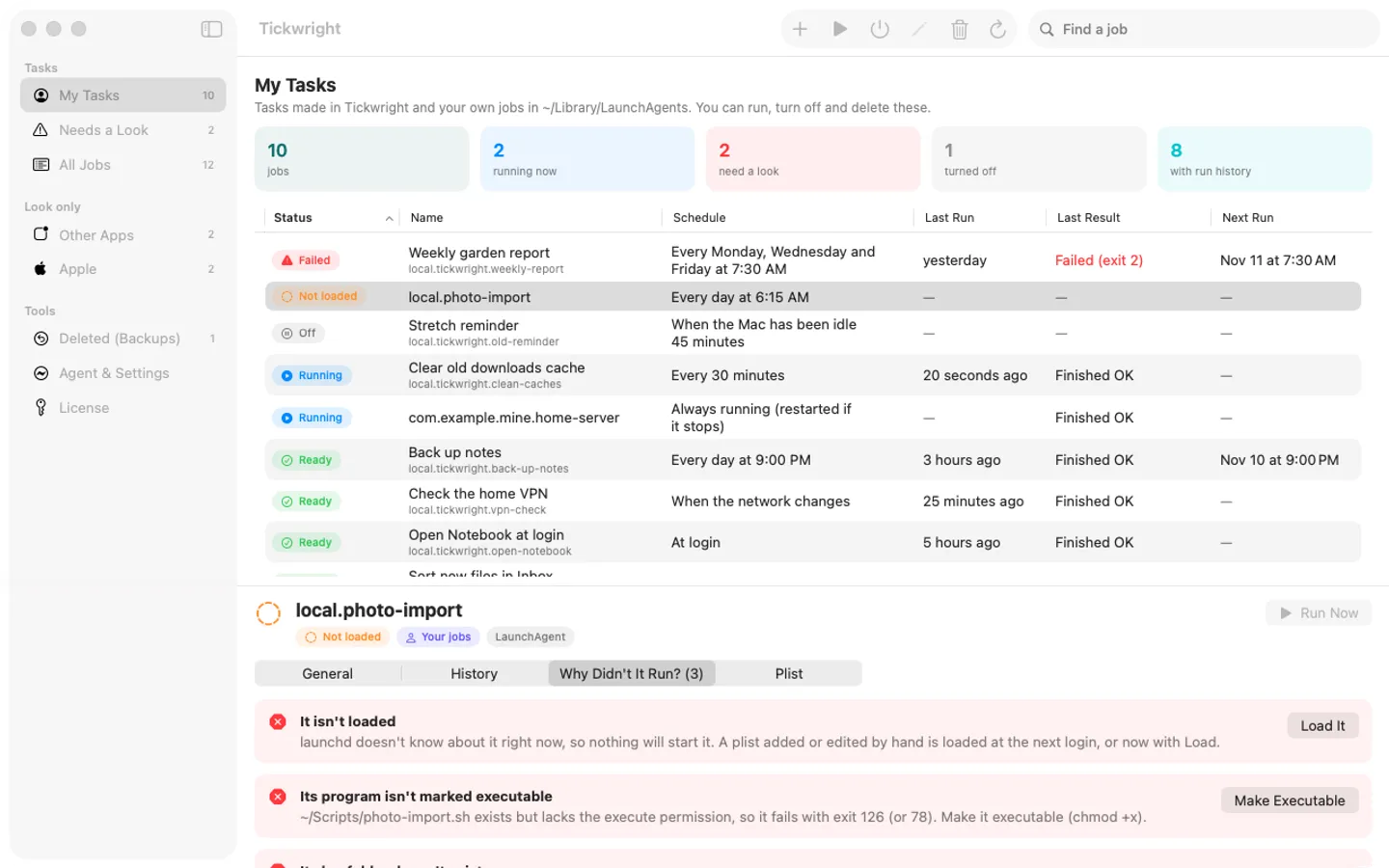
- Why Didn't It Run?: plain-words reasons with one-click fixes (Load It, Turn On, Make Executable)
- Export and import tasks between Macs, with a preview first; Delete keeps a backup you can restore
Free trial vs With a license key
| Feature | Free trial | With a license key |
|---|---|---|
| What you can do | Every feature, nothing held back | Buy a license key to unlock making, editing and importing tasks after the trial. Your tasks keep running, and seeing them and their history, Run Now, Turn Off and On, Delete, Restore and Export always work, with or without a key. |
| Price | Free to try | $14.99 one-time |
Questions
How do I make a task?
Click New Task (⌘N), give it a name, pick when it runs and what it does, then Save. Tickwright writes a plain launchd plist in ~/Library/LaunchAgents and loads it.
My task didn't run.
Select it and open Why Didn't It Run?. It checks the usual reasons (turned off, not loaded, a plist error, a missing or non-executable script, ~ in a path, a file on an external drive) and offers a fix where it can. History shows skipped runs and their reason, such as "on battery".
Wake, network or idle tasks don't start.
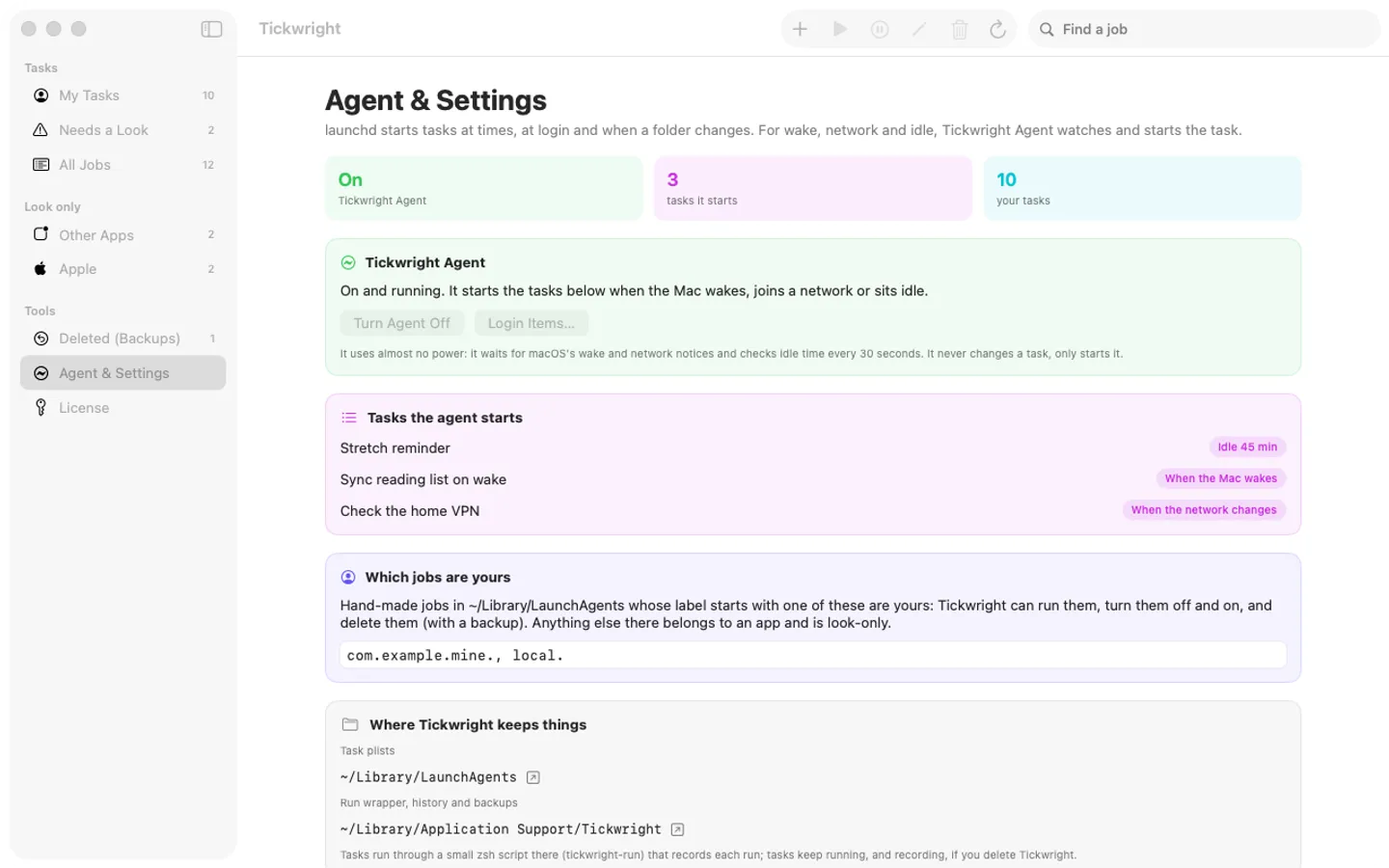
Those need Tickwright Agent: open Agent & Settings and click Turn Agent On. If macOS asks, switch Tickwright on in System Settings › General › Login Items & Extensions.
Is there a free trial?
Yes: every feature for 7 days from the first time you open it. After that, a one-time license key from Gumroad keeps making and editing tasks on up to 3 Macs, with no subscription.
What happens to my tasks if I don't buy?
Nothing: they keep running on their schedules, because they're plain launchd jobs. You can still see them and their history, run them now, turn them off or on, delete, restore and export them. Only making, editing and importing tasks needs a key.
Where do I enter my license key?
Choose License… from the Tickwright menu (or License in the window's sidebar), paste the key from your Gumroad receipt and click Activate.
From the Tickwright help page.
Setting it up
How to open a newly downloaded Mac app the first time
Step by step, with what to do if your Mac asks a question.
Requirements
- macOS
- macOS 15 Sequoia or later
- Processor
- Apple silicon and Intel
- Languages
- English
- Download
- 4.1 MB disk image
- Version
- 1.2
No permission needed to list, make, run or delete tasks; wake, network and idle tasks need Tickwright Agent switched on in System Settings › Login Items (the app explains it first).
Privacy
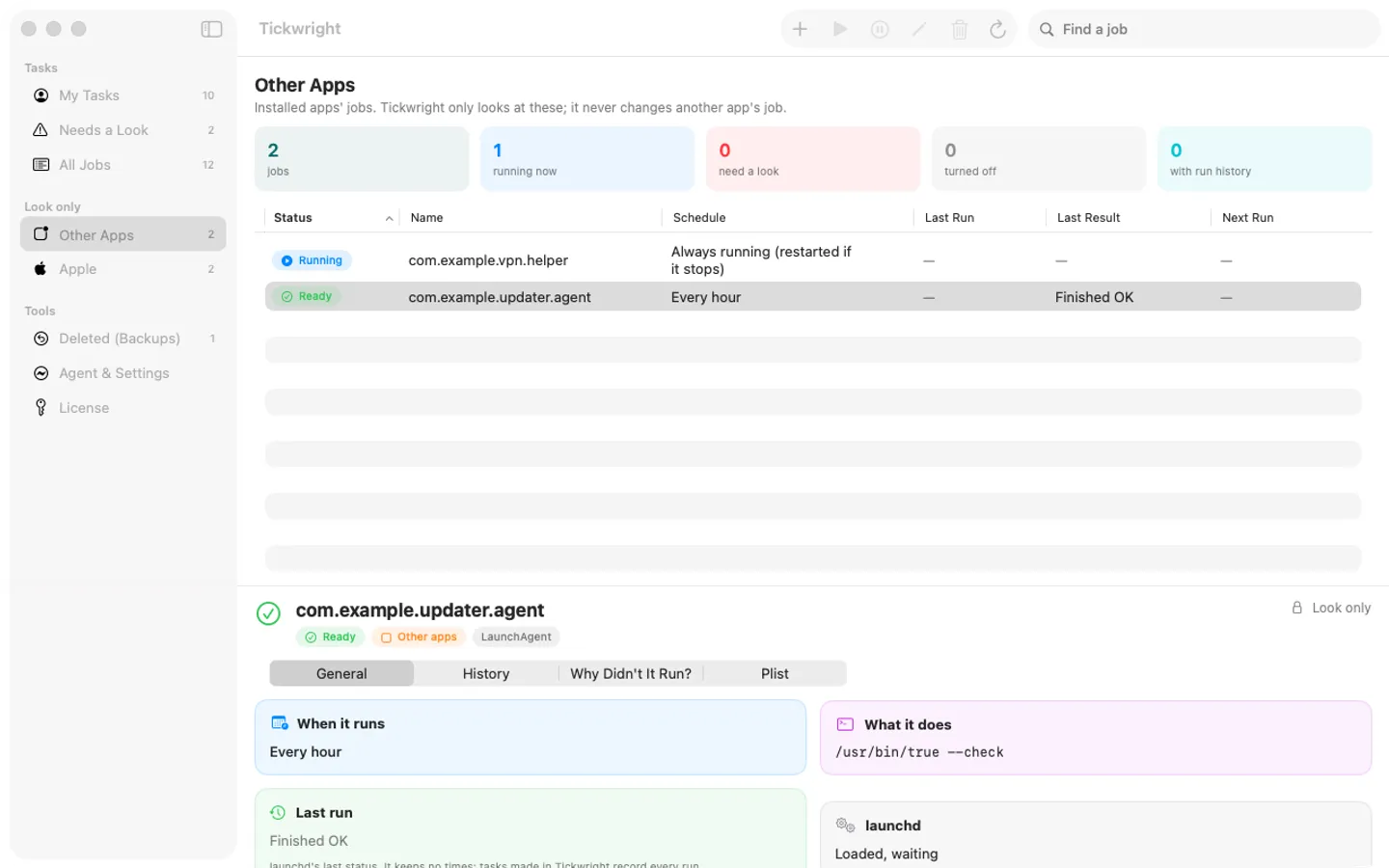
Tickwright keeps your tasks, scripts' run history and backups on your Mac; it has no account or tracking. It changes only jobs in your own LaunchAgents folder; other apps' and Apple's jobs are look-only. Tickwright Agent, for wake, network and idle tasks, runs only after you turn it on and only starts your tasks. Your license key is kept in your Keychain. The only internet requests are the license check with Gumroad (when you enter a key and about once a week) and checking for updates at fitztoppicks.com.
Questions about your purchase or license key? See Help and FAQ, reply to your Gumroad receipt or contact us.