Latchwise
Part of the FitzTopPicks security family: Latchwise for your Mac, Email Proof for your inbox. Get both in the Mac Security Bundle for $49.
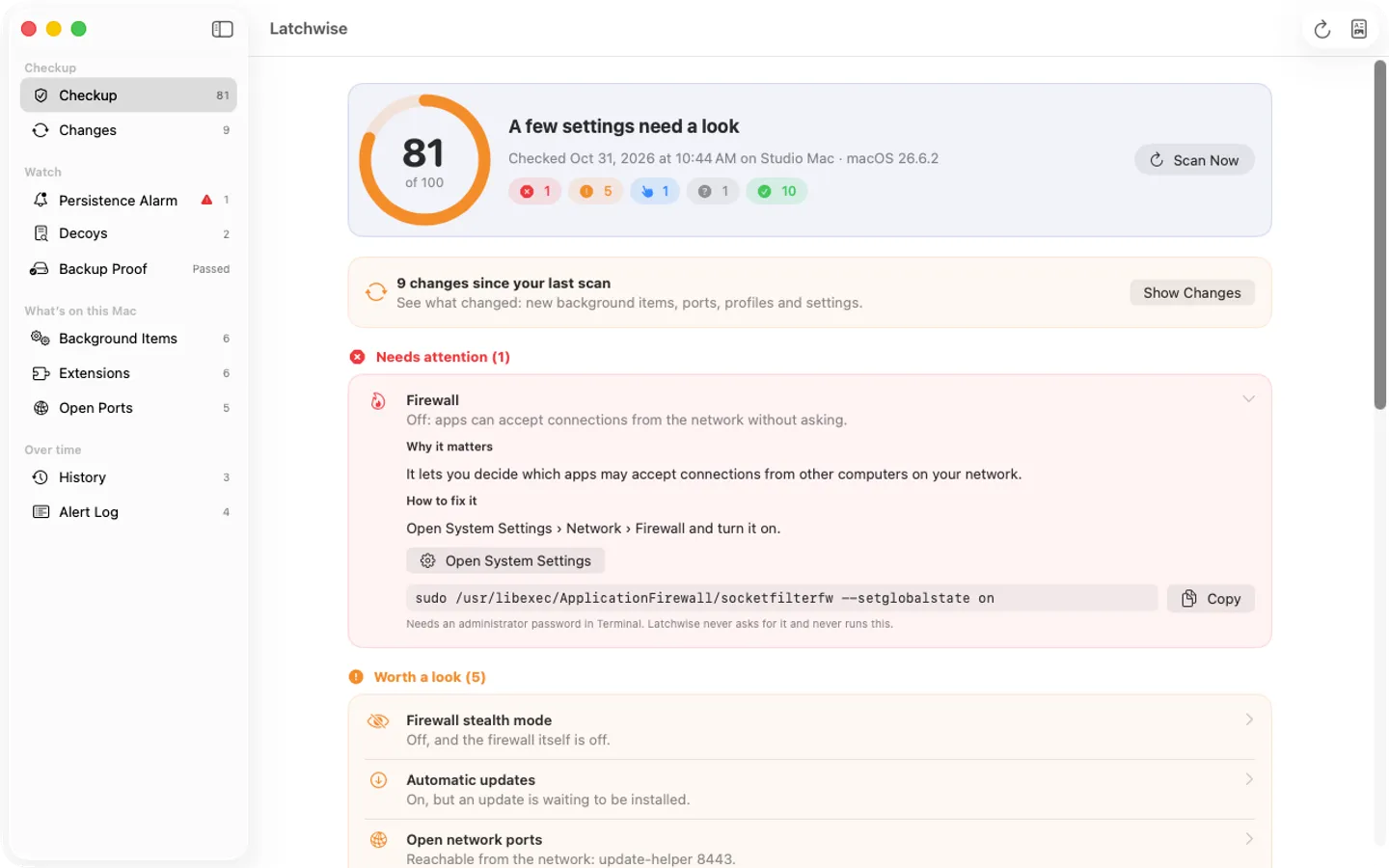
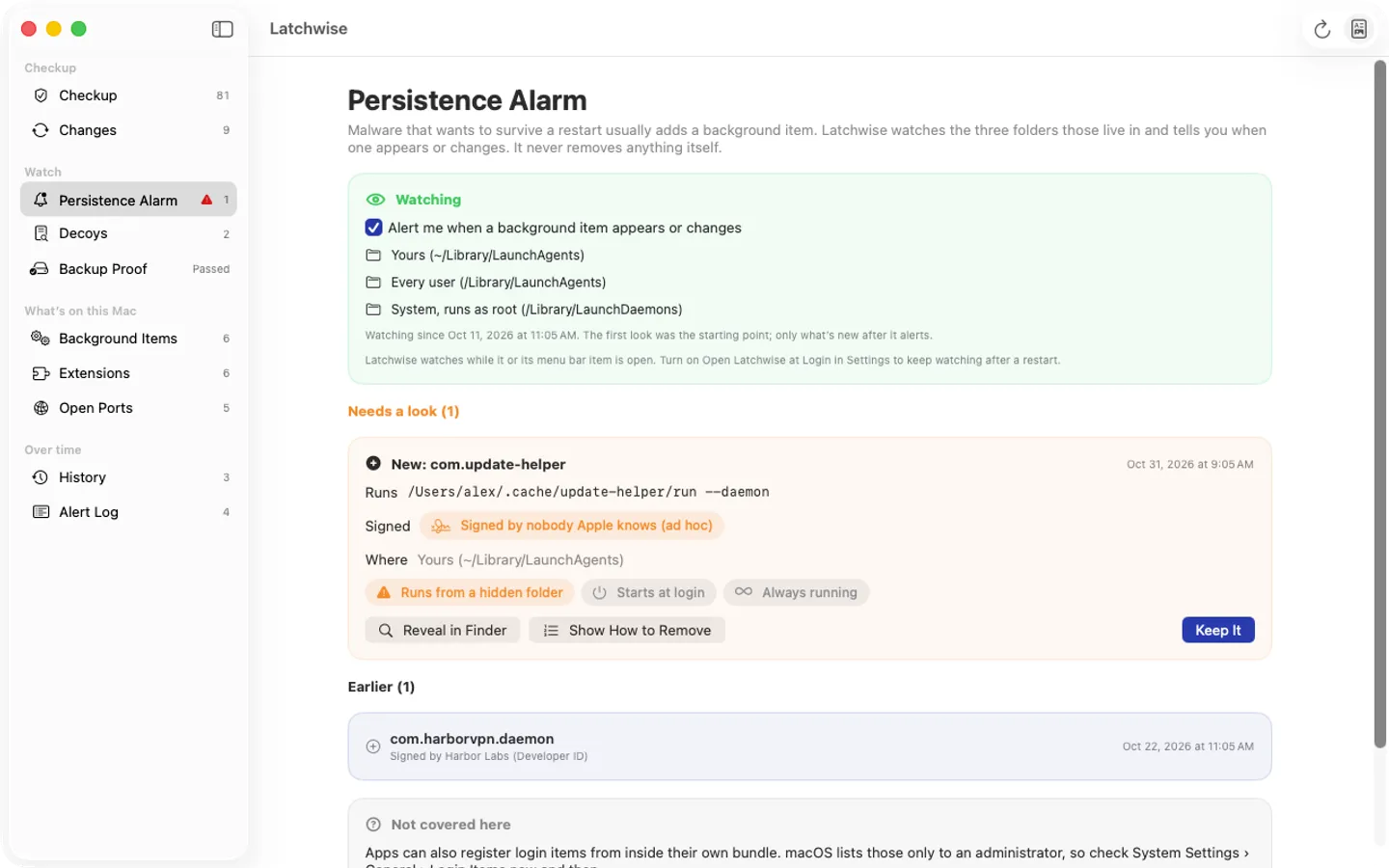
What it does: Latchwise checks about fifteen of your Mac's security settings and your browser extensions without a password, explains each one in plain words with a fix, and keeps watch between checkups: a persistence alarm for new background items, decoy files that flag mass changes, and proof your backup restores. It tells you; it does not stop malware. Everything stays on your Mac.
- Checkout by Gumroad
- Notarized by Apple
- No FitzTopPicks account needed
Free to use without a key: the full checkup, the score, every fix guide and the list of your browser extensions with risk labels, for good.
Buy a license key to unlock Pro: what changed between scans and scan history, the persistence alarm, decoys, backup proof, extension change alerts, scheduled scans and a dated PDF report.
macOS 14 Sonoma or later · Version 1.0 · 4.3 MB disk image · Notarized by Apple
One-time $39.99 for Pro. No subscription. One license key works on up to 3 of your Macs.
Download: The download (a signed, notarized .dmg) comes with your purchase in your Gumroad receipt, together with your license key. Updates install from inside the app.
Buy now opens Gumroad's checkout on this page; Gumroad is the seller and handles payment, sales tax and your receipt.
Screenshots
5 pictures: swipe or scroll sideways.
What you get
- Latchwise for Mac: macOS 14 Sonoma or later
- The signed, notarized .dmg download and your license key, in your Gumroad receipt
- One license key for up to 3 of your Macs
- Updates that install from inside the app
- A one-time price: no subscription
Features
- Persistence alarm: an alert the moment a new background item appears, with what it runs and who signed it; it never deletes anything itself
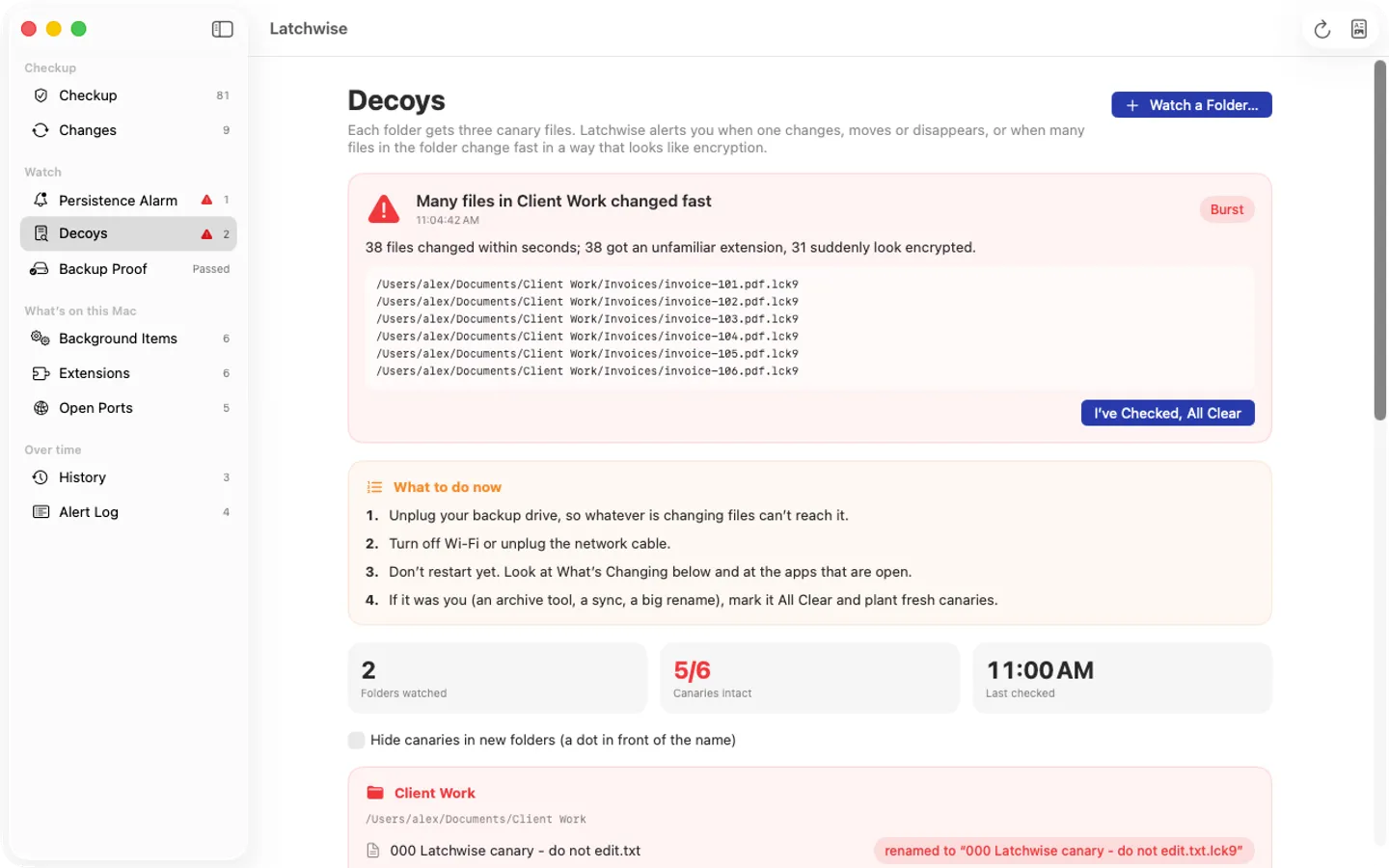
- Decoys: canary files in folders you choose, and an alert when one is touched or many files change fast in a way that looks like encryption
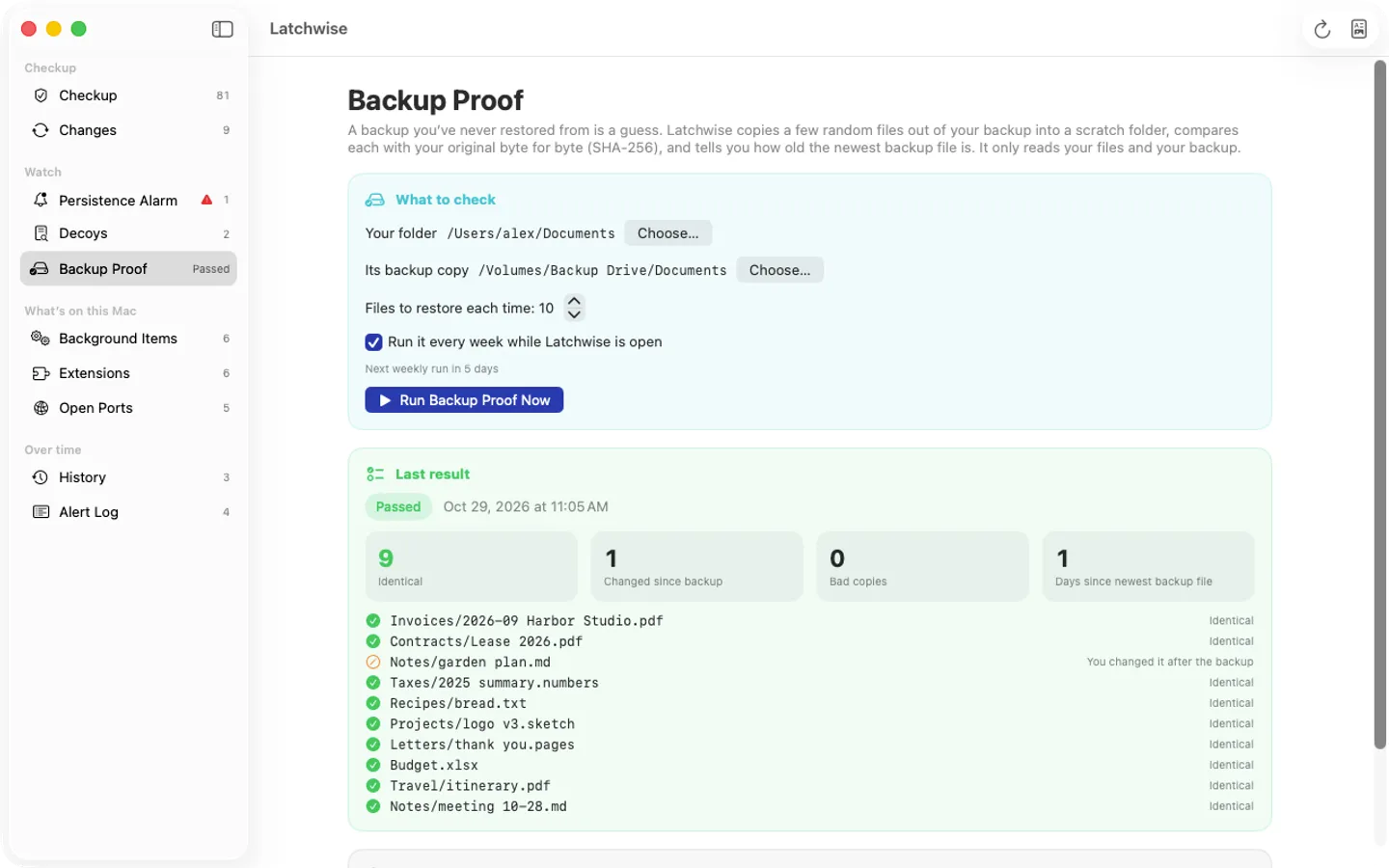
- Backup proof: random files restored from your backup copy and checked byte for byte, weekly, plus how old your newest backup file is
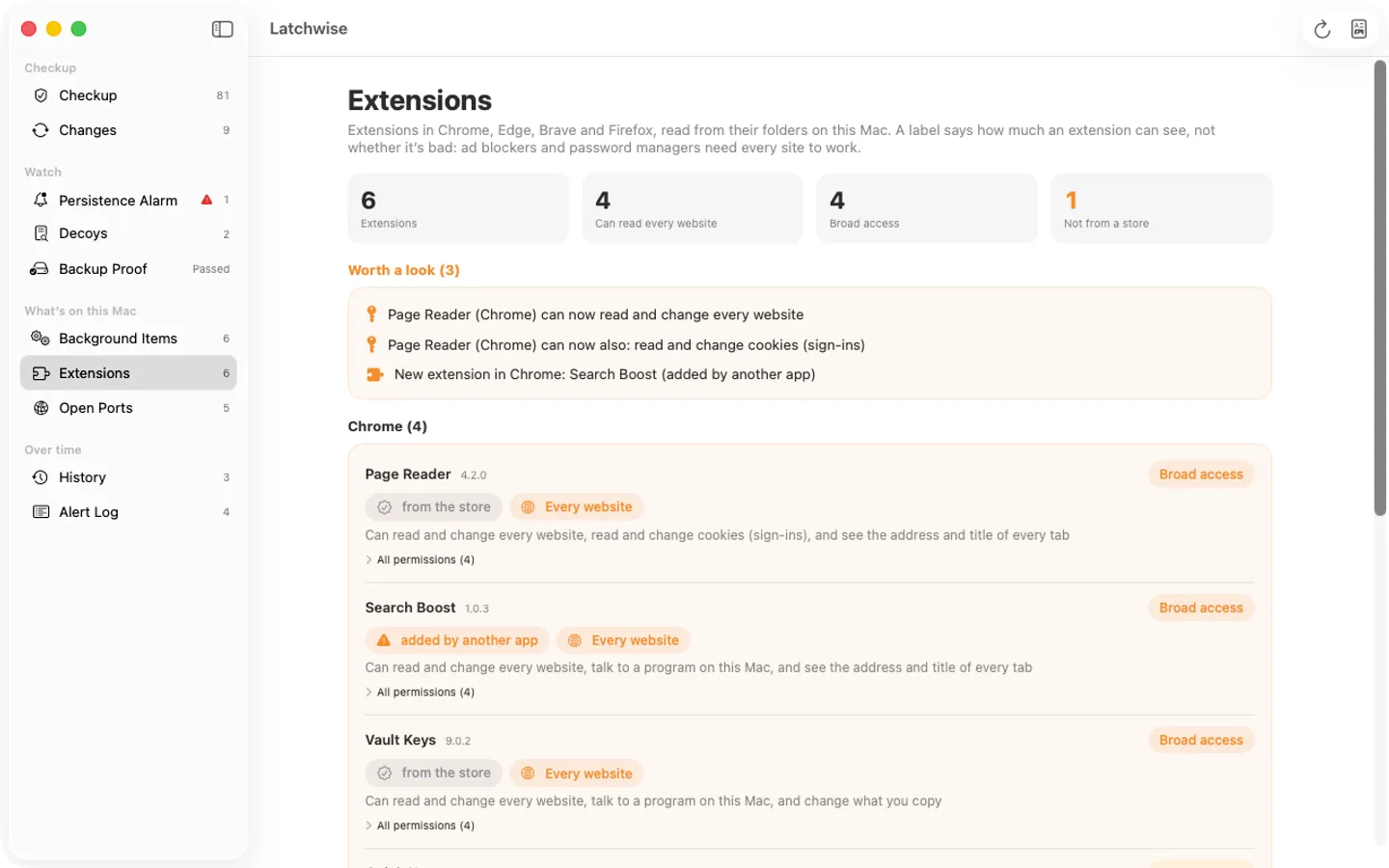
- Browser extensions in Chrome, Edge, Brave and Firefox with plain risk labels (free); Pro alerts when one gains permissions or access to every site
- Shows what changed since the last scan, with scheduled daily or weekly scans and a dated PDF report (evidence of settings, not a certification)
- A checkup of FileVault, firewall, Gatekeeper, updates, screen lock, sharing, background items and more, with a score and plain-words fixes
- Reads only: no password, no admin rights, nothing uploaded. A checkup and tripwire, not antivirus
- English and Spanish
Free vs Pro
| Feature | Free | Pro |
|---|---|---|
| What you can do | The full checkup, the score, every fix guide and the list of your browser extensions with risk labels, for good | Everything free, plus what changed between scans and scan history, the persistence alarm, decoys, backup proof, extension change alerts, scheduled scans and a dated PDF report |
| Price | Free download | $39.99 one-time |
Questions
Does Latchwise protect my Mac?
No: it’s a checkup and a tripwire. It reads your settings and tells you which ones to look at and how to fix them, and (Pro) alerts you to new background items, touched decoy files and extension changes. It tells you; it does not stop malware. It isn’t antivirus; XProtect, built into macOS, scans for malware, and Latchwise checks that its definitions are up to date.
Does it check Time Machine?
No. Time Machine backups need Full Disk Access and admin rights to restore for a test, and Latchwise doesn’t ask for admin rights. Backup proof checks a folder copy of your files instead (Carbon Copy Cloner, SuperDuper, rsync, a NAS share or an external drive).
Why does it say “Couldn’t check”?
Latchwise works without an administrator password, so a few things are out of reach (for example other users’ open ports, or computer-wide profiles). It says so rather than guess, shows the command that would tell you, and leaves those checks out of the score.
Where are my scans saved?
In a file on your Mac. Settings › General › Show Data Folder in Finder shows it.
What’s free, and what does a key add?
Without a key you get the full checkup, the score, every fix guide and the list of your browser extensions with risk labels, for as long as you like. A key adds what changed between scans and the scan history, the persistence alarm, decoys, backup proof, extension change alerts, scheduled scans and a dated PDF report, on up to 3 Macs. It’s a one-time purchase on Gumroad, with no subscription.
Where do I enter my license key?
Choose Latchwise › Settings…, open the Pro tab, paste the key from your Gumroad receipt and click Activate.
From the Latchwise help page.
Requirements
- macOS
- macOS 14 Sonoma or later
- Processor
- Apple silicon and Intel
- Languages
- English, Spanish
- Download
- 4.3 MB disk image
- Version
- 1.0
Privacy
Latchwise reads your Mac's settings, background item folders and browser extension folders on your Mac and saves each scan, your watched folders, canary fingerprints, backup proof results and alerts in files there; it has no account or tracking and never uploads anything about your Mac, your files or your extensions. Your license key is kept in your Keychain. The only internet requests are the license check with Gumroad (when you enter a key and about once a week) and checking for updates at fitztoppicks.com. Pro's optional outdated-apps check (Settings › Watch, off unless you turn it on) asks each browser maker's public update feed for its newest version number (Google, Mozilla, Microsoft, Brave, Slack, VideoLAN), sending nothing about your Mac; and the app signing check uses macOS's own Gatekeeper, which may ask Apple whether an app is notarized.
Questions about your purchase or license key? Reply to your Gumroad receipt or contact us.