Updatewright
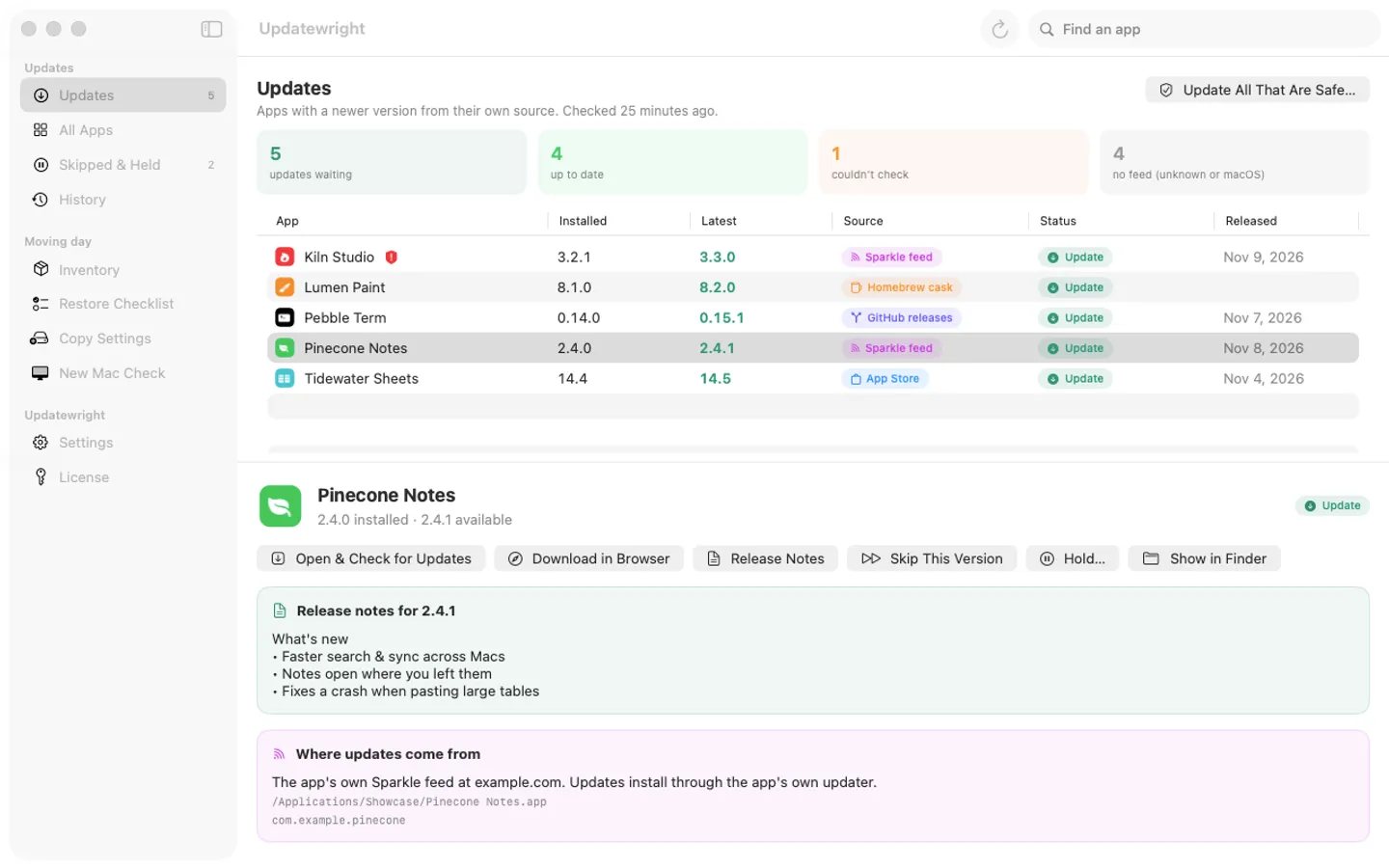
What it does: Updatewright lists every app on your Mac with where its updates come from (its own Sparkle feed, Homebrew, GitHub or the App Store) and hands each update to something you can watch. Moving day takes your apps and settings to your next Mac.
- Checkout by Gumroad
- Notarized by Apple
- No FitzTopPicks account needed
Free for 7 days from the first time you open it, with every feature.
Buy a license key to unlock checking for updates, Update All That Are Safe, Copy Settings and New Mac Check after the trial. Your last list, History, holds, Inventory and Restore Checklist always stay open.
macOS 15 Sequoia or later · Version 1.1 · 3.8 MB disk image · Notarized by Apple
One-time $19.99. No subscription. One license key works on up to 3 of your Macs.
Download: The download (a signed, notarized .dmg) comes with your purchase in your Gumroad receipt, together with your license key. Updates install from inside the app.
Buy now opens Gumroad's checkout on this page; Gumroad is the seller and handles payment, sales tax and your receipt.
Screenshots
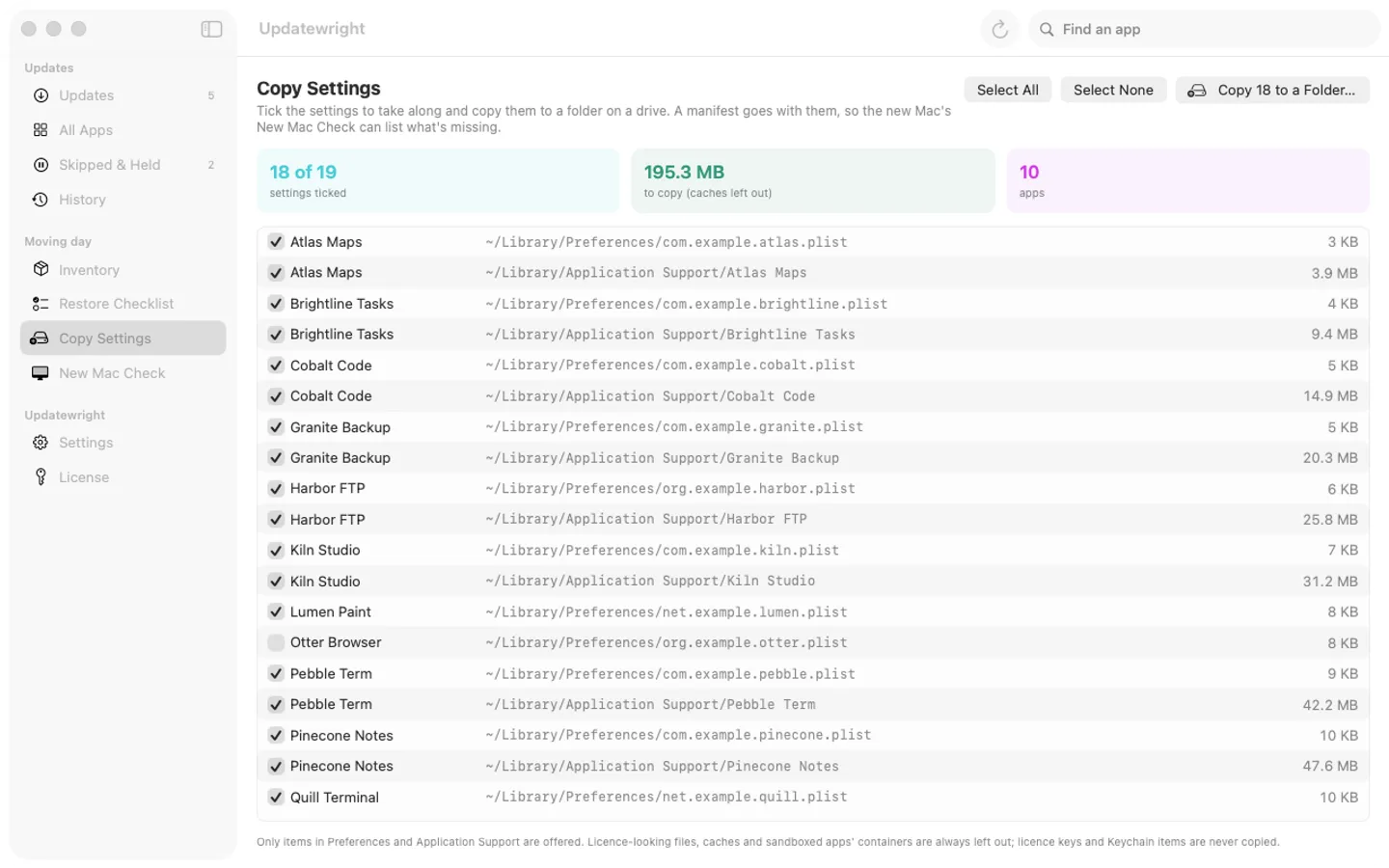
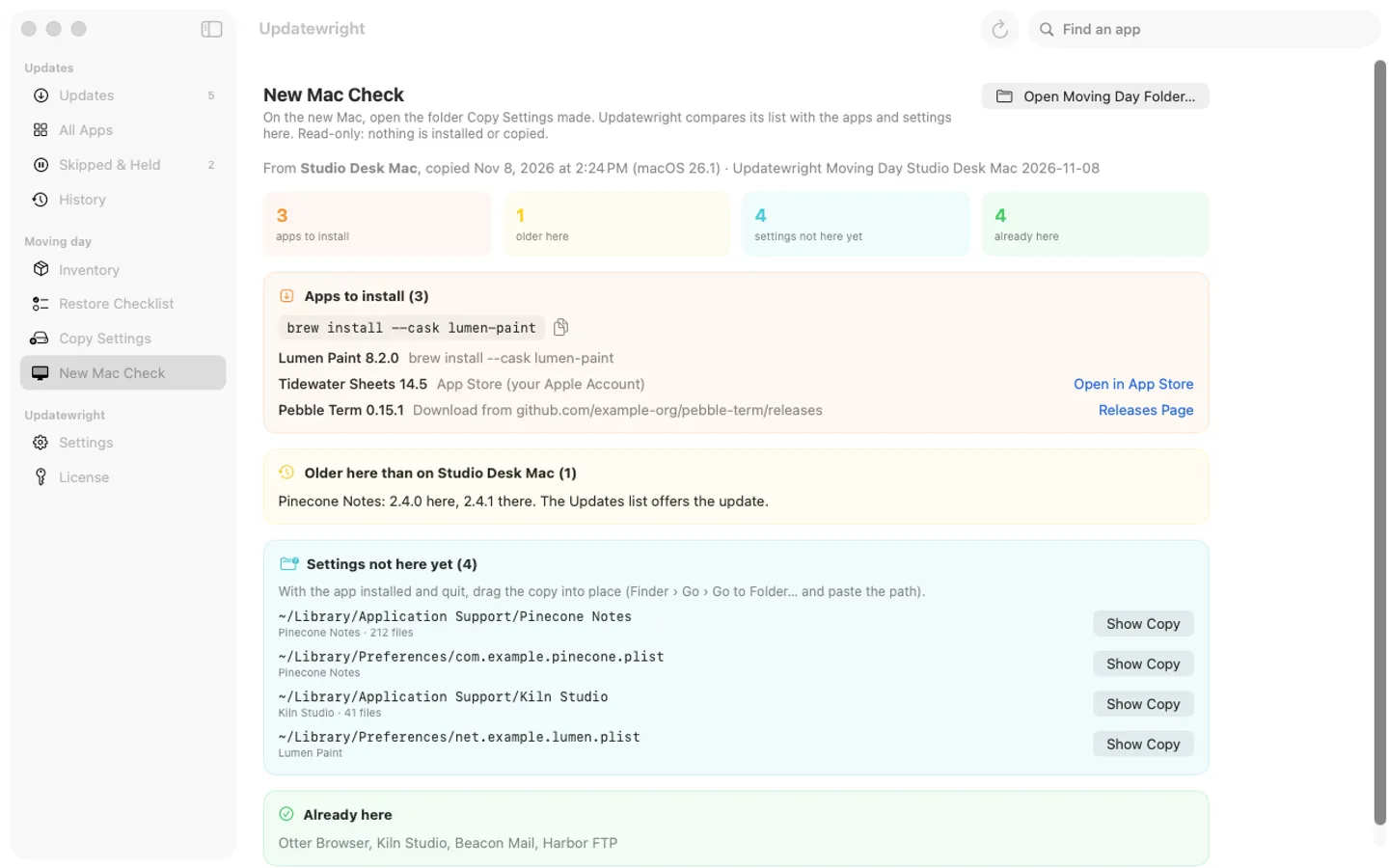
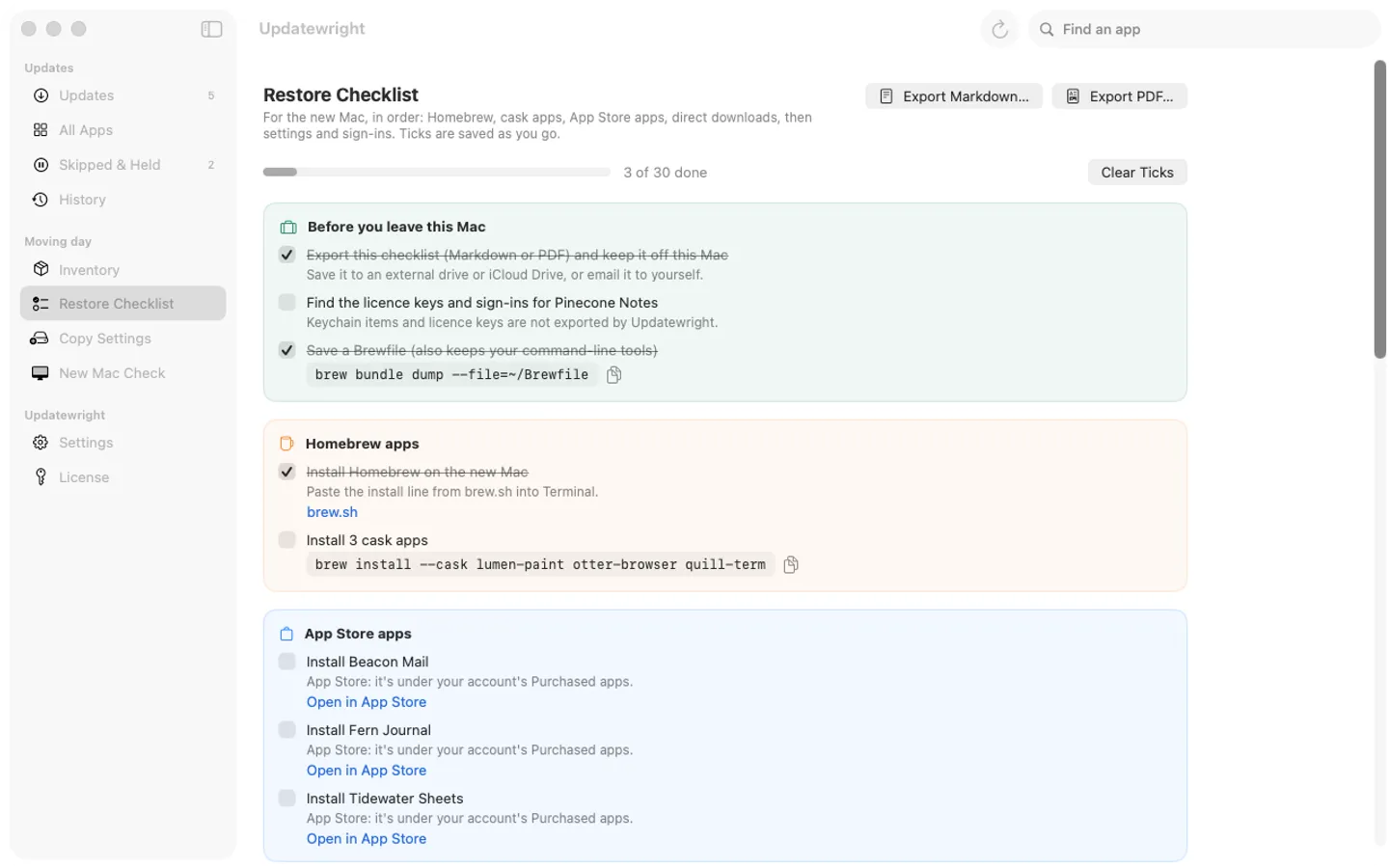
5 pictures: swipe or scroll sideways.
What you get
- Updatewright for Mac: macOS 15 Sequoia or later
- The signed, notarized .dmg download and your license key, in your Gumroad receipt
- One license key for up to 3 of your Macs
- Updates that install from inside the app
- A one-time price: no subscription
Features
- One list of every app in /Applications and ~/Applications with its update source, versions and release notes
- Sparkle feeds, Homebrew casks, GitHub releases and App Store apps, each checked at its own source
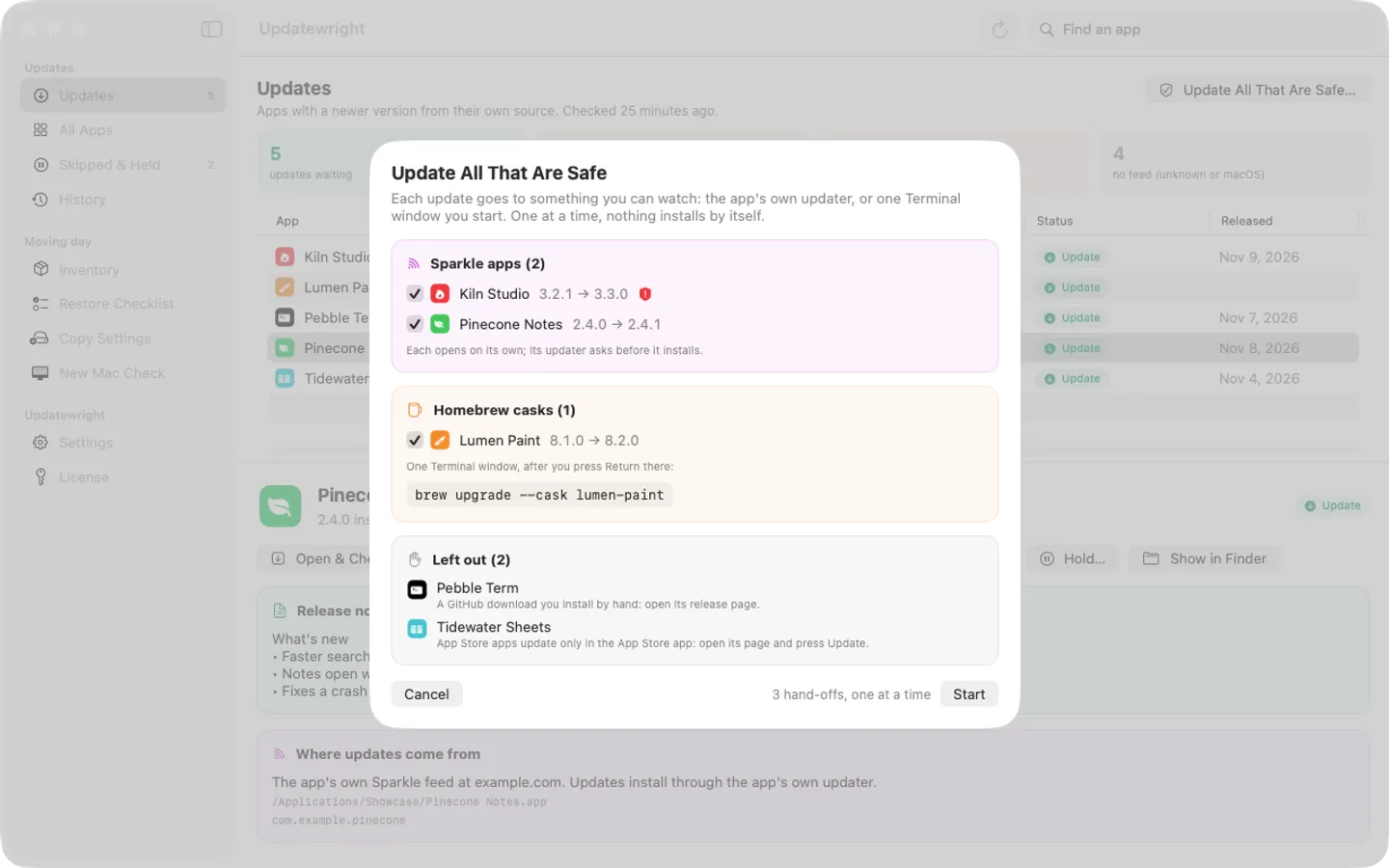
- Update All That Are Safe: one hand-off at a time to the app's own updater or one Terminal window you start; nothing installs silently
- Skip a version, hold an app with a note, and a History of every update
- A menu bar badge, a daily check and an optional weekly summary
- Moving day: an inventory of apps and settings, Copy Settings to a drive, New Mac Check and a Restore Checklist (Markdown or PDF)
Free trial vs With a license key
| Feature | Free trial | With a license key |
|---|---|---|
| What you can do | Free for 7 days from the first time you open it, with every feature. | Buy a license key to unlock checking for updates, Update All That Are Safe, Copy Settings and New Mac Check after the trial. Your last list, History, holds, Inventory and Restore Checklist always stay open. |
| Price | Free to try | $19.99 one-time |
Questions
Why does an app say “No feed”?
It has no update source Updatewright can read (no Sparkle feed, Homebrew cask, GitHub release or App Store receipt). Its own updater still works as before; check the developer’s website.
Does Updatewright install updates by itself?
No. Each update is handed to something you can see: the app’s own updater, a Terminal window that runs the brew command only after you press Return, or the App Store app. Update All That Are Safe does that one app at a time.
How does Moving day work?
On the old Mac, Copy Settings copies the settings you tick to a folder on a drive with a manifest. On the new Mac, New Mac Check opens that folder and lists the apps to install and the settings not there yet. The Restore Checklist puts it all in order.
What does the trial include?
Every feature for 7 days from the first time you open it. After that, checking for updates, Update All That Are Safe, Copy Settings and New Mac Check need a license key; your last list, History, holds, Inventory and Restore Checklist stay open. A key is a one-time purchase on Gumroad for up to 3 Macs, with no subscription.
Where do I enter my license key?
Choose License in Updatewright’s sidebar (or License… in its menu bar menu), paste the key from your Gumroad receipt and click Activate.
How does Updatewright update itself?
Choose Updatewright › Check for Updates…; it also checks on its own about once a day. Its own row in the list uses the same updater, and it’s never part of Update All That Are Safe. Updates are free.
From the Updatewright help page.
Setting it up
How to open a newly downloaded Mac app the first time
Step by step, with what to do if your Mac asks a question.
Requirements
- macOS
- macOS 15 Sequoia or later
- Processor
- Apple silicon and Intel
- Languages
- English
- Download
- 3.8 MB disk image
- Version
- 1.1
Homebrew optional.
Privacy
Updatewright reads your apps' Info.plist files on your Mac and never installs anything by itself. Its network requests are each app's own update feed, Apple's App Store lookup, GitHub's public releases, its license check with Gumroad (when you enter a key and about once a week) and its own update check at fitztoppicks.com. It has no account or tracking, never sends your list of apps anywhere, and never reads licence keys or Keychain items. Your license key is kept in your Keychain.
Questions about your purchase or license key? See Help and FAQ, reply to your Gumroad receipt or contact us.