Backframe
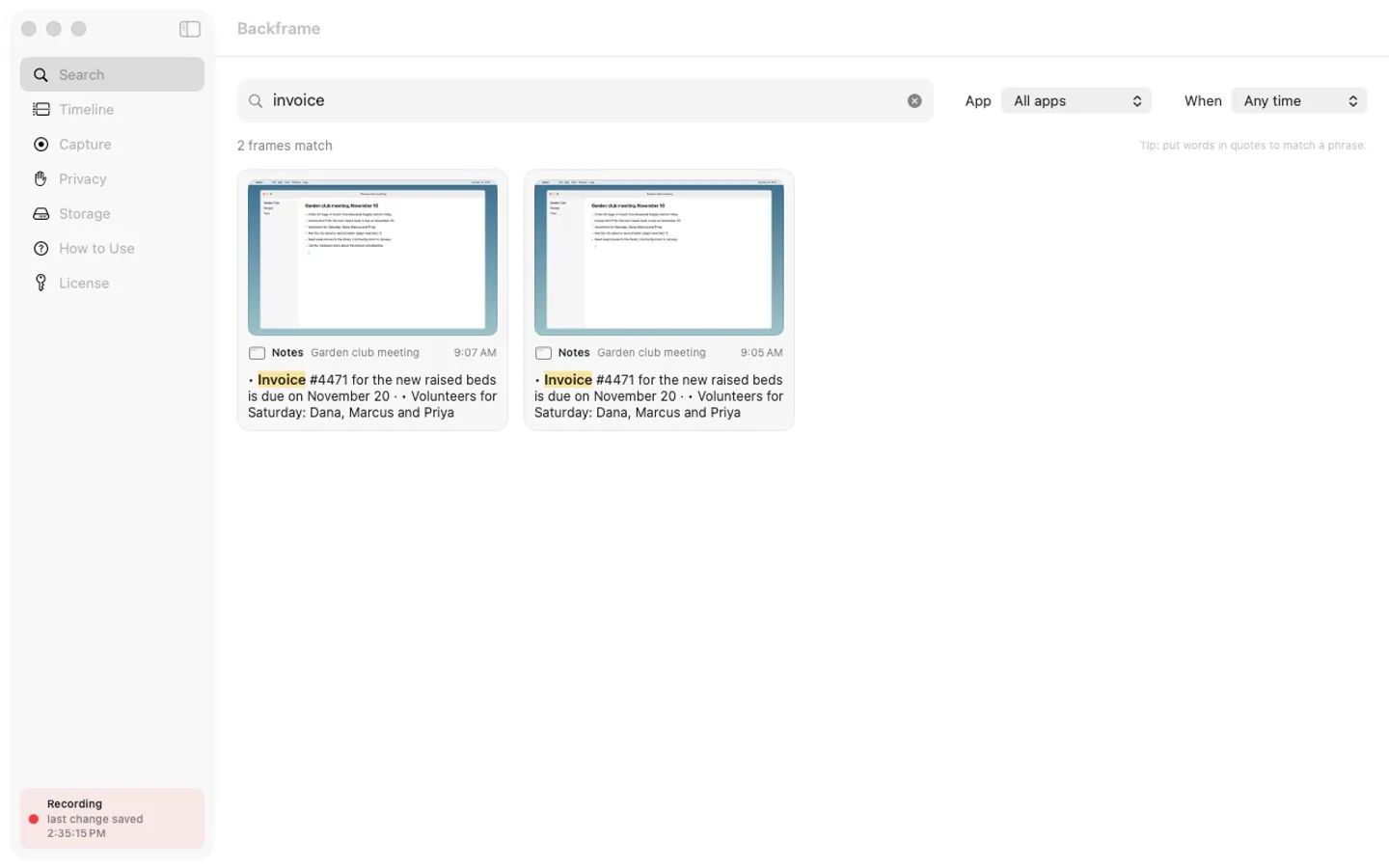
What it does: Backframe keeps a small encrypted screenshot whenever your screen changes, reads its text on your Mac and lets you search everything you saw: the number, name or sentence from an hour ago or last week. Capture is off until you switch it on, and nothing leaves your Mac.
- Checkout by Gumroad
- Notarized by Apple
- No FitzTopPicks account needed
Free for 7 days from the first time you open it: every feature, nothing held back.
Buy a license key to unlock saving new frames after the trial. Your saved history stays searchable, viewable and deletable with or without a key.
macOS 15 Sequoia or later · Version 1.0 · 4.6 MB disk image · Notarized by Apple
One-time $29. No subscription. One license key works on up to 3 of your Macs.
Download: The download (a signed, notarized .dmg) comes with your purchase in your Gumroad receipt, together with your license key. Updates install from inside the app.
Buy now opens Gumroad's checkout on this page; Gumroad is the seller and handles payment, sales tax and your receipt.
Screenshots
5 pictures: swipe or scroll sideways.
What you get
- Backframe for Mac: macOS 15 Sequoia or later
- The signed, notarized .dmg download and your license key, in your Gumroad receipt
- One license key for up to 3 of your Macs
- Updates that install from inside the app
- A one-time price: no subscription
Features
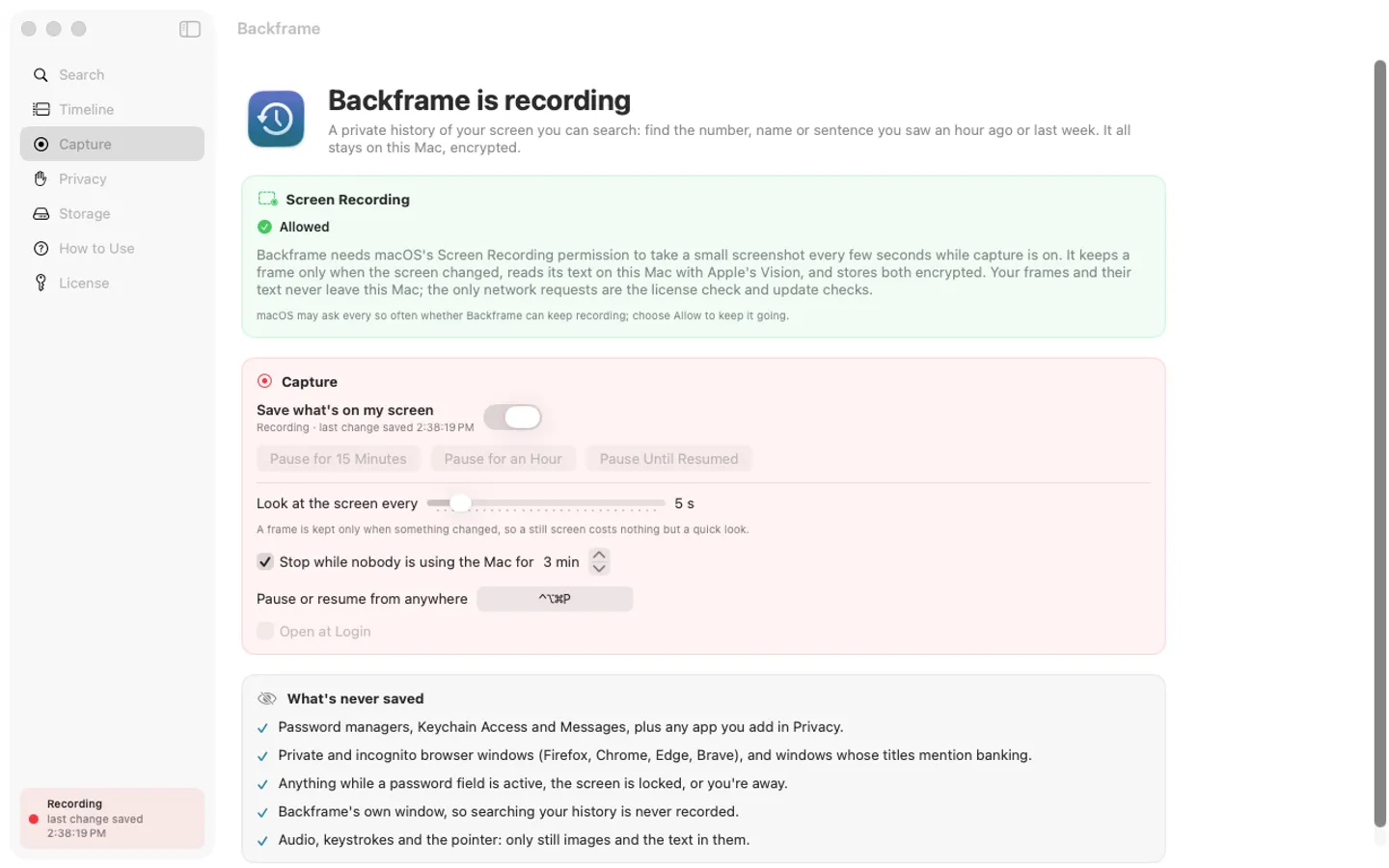
- Capture starts off; switch it on from the menu bar and it keeps a small screenshot only when the screen changed
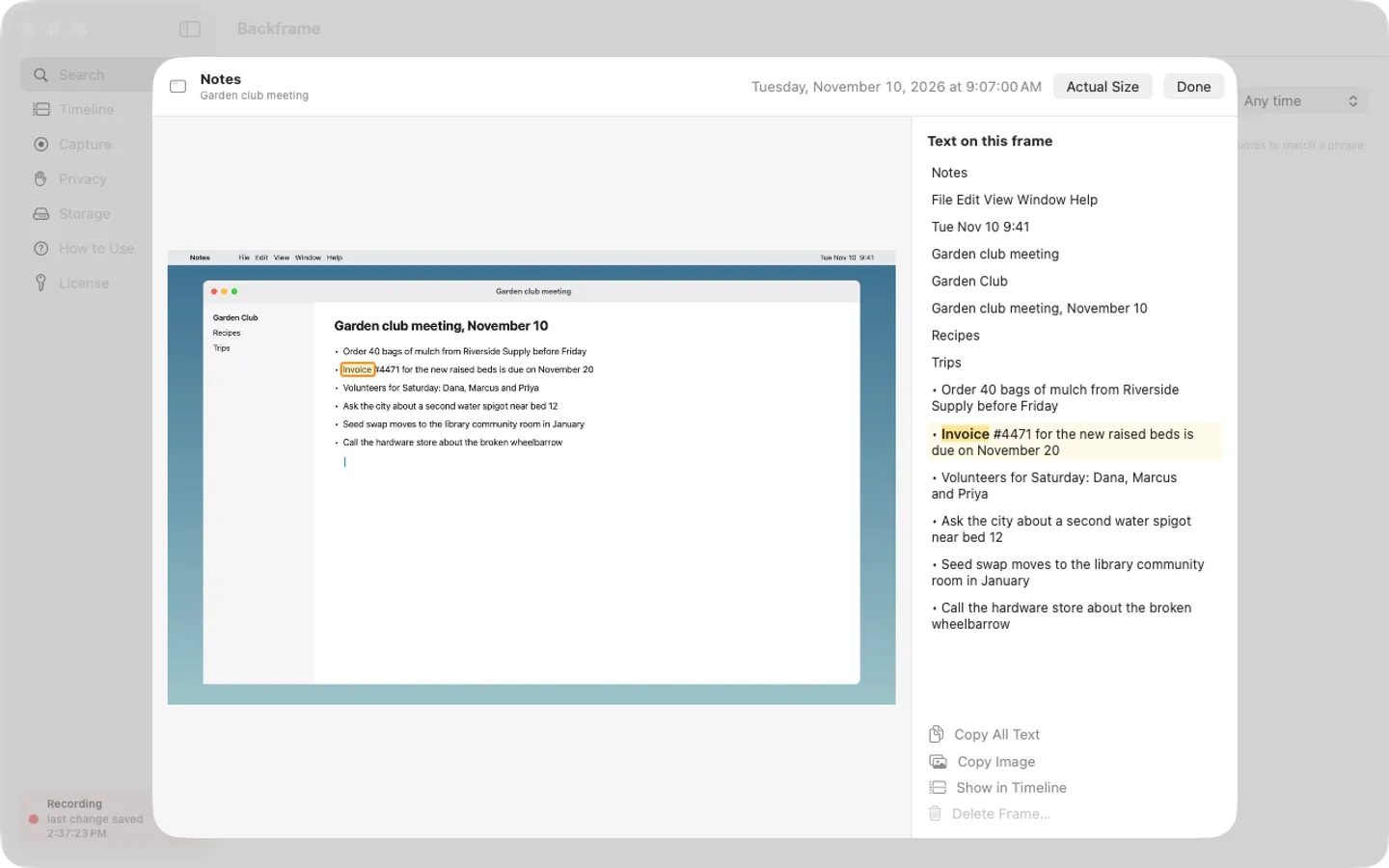
- Apple's Vision reads the text in every frame on your Mac, so you can search words, numbers and names you saw
- Search by word beginnings in any order or a “quoted phrase”, filtered by app and date, with the matches outlined
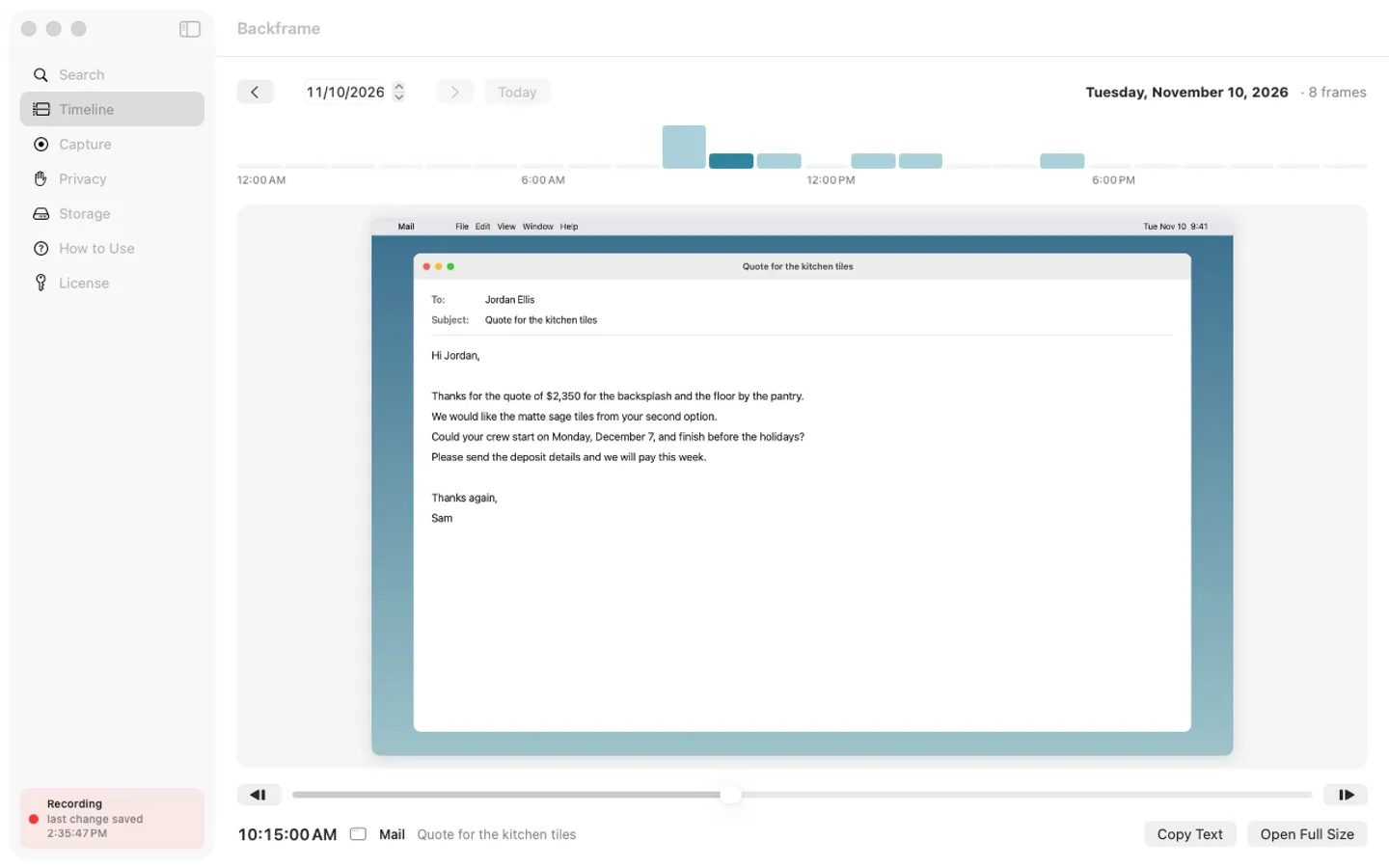
- A day timeline: an hour-by-hour activity strip, a scrubber and arrow keys to step through frames
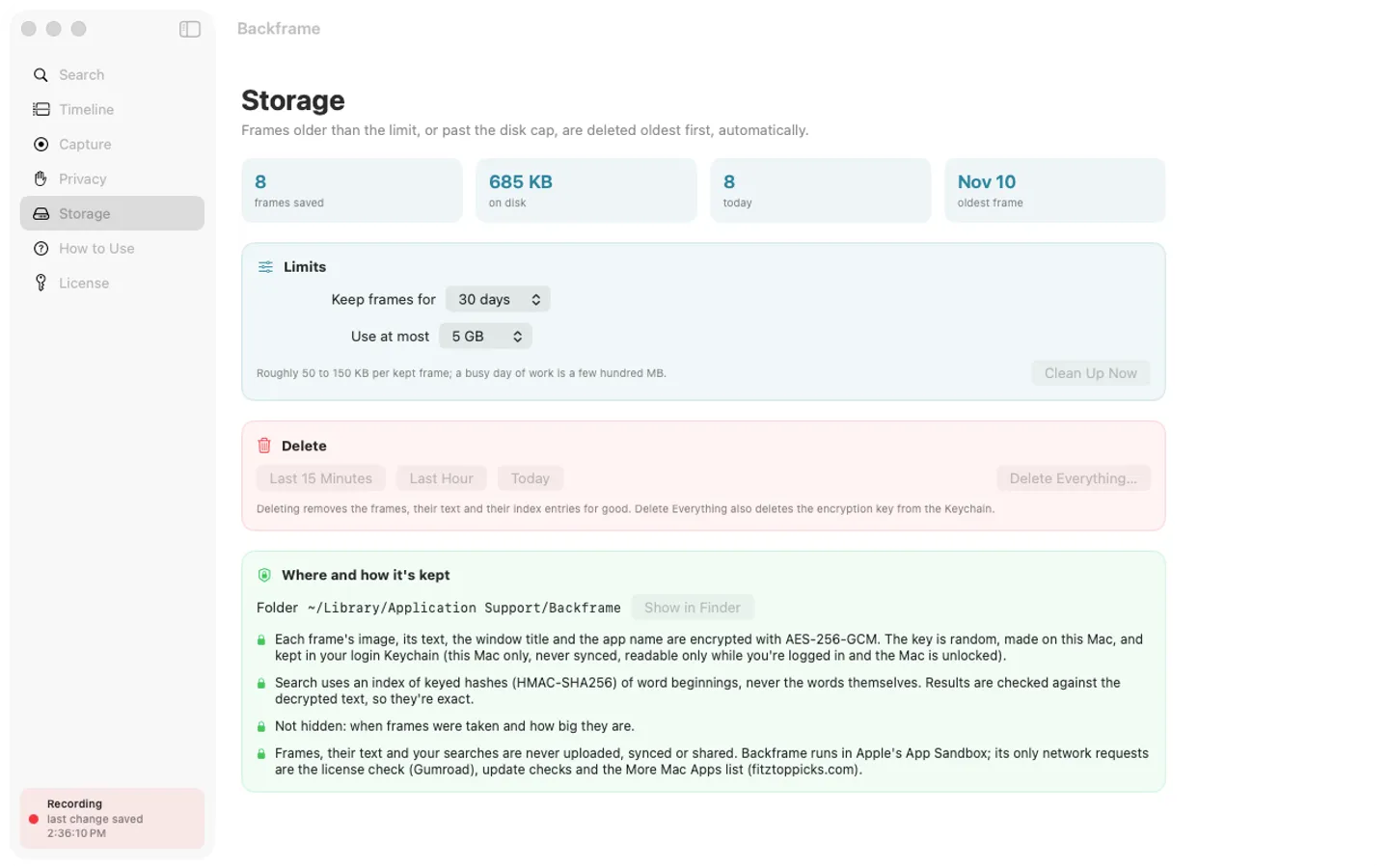
- Frames and text encrypted with AES-256-GCM; the key stays in your Keychain on this Mac
- Never records password managers, Messages, private browser windows, banking titles or password fields; add your own apps and words
- Pause anywhere with ⌃⌥⌘P; delete the last 15 minutes, hour, day or everything; 30 days and 5 GB by default
Free trial vs With a license key
| Feature | Free trial | With a license key |
|---|---|---|
| What you can do | Every feature, nothing held back | Buy a license key to unlock saving new frames after the trial. Your saved history stays searchable, viewable and deletable with or without a key. |
| Price | Free to try | $29 one-time |
Questions
How do I start?
Open Backframe from the menu bar, choose Turn Capture On, then click Allow Screen Recording and switch Backframe on in System Settings › Privacy & Security › Screen & System Audio Recording. Capture is off until you do this.
How do I find something I saw?
Choose Search History… from the menu bar and type a few words: each word matches from its start, in any order. Put words in quotes for an exact phrase, and narrow results by app or date.
How do I stop it recording something?
Press ⌃⌥⌘P anywhere to pause or resume, or pause for 15 minutes, an hour or until tomorrow from the menu bar. Add apps or window-title words in Privacy so they're never recorded, and delete the last 15 minutes, hour or day from the menu bar.
Safari's private windows were recorded.
Safari doesn't mark its private windows in their titles, so Backframe can't tell them apart. Add Safari in Privacy, or pause while you browse privately there.
Is there a free trial?
Yes: every feature for 7 days from the first time you open it. After that, a one-time license key from Gumroad keeps saving new frames on up to 3 Macs, with no subscription.
What happens to my history if I don't buy?
Nothing: everything already saved stays searchable in Search and the Timeline, and you can still copy text, delete frames and clean up. Only saving new frames needs a key.
From the Backframe help page.
Setting it up
How to open a newly downloaded Mac app the first time
Step by step, with what to do if your Mac asks a question.
Requirements
- macOS
- macOS 15 Sequoia or later
- Processor
- Apple silicon and Intel
- Languages
- English
- Download
- 4.6 MB disk image
- Version
- 1.0
Screen Recording permission, asked only after you switch capture on (the app explains it first).
Privacy
Backframe saves screenshots only while you have capture switched on (it starts off): a downscaled picture of the display you're using when something changed, its text read on your Mac, the window title, app name and time. All of it is stored in ~/Library/Application Support/Backframe on your Mac, encrypted with AES-256-GCM using a random key kept in your login Keychain (this Mac only, never synced); search uses keyed hashes, never your words. Backframe runs in Apple's App Sandbox, has no account or tracking, and never sends your frames, text or searches anywhere. Your license key is kept in your Keychain. The only internet requests are the license check with Gumroad (when you enter a key and about once a week), checking for updates at fitztoppicks.com and the More Mac Apps list.
Questions about your purchase or license key? See Help and FAQ, reply to your Gumroad receipt or contact us.