
Datepatch: Fix the dates on scanned photos before Photos
Free version Free to use without a key. What's free
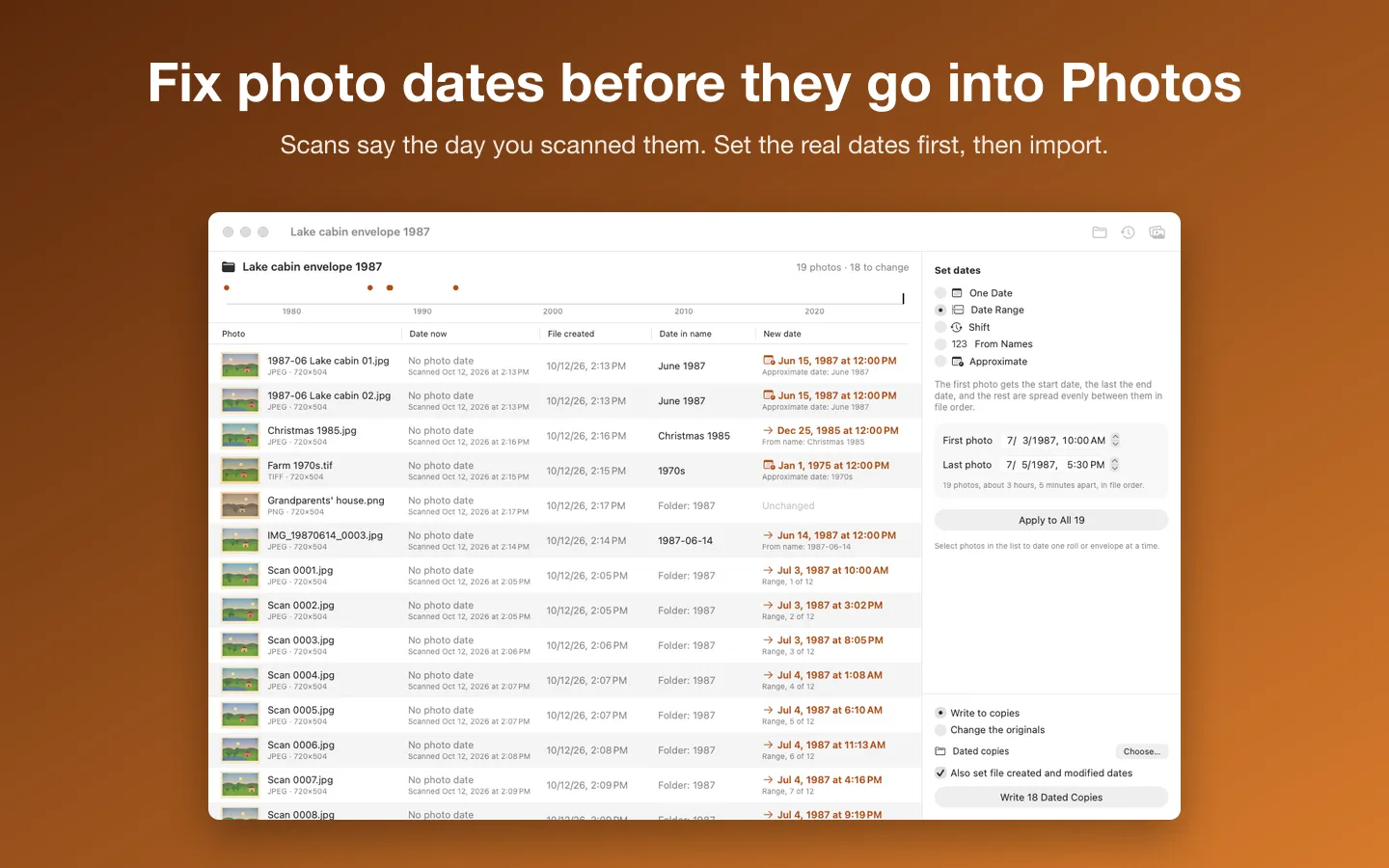
What it does: Scans arrive dated the day you scanned them, so Photos piles a family archive into one afternoon. Drop the folder into Datepatch, set the real dates roll by roll (one date, a range spread in scan order, a clock offset, the date in the file name, or an approximate “Summer 1987”), check the preview, then import the dated photos into Photos.
Black Friday: $11.19 through November 30 (New York time); normally $15.99. Buy now carries the code BFMAC30. The whole sale
- Checkout by Gumroad
- Notarized by Apple
- No FitzTopPicks account needed
Free to use without a key: everything works, 25 photos per batch.
Buy a license key to unlock Pro: write every photo in a batch, however big the box of scans.
macOS 14 Sonoma or later · Version 1.0 · 3.5 MB disk image · Notarized by Apple
One-time $15.99 for the app with Pro: every photo in every batch. No subscription. One license key works on up to 3 of your Macs.
Download: The download (a signed, notarized .dmg) comes with your purchase in your Gumroad receipt, together with your license key. Updates install from inside the app.
Buy now opens Gumroad's checkout on this page; Gumroad is the seller and handles payment, sales tax and your receipt.
Screenshots
5 pictures: swipe or scroll sideways.
What you get
- Datepatch for Mac: macOS 14 Sonoma or later
- The signed, notarized .dmg download and your license key, in your Gumroad receipt
- One license key for up to 3 of your Macs
- Updates that install from inside the app
- A one-time price: no subscription
Features
- Shows each photo's current date, file date and any date in its file or folder name, side by side
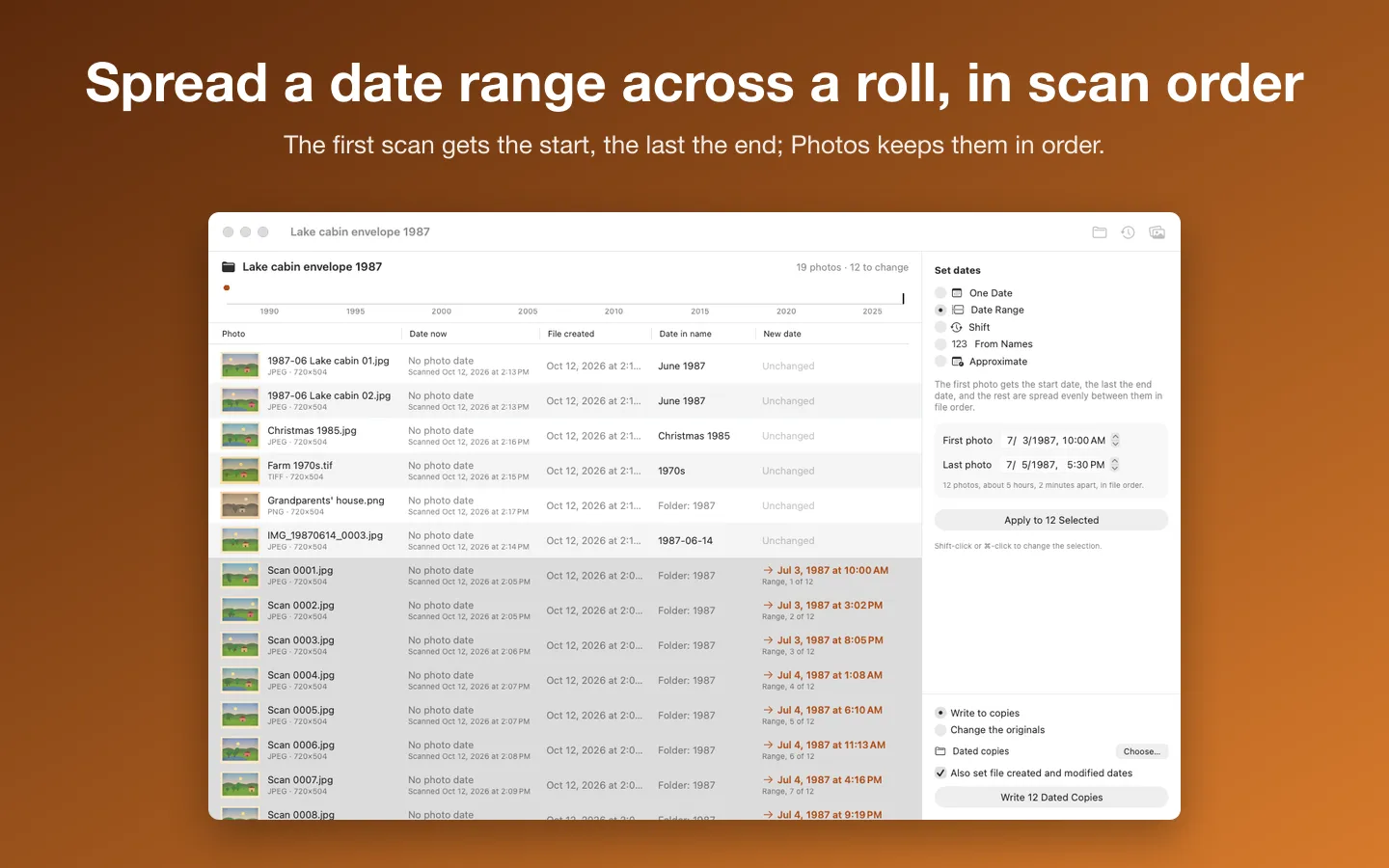
- One date for a roll or envelope, each photo a few seconds later so Photos keeps scan order
- A date range spread evenly across a scan sequence, in file order
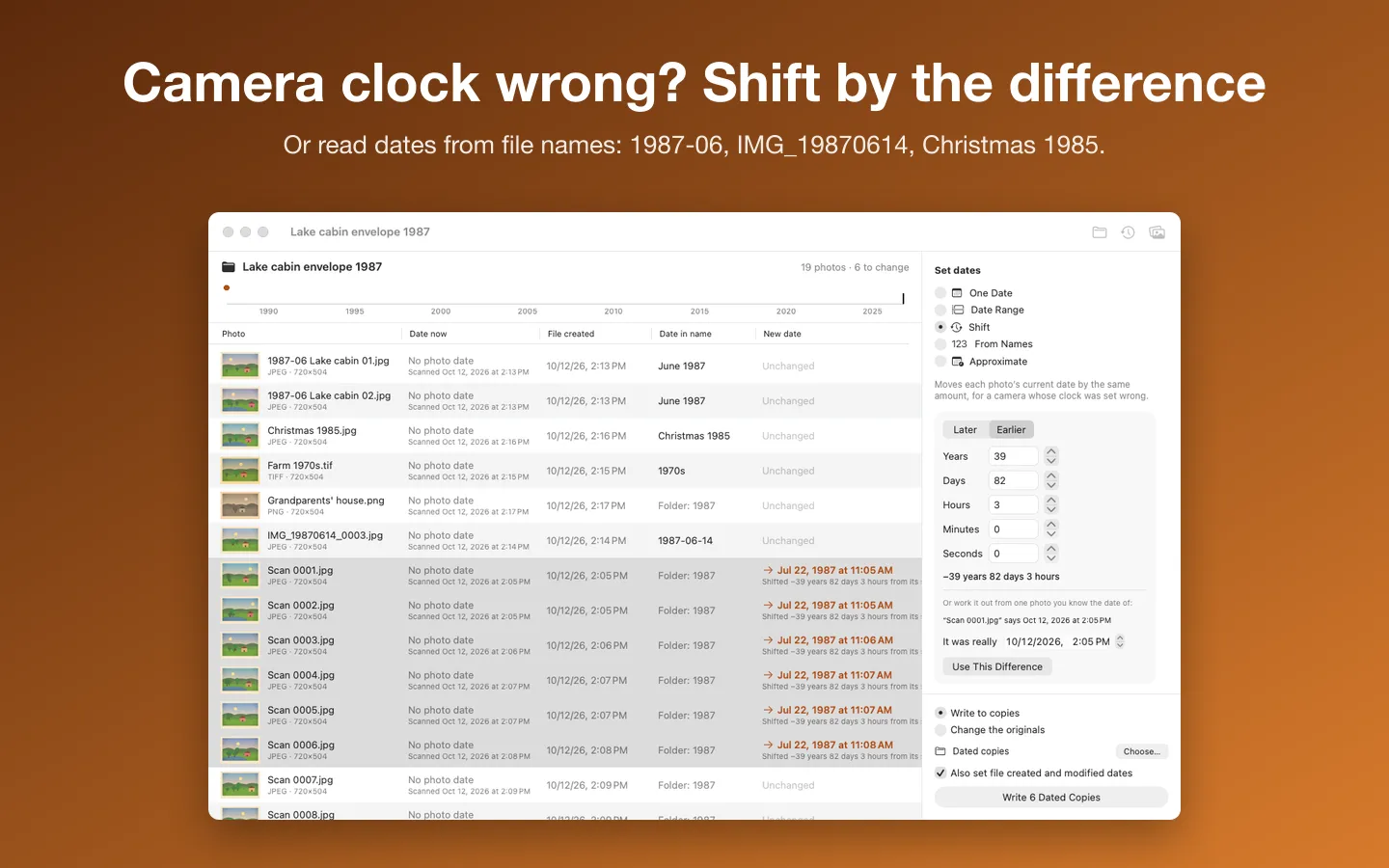
- Shift by an offset for a camera with the wrong clock, or work it out from one photo you know
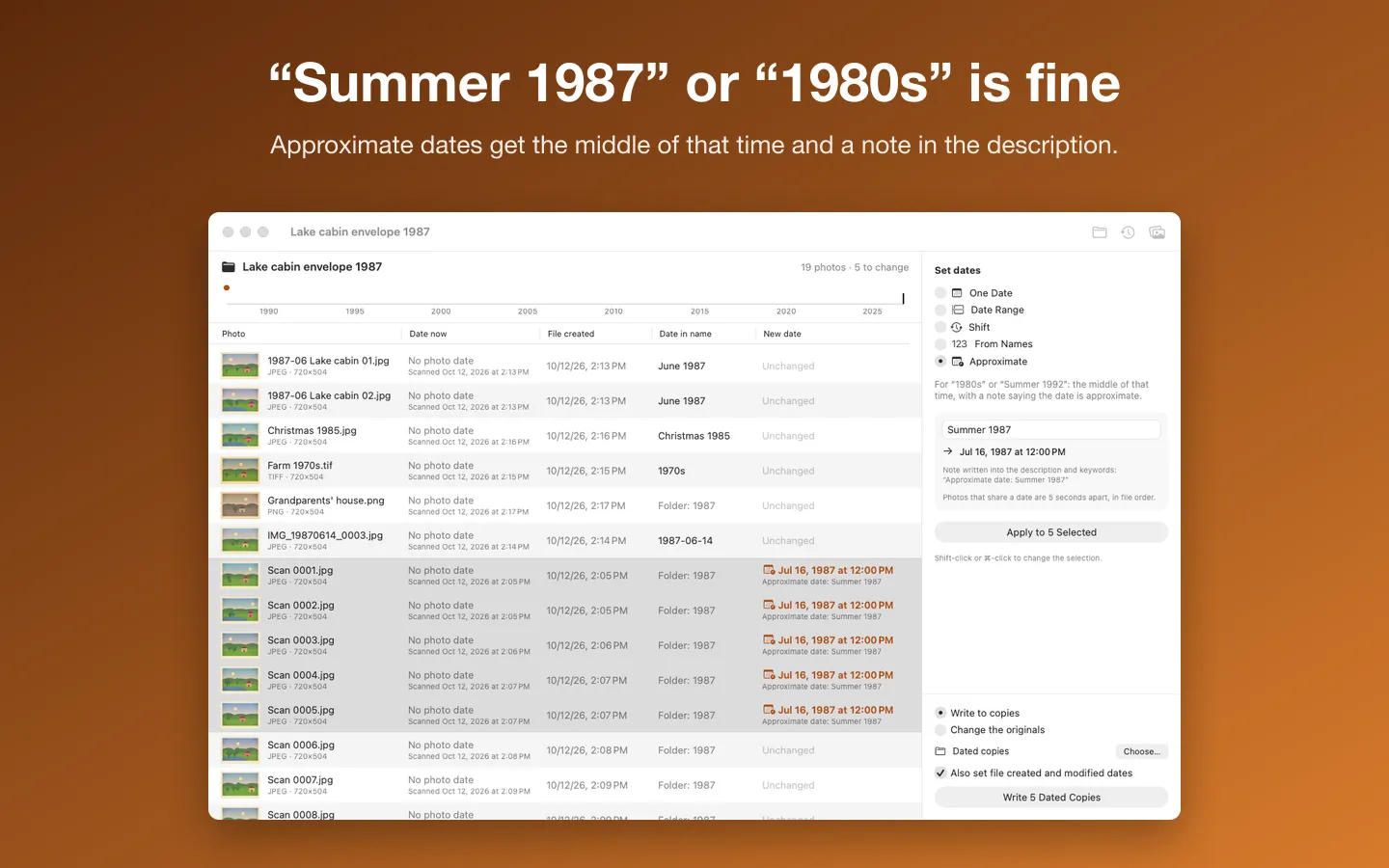
- Reads dates from names: 1987-06, IMG_19870614, June 14 1987, Christmas 1985, Summer 1992, 1980s
- Approximate dates get the middle of that time and a note in the description and keywords
- A preview of every change before anything is written
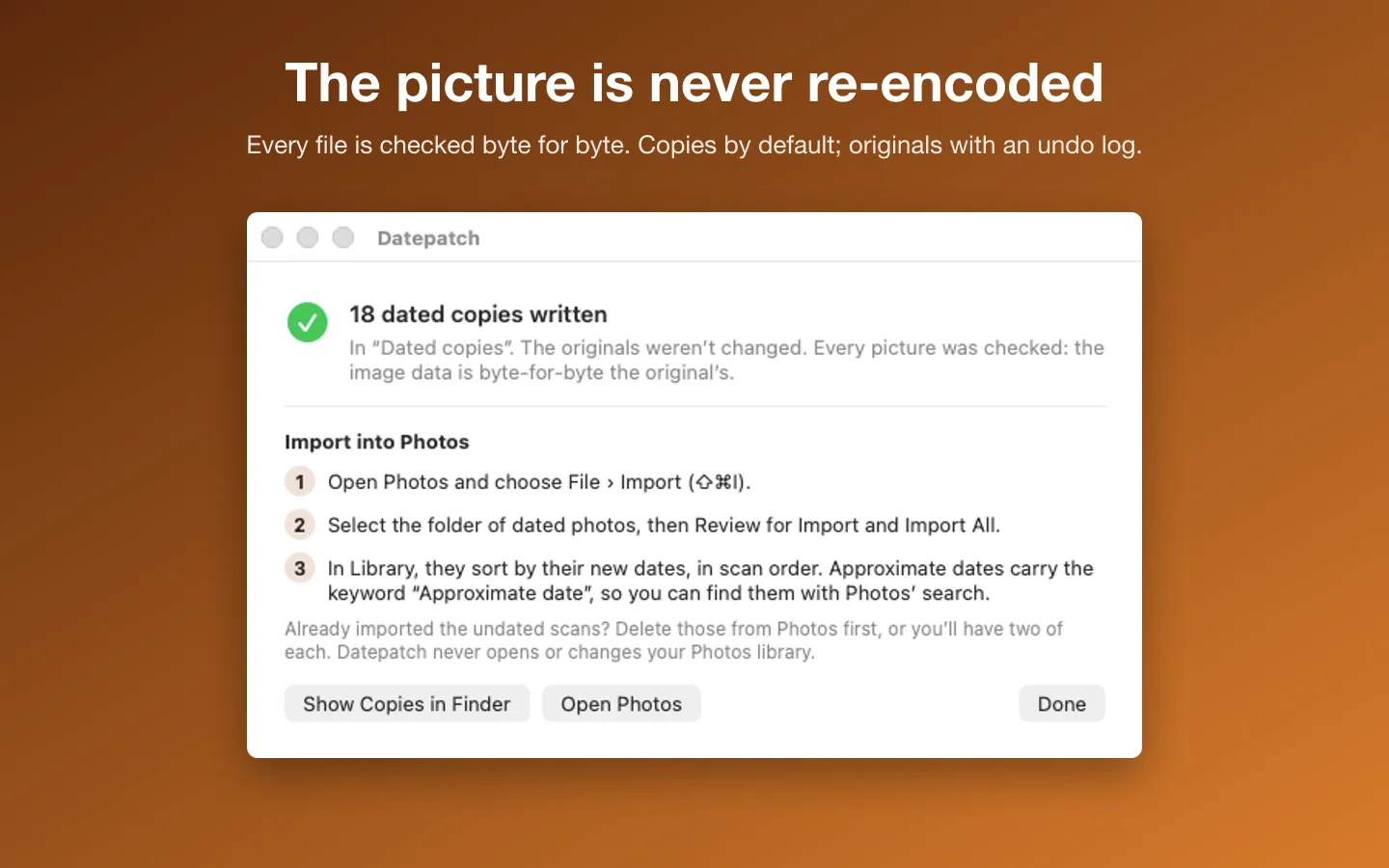
- Writes dated copies by default; change the originals only if you choose, with an undo log
- Never re-encodes JPEG, HEIC or TIFF; PNG is rewritten losslessly. Every written photo is checked against the original's image data
- JPEG, HEIC, TIFF and PNG dated inside the file; RAW files get an .xmp sidecar; GPS and camera details untouched
Free vs Pro
| Feature | Free | Pro |
|---|---|---|
| What you can do | Everything works, 25 photos per batch | Everything free, plus write every photo in a batch, however big the box of scans |
| Price | Free download | $15.99 one-time |
How it compares
| How it compares | Datepatch | Photo Date Changer: File Dates | Photos Exif Editor | ExifTool / osxphotos |
|---|---|---|---|---|
| Price | $15.99 one-time | $29.99 one-time | $6.99 one-time | Free |
| How you pay | Free version, then one-time | One-time purchase | One-time purchase | Free |
| Dates from folder or file names ("1987-06", "Christmas 1985") | Yes | No | No | Partly |
| Spreads a date range across a scan sequence | Yes | No | No | Partly |
| Preview before writing, undo log, dated copies by default | Yes | Partly | No | No |
| Writes EXIF dates (not only file dates) losslessly | Yes | No | Yes | Yes |
Prices and features are from each app's own website or store listing on the date checked; "No" means we didn't find it listed there. Prices change, so check each site before you buy. Names belong to their owners.
Sources: Photo Date Changer: File Dates () · Photos Exif Editor () · ExifTool / osxphotos ()
Questions
Why fix dates before importing?
Photos reads a picture’s date when you import it. Scans carry the day they were scanned, so a family archive lands on one afternoon. Fixing the files first means Photos sorts them by when they were taken, in scan order.
Which files work?
JPEG, HEIC, TIFF and PNG are dated inside the file. RAW files get an.xmp sidecar with the same name. Datepatch works on the photos at the top of the folder you open.
Does it change the picture?
No. JPEG, HEIC and TIFF are copied with new dates and no re-encoding, and every written photo is checked byte for byte against the original’s image data before it’s kept. A PNG is written again from its own pixels (PNG is lossless) and checked the same way.
What if I get it wrong?
By default Datepatch writes dated copies and leaves the originals alone, so just delete the copies. If you change the originals, Undo History puts the batch back as it was.
What’s free, and what does Pro add?
Everything works without a key, 25 photos per batch. Pro writes every photo in a batch. It’s a one-time purchase on Gumroad, with no subscription.
Where do I enter my license key?
Choose Datepatch › Settings…, open the Pro tab, paste the key from your Gumroad receipt and click Activate.
From the Datepatch help page.
How-to guide
How to fix wrong dates on scanned photos before importing to Photos
The free and built-in ways first, where they stop, and how Datepatch does it.
Setting it up
How to open a newly downloaded Mac app the first time
Step by step, with what to do if your Mac asks a question.
Requirements
- macOS
- macOS 14 Sonoma or later
- Processor
- Apple silicon and Intel
- Languages
- English
- Download
- 3.5 MB disk image
- Version
- 1.0
JPEG, HEIC, TIFF and PNG photos; RAW files get a sidecar.
Privacy
Your photos never leave your Mac. Datepatch works only with the folders you open or drop and never opens or changes your Photos library. Your settings, an undo log and folder bookmark for batches you write to originals, and your license key (in your Keychain) are kept on your Mac. The only network requests are the license check (when you enter a key, then each time the app opens and about once a week: Gumroad gets your key, and our license page, licence.fitztoppicks.com, gets a fingerprint of the key, not the key itself, to see whether it was reset; both get the app’s product ID) and checking for updates at fitztoppicks.com; neither sends anything about your photos.
Questions about your purchase or license key? See Help and FAQ, reply to your Gumroad receipt or contact us.