
Mask & Restore
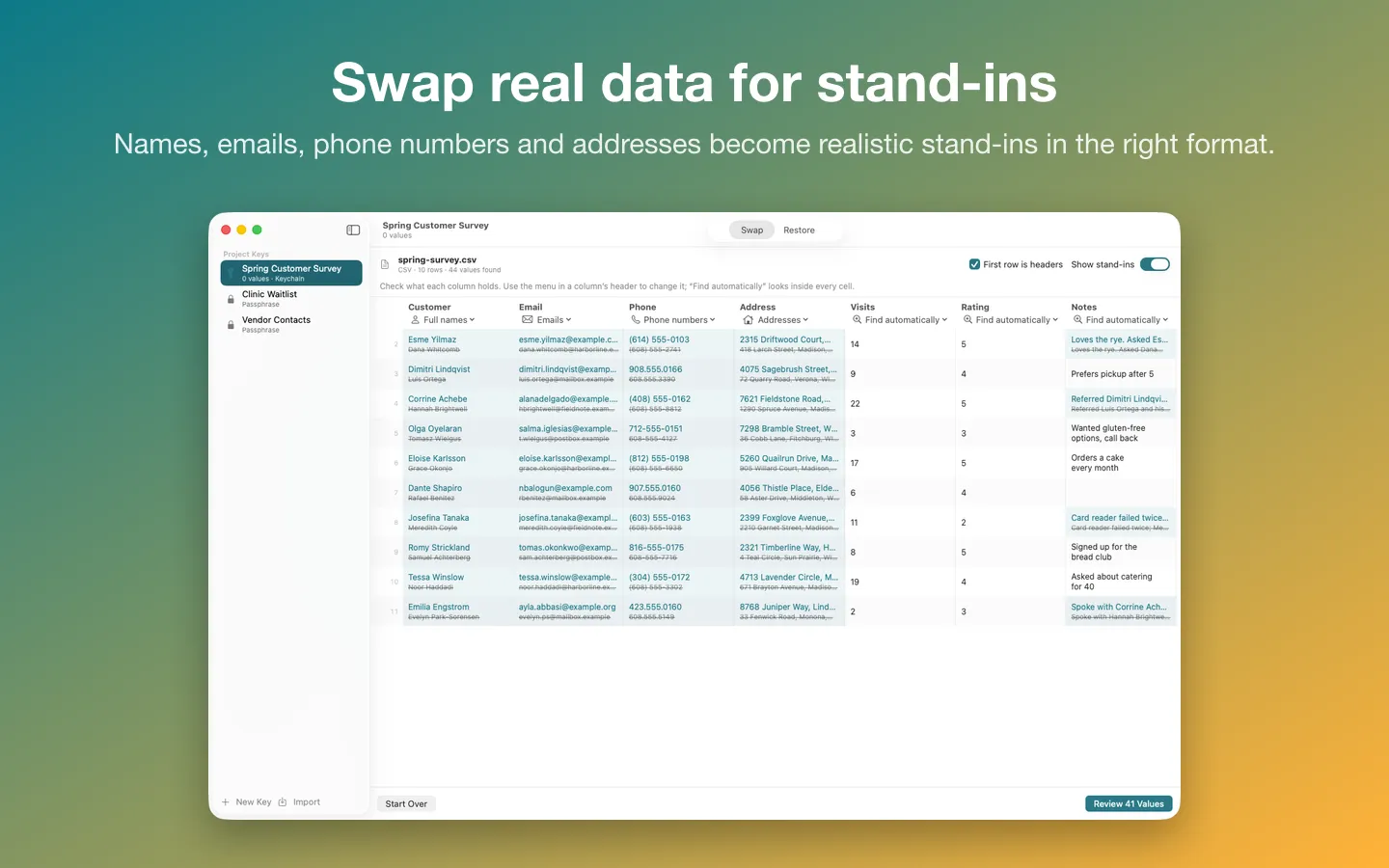
What it does: Swap the names, emails, phone numbers and addresses in a CSV or Excel file for realistic stand-ins before you share it with a contractor, a colleague or an AI. A project key saved on your Mac puts the real values back when the file returns, even after it was sorted or edited.
- Checkout by Gumroad
- Notarized by Apple
- No FitzTopPicks account needed
Free to use without a key: CSV and TSV files up to 200 rows, each project key with one file, the review list and restoring returned CSV files.
Buy a license key to unlock Pro: unlimited rows, one key across many files, Excel workbooks and restoring pasted text.
macOS 14 Sonoma or later · Version 1.1.3 · 3.5 MB disk image · Notarized by Apple
One-time $6.99 for the app with Pro: unlimited rows, one key across many files, Excel workbooks and restoring pasted text. No subscription. One license key works on up to 3 of your Macs.
Download: The download (a signed, notarized .dmg) comes with your purchase in your Gumroad receipt, together with your license key. Updates install from inside the app.
Buy now opens Gumroad's checkout on this page; Gumroad is the seller and handles payment, sales tax and your receipt.
Screenshots
4 pictures: swipe or scroll sideways.
What you get
- Mask & Restore for Mac: macOS 14 Sonoma or later
- The signed, notarized .dmg download and your license key, in your Gumroad receipt
- One license key for up to 3 of your Macs
- Updates that install from inside the app
- A one-time price: no subscription
Features
- Realistic stand-ins in the right format: names, emails at reserved example domains, 555 phone numbers, made-up streets and towns
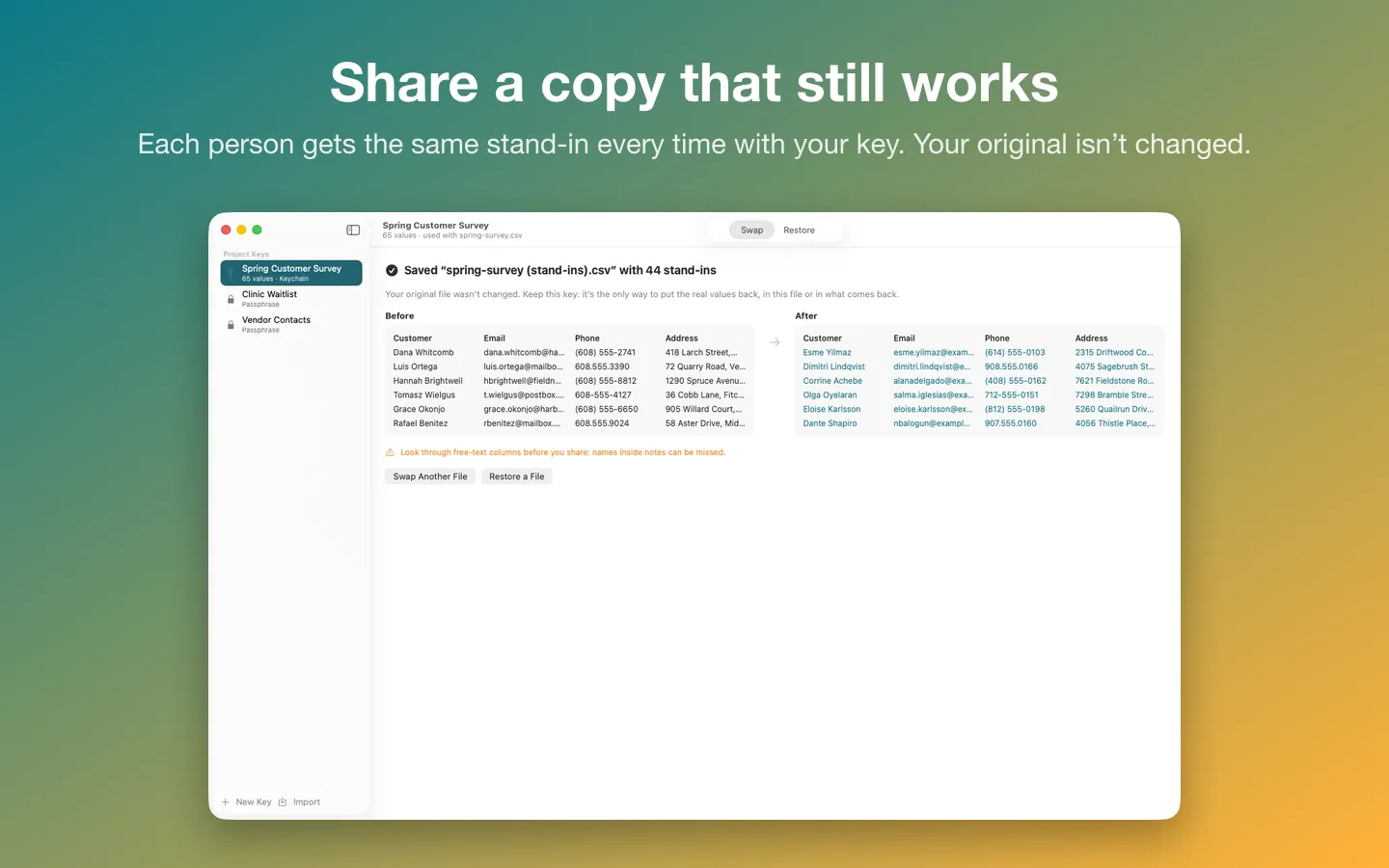
- One encrypted project key (Keychain or passphrase): the same person gets the same stand-in in every file
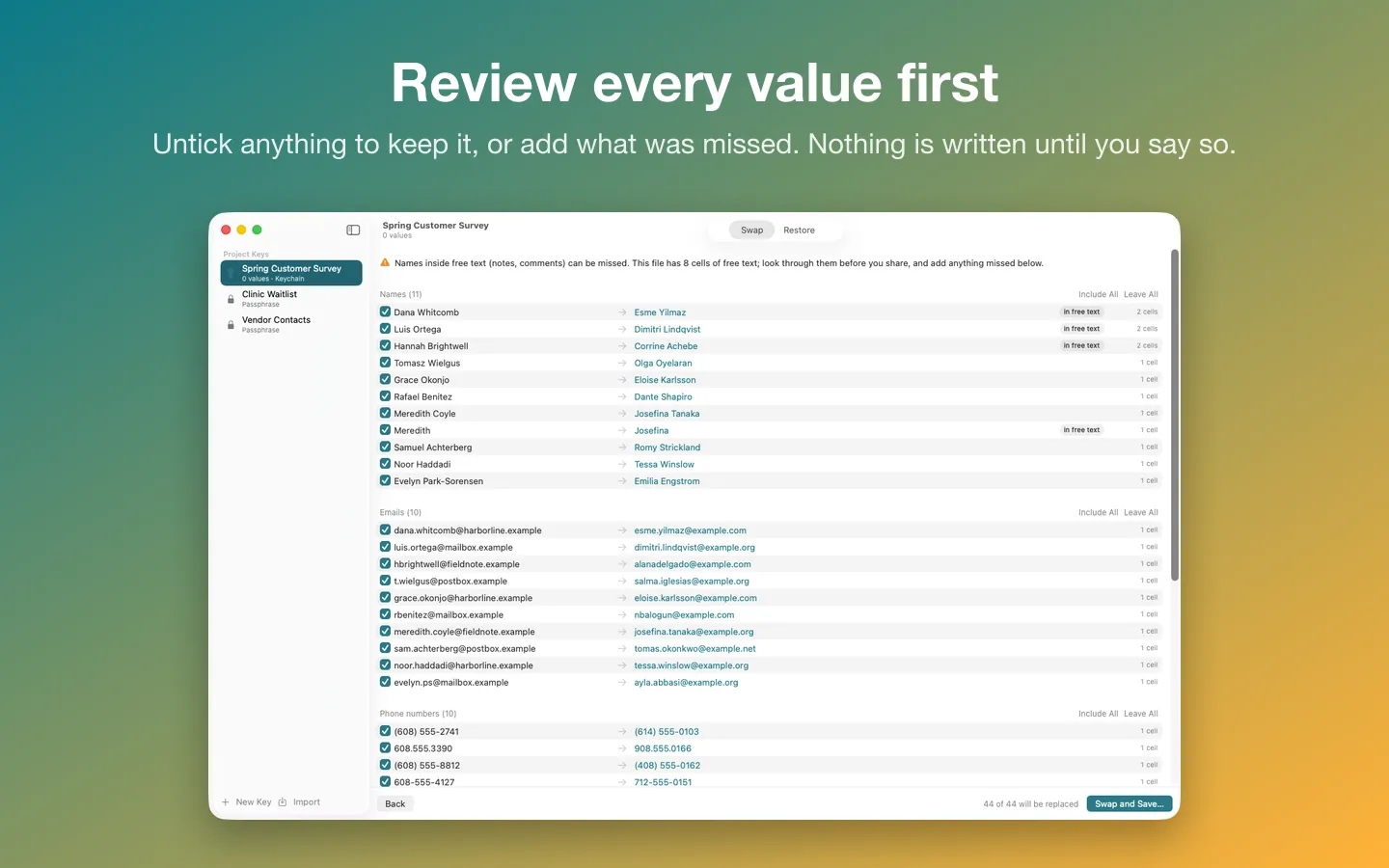
- A review list before anything is written; untick any value or add what was missed
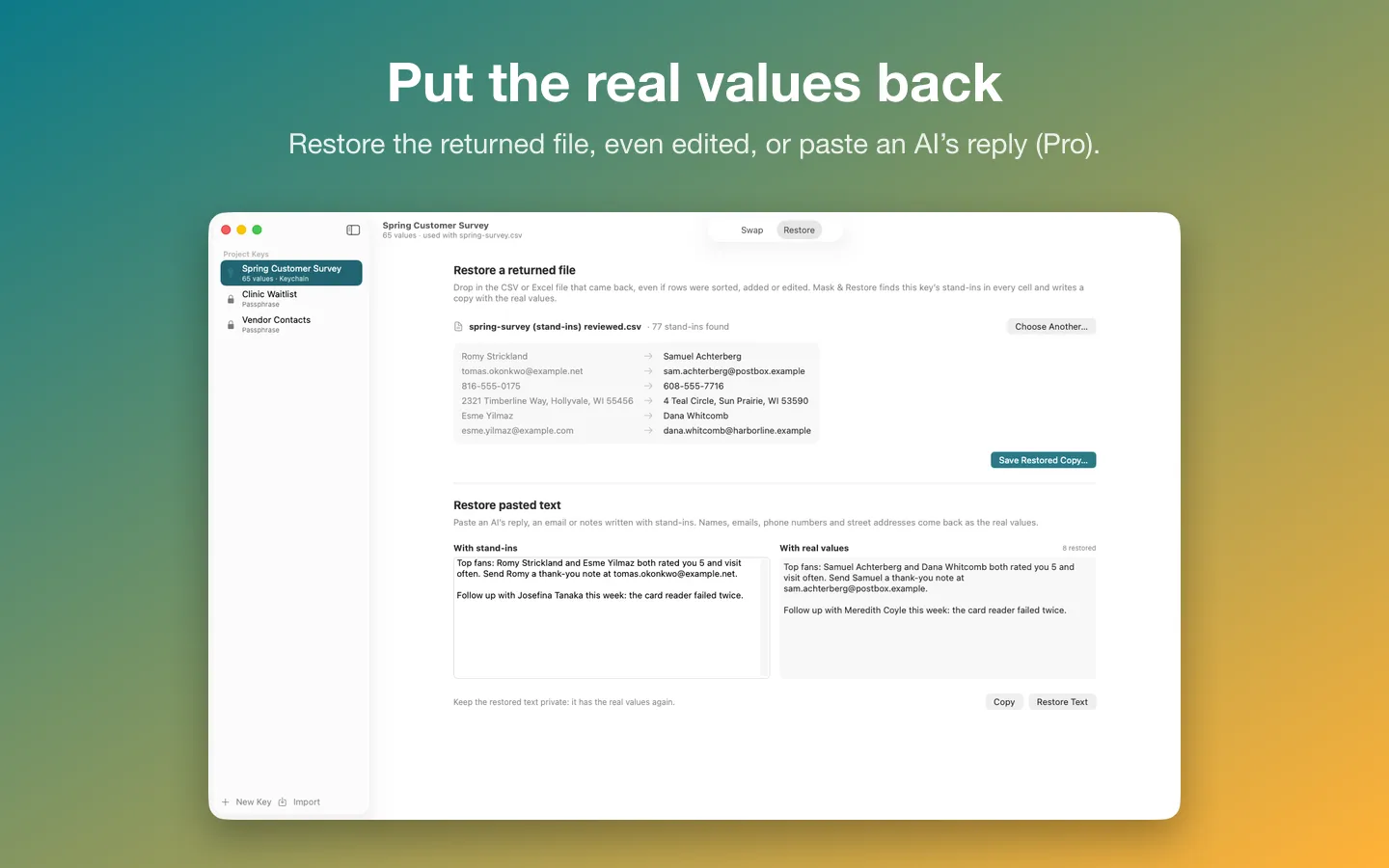
- Restore a returned CSV or Excel file, even sorted, edited or added to
- Excel .xlsx: only cell text changes, so formulas, formatting and every sheet stay as they were
- Copy as Markdown: the sheet with stand-ins as a table ready to paste into an AI chat (all rows, the first 25 or 100, or rows you pick), with no file to save first
- Restore pasted text, such as an AI's reply
- Unlimited rows; export or import a key with a passphrase
- Pseudonymization, not anonymization: anyone with the key can restore the file, and names inside free text can be missed, so check notes columns before you share
Free vs Pro
| Feature | Free | Pro |
|---|---|---|
| What you can do | CSV and TSV files up to 200 rows, each project key with one file, the review list and restoring returned CSV files | Everything free, plus unlimited rows, one key across many files, Excel workbooks and restoring pasted text |
| Price | Free download | $6.99 one-time |
Questions
How do I swap a file?
Make a key with New Key…, then drop a CSV or Excel file on the Swap tab (or click Choose File…). Check what each column holds in its header menu, click Review, and then Swap and Save… to save a copy with stand-ins.
What do stand-ins look like?
Names come from bundled lists, emails are at example.com, example.net or example.org (reserved domains that never deliver mail), US phone numbers are in the fictional 555-0100 to 555-0199 range, and street addresses and towns are made up while the state is kept. Each one keeps the format of the original.
Will the same person get the same stand-in?
Yes, every time you use the same key. With Pro, one key works across many files, so a customer has the same stand-in in every file and lookups still match.
Can I use a Numbers file?
Export it first: in Numbers, choose File › Export To › CSV or Excel.
I lost my key.
Without the key the real values can’t be put back; that’s what keeps them private. Use Export… on a key to keep a passphrase-protected backup.
What does Pro add?
Unlimited rows (without a license key it swaps up to 200), one key across many files, Excel workbooks and restoring pasted text. It’s a one-time purchase on Gumroad, with no subscription, and the license key works on up to 3 of your Macs.
From the Mask & Restore help page.
How-to guide
How to remove names from a spreadsheet before pasting it into an AI chatbot, then put them back
The free and built-in ways first, where they stop, and how Mask & Restore does it.
Setting it up
How to open a newly downloaded Mac app the first time
Step by step, with what to do if your Mac asks a question.
Requirements
- macOS
- macOS 14 Sonoma or later
- Processor
- Apple silicon and Intel
- Languages
- English
- Download
- 3.5 MB disk image
- Version
- 1.1.3
What's new
Version 1.1.3 ·
- New More Mac Apps… menu item lists our other Mac apps. The list is built into the app, so nothing is downloaded.
- Easier to read: warning, success and error text now uses deeper shades in Light Mode, so it stands out clearly on the window (Dark Mode looks the same).
- Faint hint text in Swap is darker and easier to read.
Version 1.1.2 ·
- Licence checks are stricter, so Pro stays tied to a real licence key. Nothing changes for buyers with a key.
Version 1.1.1 ·
- Fixes and small improvements.
From Mask & Restore's release notes. Updates install from inside the app.
Privacy
Your files and keys never leave your Mac. Your project keys (encrypted), the names of files you swapped and your license key (in your Keychain) are kept on your Mac. The only network requests are the license check with Gumroad (your license key, when you enter it and about once a week) and checking for updates at fitztoppicks.com; neither sends anything about your files or keys.
Questions about your purchase or license key? See Help and FAQ, reply to your Gumroad receipt or contact us.