How to check a used Mac before you buy it (or sell it)
UpdatedShort answer
Check five things on the Mac itself, with the seller there: the model and serial number (About This Mac), the battery's cycle count and condition (System Information › Power), that Activation Lock is off (System Information › Hardware), that it isn't enrolled in someone's device management (System Settings › General › Device Management), and that the keys, trackpad, screen, speakers, cameras and ports work. Apple Diagnostics checks the hardware for free.
The free ways
Free: what macOS tells you
- Choose Apple menu › About This Mac: the model, chip, memory, serial number and macOS version are listed. Compare the serial with the box or the listing.
- Hold Option, choose Apple menu › System Information, then click Power under Hardware: on a MacBook, Cycle Count and Condition are under Battery Information.
- In the same window, click Hardware: Activation Lock Status should read Disabled. If it says Enabled, the seller needs to turn off Find My and sign out of their Apple Account first.
- Open System Settings › General › Device Management (Privacy & Security › Profiles on macOS 13). An enrollment or a profile you don't recognize means a school or company may still manage the Mac: ask about it before you pay.
Free: test the hardware
- Run Apple Diagnostics. On a Mac with Apple silicon, shut down, then press and hold the power button until the startup options appear and press ⌘D. On an Intel Mac, turn it on and hold D. It reports anything it finds as reference codes.
- Open TextEdit and press every key; click and drag on the trackpad; play a video to hear the speakers; open Photo Booth to check the camera.
- Look at a plain white page full screen for dead or stuck pixels.
- Plug a USB device into each port and check it shows up.
Where the free ways stop
- Each fact is in a different window, and nothing is left to hand the buyer as a record afterwards.
- Testing every key by hand is easy to get wrong, and macOS keeps some keys for itself, like the brightness and volume keys.
- Apple Diagnostics reports problems as reference codes, not a list of what passed.
How Resale Ready does it
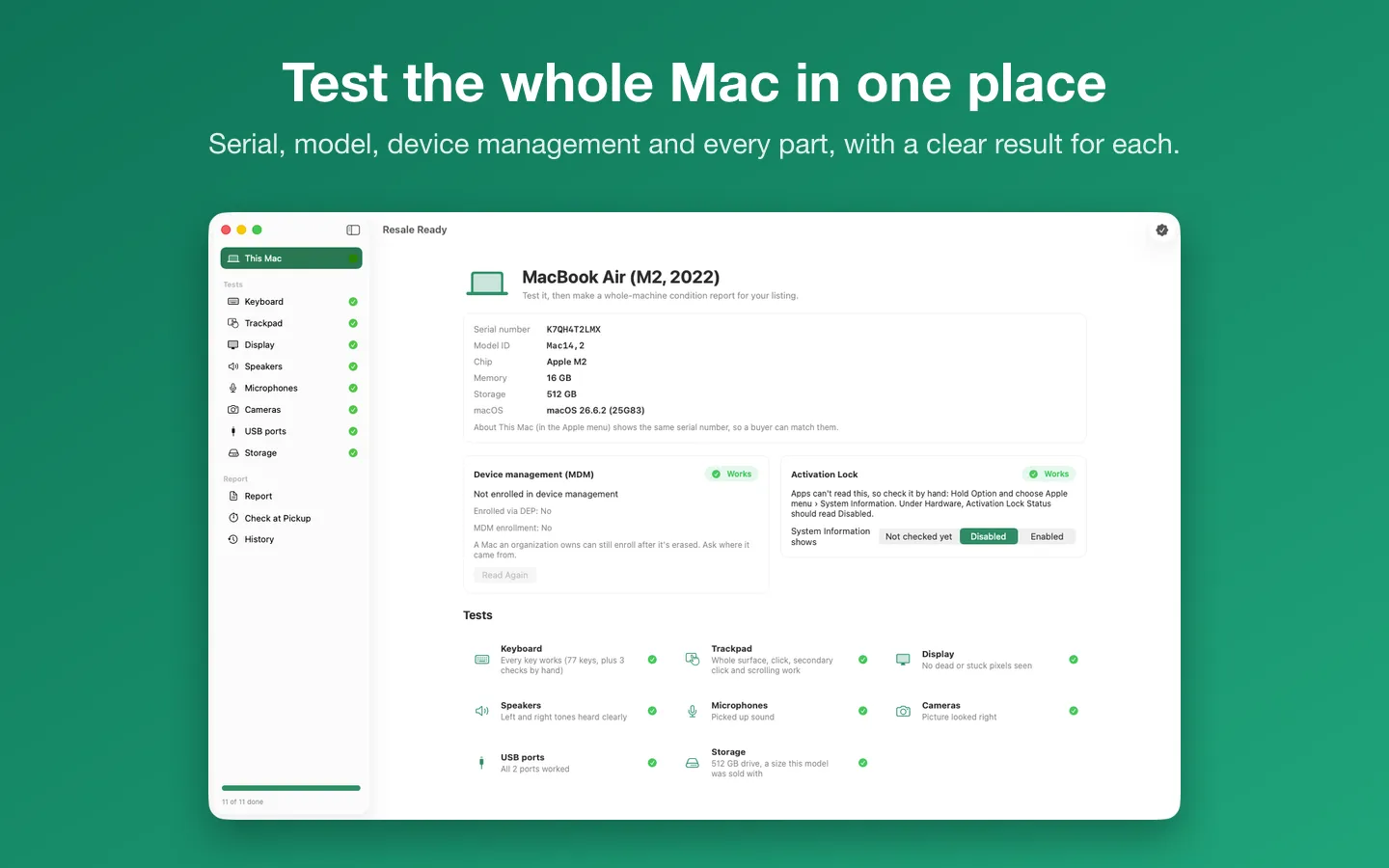
Resale Ready is a Mac app we make: test a used Mac and make a condition report for selling it.
- Open Resale Ready on the Mac you're testing: the model, serial number, chip, memory, macOS and device management enrollment are read from the Mac itself.
- Run the tests: a keyboard diagram that checks off every key, the trackpad, full-screen display colors, left and right speakers, microphones, cameras, USB ports one by one, and the storage size compared with what Apple sold that model with.
- Activation Lock is a guided check by hand, because macOS doesn't let apps read it; the report says which answers were given by hand.
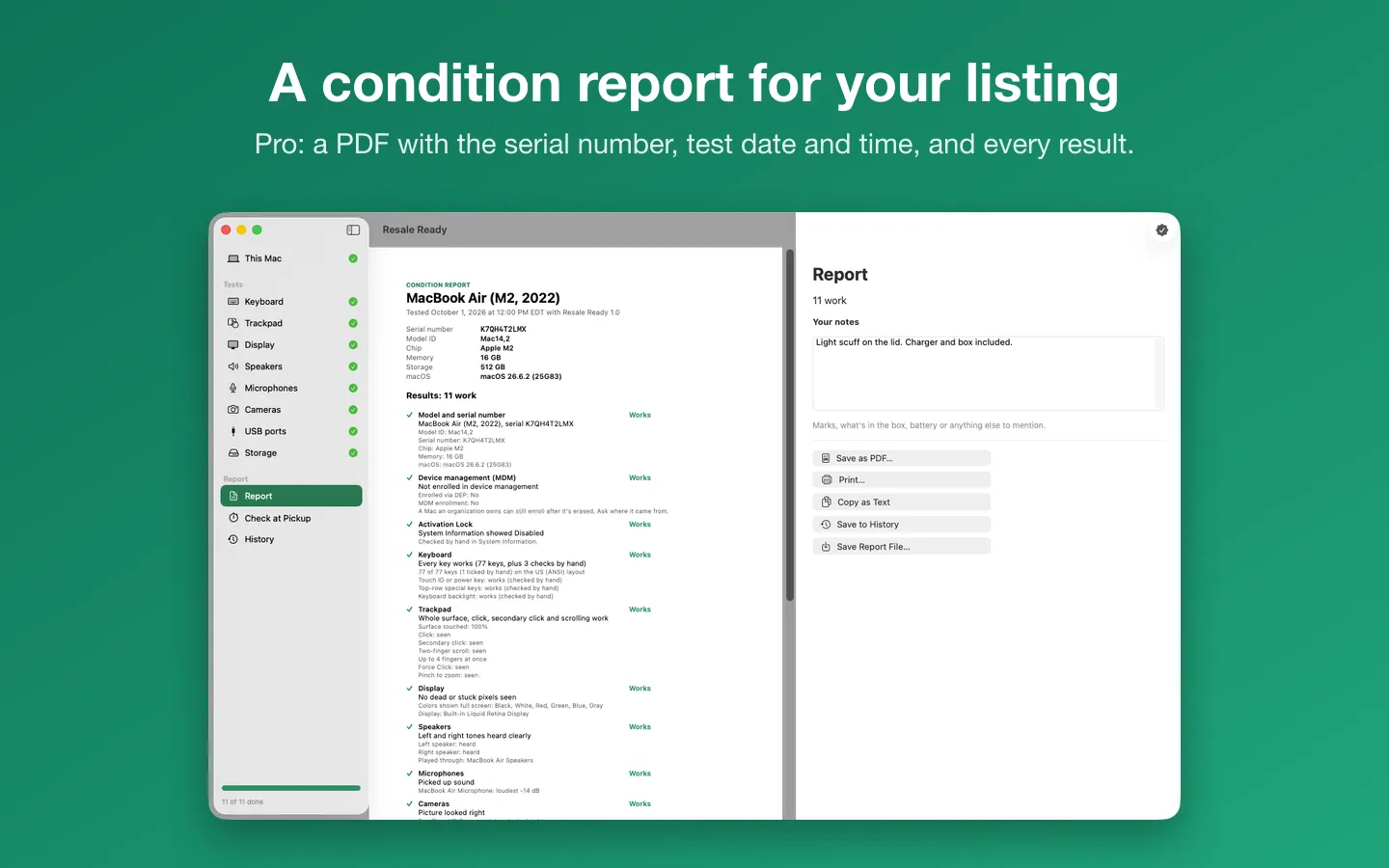
- Every result goes into one condition report (as a PDF, printout or text with Pro), and the buyer can rerun a two-minute check at pickup.
Free to use without a key: every test, the results on screen, the report preview and the check at pickup.
$5.99 one-time for Pro, no subscription. Buy a license key to unlock Pro: the PDF and printed report, copy as text, history and reports from more than one Mac.
macOS 14 Sonoma or later. Apple silicon and Intel.
Questions
Does Resale Ready test the battery or the drive's health?
No. It checks what you can see and hear on the day, and the storage size. For the battery, use System Information › Power, or System Settings › Battery on a MacBook.
How do I know Activation Lock is off?
Hold Option, choose Apple menu › System Information, and look under Hardware: Activation Lock Status should read Disabled. If it says Enabled, the seller needs to turn off Find My and sign out of their Apple Account.
How does a buyer know a report is real?
Every report has the Mac's serial number, model ID and the test date and time, and ends with a check at pickup: open Resale Ready on that Mac, choose Check at Pickup, compare the serial number and rerun the quick tests. It takes under two minutes and is free.
What can I do without buying it?
Every test, the results on screen, the report preview and the check at pickup. Pro adds the PDF and printed report, copy as text, history and reports from more than one Mac.