How to see all the keyboard shortcuts for any app on a Mac
UpdatedShort answer
Every Mac app lists its keyboard shortcuts in its menus: open a menu and each command's shortcut is at the right, written with the symbols ⌘ Command, ⌥ Option, ⌃ Control and ⇧ Shift. The Help menu's search box finds a command by name and points to it in its menu. macOS has no built-in list of every shortcut an app has in one place; for that you need an app that reads the menus for you.
The free ways
Free: read them in the menus
- Click a menu in the menu bar (File, Edit, View and so on). Each command that has a shortcut shows it at the right edge, such as ⇧⌘S.
- Read the symbols: ⌘ is Command, ⌥ is Option, ⌃ is Control and ⇧ is Shift. Hold those keys together, then press the key after them.
- Rest the pointer on items with an arrow to open their submenus: their commands have shortcuts too.
- Some menus show extra commands while you hold Option, each with its own shortcut.
Free: search the Help menu
Every app's Help menu has a search box that also searches the app's menus.
- Press ⇧⌘/ (Shift-Command-slash, the same as ⌘?) to open the Help menu's search box, or click Help in the menu bar.
- Type part of a command's name, such as duplicate.
- Rest the pointer on a result under Menu Items: macOS opens that menu and points an arrow at the command, with its shortcut beside it.
Free: macOS's own list, and shortcuts of your own
- Choose Apple menu › System Settings › Keyboard, then click Keyboard Shortcuts….
- The list shows the shortcuts macOS itself uses (screenshots, Spotlight, Mission Control and more), not each app's own.
- Under App Shortcuts you can give a menu command a shortcut of your own: click +, choose the app, type the command's exact menu name and press the keys.
Where the free ways stop
- Menus show one menu at a time, so seeing everything an app can do means opening every menu and submenu.
- Help search finds commands by name, not by keys: it can't tell you what ⇧⌘S does in this app.
- System Settings lists macOS's own shortcuts, not every app's.
- Nothing reminds you of a shortcut at the moment you reach for the mouse, which is when it would stick.
How Keyhabit does it

Keyhabit is a Mac app we make: hold ⌘ to see any app’s keyboard shortcuts, then learn them for good.
- Allow Accessibility once when Keyhabit asks: macOS lets one app read another app's menus only with that permission.
- Hold ⌘ in any app for about a second: every shortcut in its menus appears, grouped by menu, with submenus. Let go to close it, or click it to keep it open.
- Search by name (“dup”) or by keys (“shift cmd s” or “⇧⌘S”) to find a command or see what a shortcut does.
- With Pro, picking a command with the mouse shows a small nudge with its shortcut, practice rounds of 10 drill the ones you keep clicking, and a cheat sheet prints as a PDF or saves as Markdown.
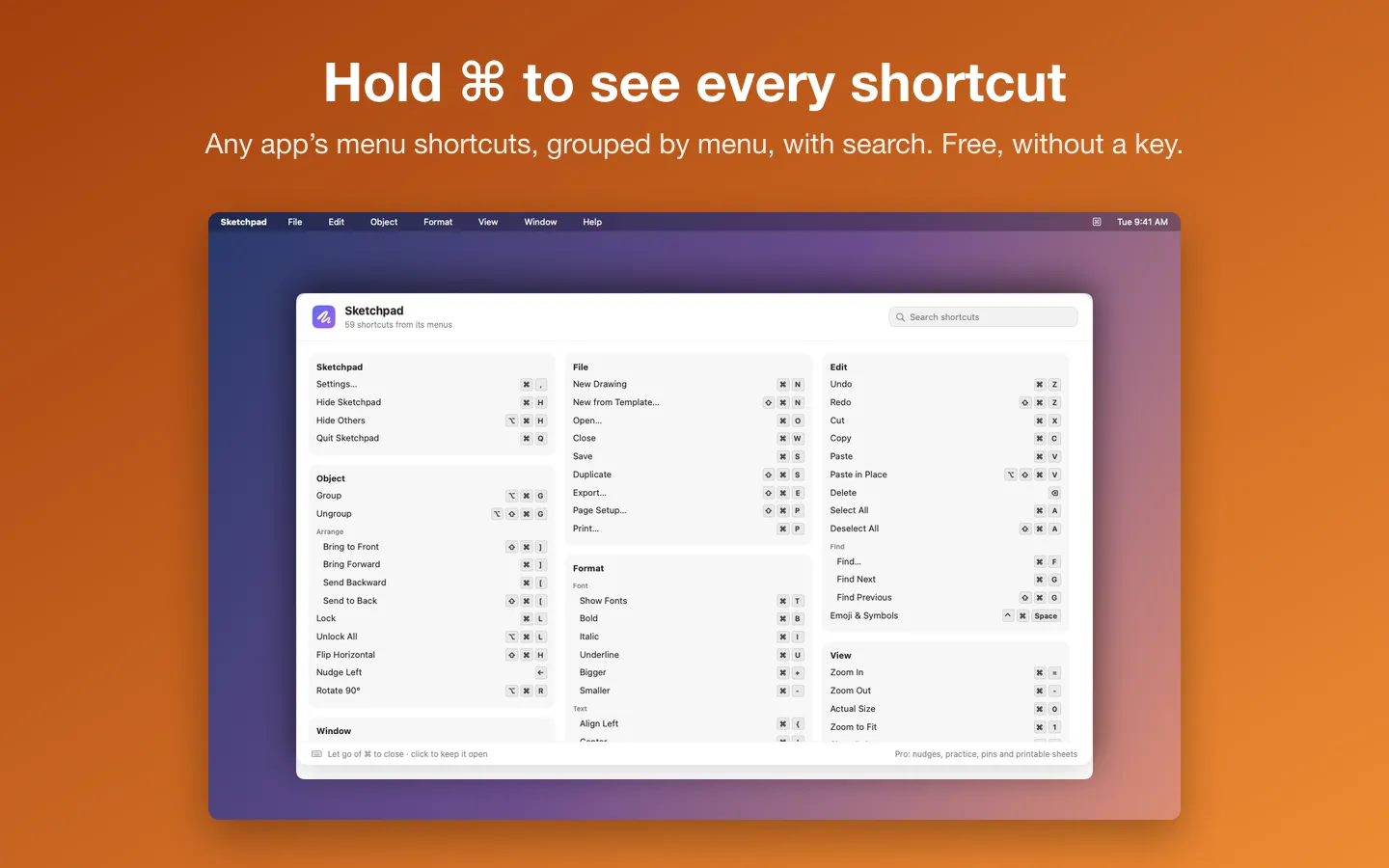
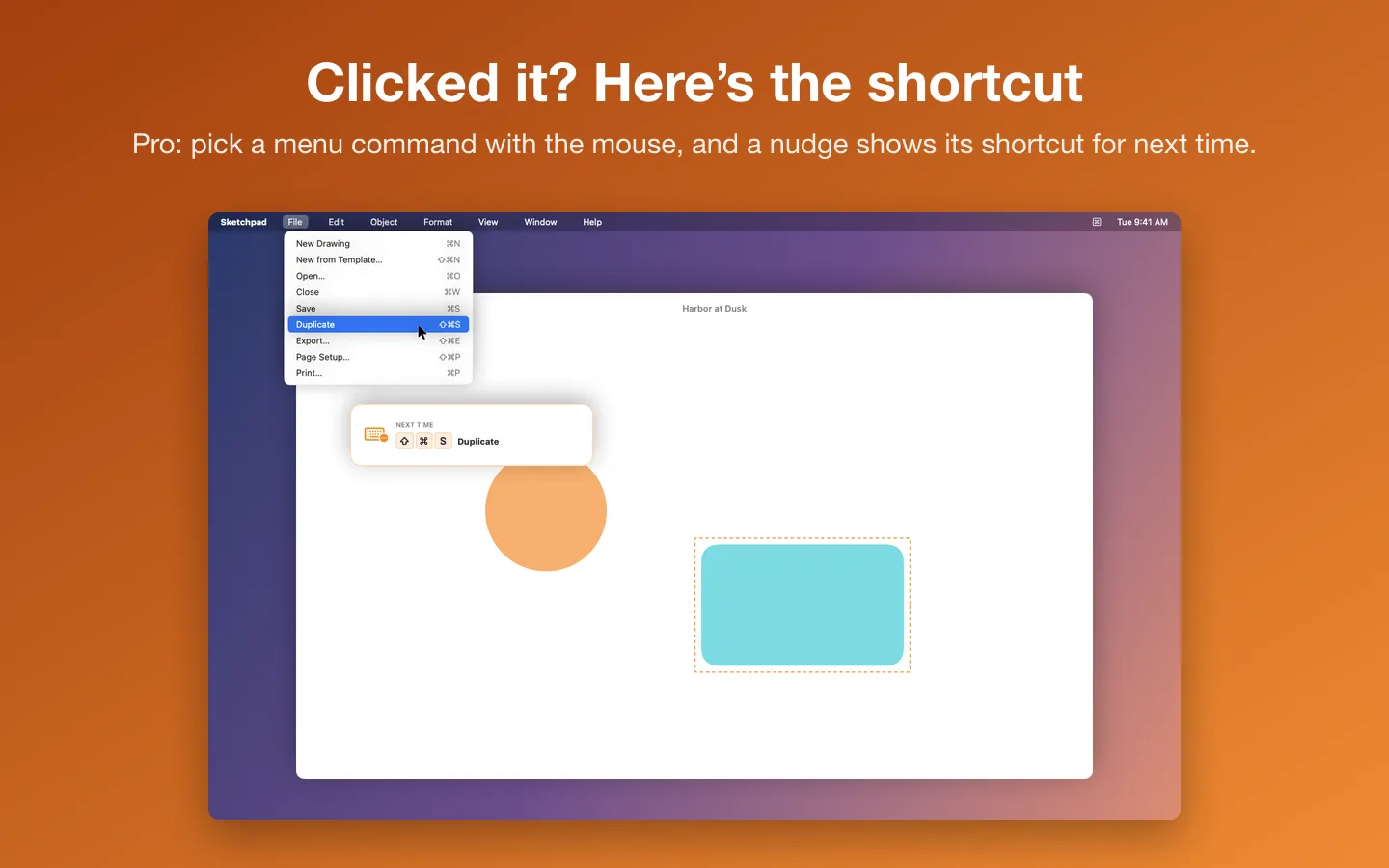
Free to use without a key: hold ⌘ (or ⌥ or ⌃) in any app for every shortcut in its menus, grouped by menu, with search.
$9.99 one-time for Pro, no subscription. Buy a license key to unlock Pro: click nudges, practice rounds, pins and notes, the Library, and cheat sheets as a PDF, a printout or Markdown.
macOS 14 Sonoma or later. Apple silicon and Intel. Needs the Accessibility permission (System Settings › Privacy & Security › Accessibility).
Questions
Is there a Mac shortcut that shows all of an app's shortcuts?
Not built in. The Help menu's search (⇧⌘/) finds one command at a time, and System Settings › Keyboard › Keyboard Shortcuts lists macOS's own shortcuts. Apps like Keyhabit show an app's whole list when you hold ⌘.
Why does an app show no shortcuts in Keyhabit?
Some apps draw their own menus, which macOS doesn't share with other apps, so Keyhabit can't list them. Their shortcuts are usually in the app's own help or settings.
Does Keyhabit record what I type?
No. It reads the front app's menus through the Accessibility permission and keeps its counts on your Mac. It never records what you type; it only counts shortcuts that match a menu.
What can I do without buying it?
Hold ⌘ (or ⌥ or ⌃) in any app for every shortcut in its menus, grouped by menu, with search. Pro adds click nudges, practice rounds, pins and notes, the Library and cheat sheets.