How to print labels from an Excel or CSV spreadsheet on a Mac
UpdatedShort answer
For address labels on Avery-style sheets, the free ways are the Contacts app (import the spreadsheet as contacts, then print the group as mailing labels) or Avery's own online designer, which can merge a spreadsheet onto its templates. Word's mail merge does the same if you have Word. For price tags, barcodes or a roll label printer, you need a label app that reads the spreadsheet and prints through the printer's macOS driver.
The free ways
Free: Contacts, for address labels
- Save the spreadsheet as a CSV file (in Numbers: File › Export To › CSV).
- In Contacts, choose File › Import, pick the CSV and match its columns to contact fields. Put the new contacts in their own group so you can print just them.
- Select the group, choose File › Print, click Show Details if you need to, and set Style to Mailing Labels. Pick your label sheet under Layout, then print one page on plain paper to check the fit.
Free: Avery's online designer
- On Avery's website, find the product number from your label pack and open its template in Avery's designer.
- Use its option to import a spreadsheet, place the fields on the label, and print a test page on plain paper first.
If you have Word: mail merge
- In Word, choose Mailings › Start Mail Merge › Labels and pick the label maker and product number.
- Choose Select Recipients › Use an Existing List and pick the spreadsheet.
- Insert the merge fields on the label, preview the results, then finish the merge to print.
Where the free ways stop
- Contacts and mail merge make address labels; price tags and inventory labels from a stock sheet aren't what they're for.
- They print on sheets for office printers. A roll label printer wants each label as its own page, the size of the label.
- Barcodes need a barcode font or add-on, and a code with a wrong check digit won't scan.
- A shipping label PDF from a carrier comes on a letter-size page, not 4 × 6.
How Label Printer Studio does it
Label Printer Studio is a Mac app we make: price tags, barcode and seller labels from your spreadsheet, printed through your Mac’s print dialog.
- Import a CSV or Excel (.xlsx) sheet: matching columns fill the label, and a quantity column sets how many copies each row gets.
- Pick a price tag, barcode, inventory or address template. UPC, EAN, Code 128 and QR codes get their check digits, with bars sized to whole printer dots.
- Run Printer Setup once (print a test page and measure it with a ruler) so labels land where they should, then preview every label and print through the Mac's print dialog.
- Turn a letter-size shipping label PDF into a 4 × 6 label in the PDF to 4×6 tab. Free prints up to 10 labels at a time with a small watermark; Pro prints whole spreadsheets and adds Avery sheets and seller templates.
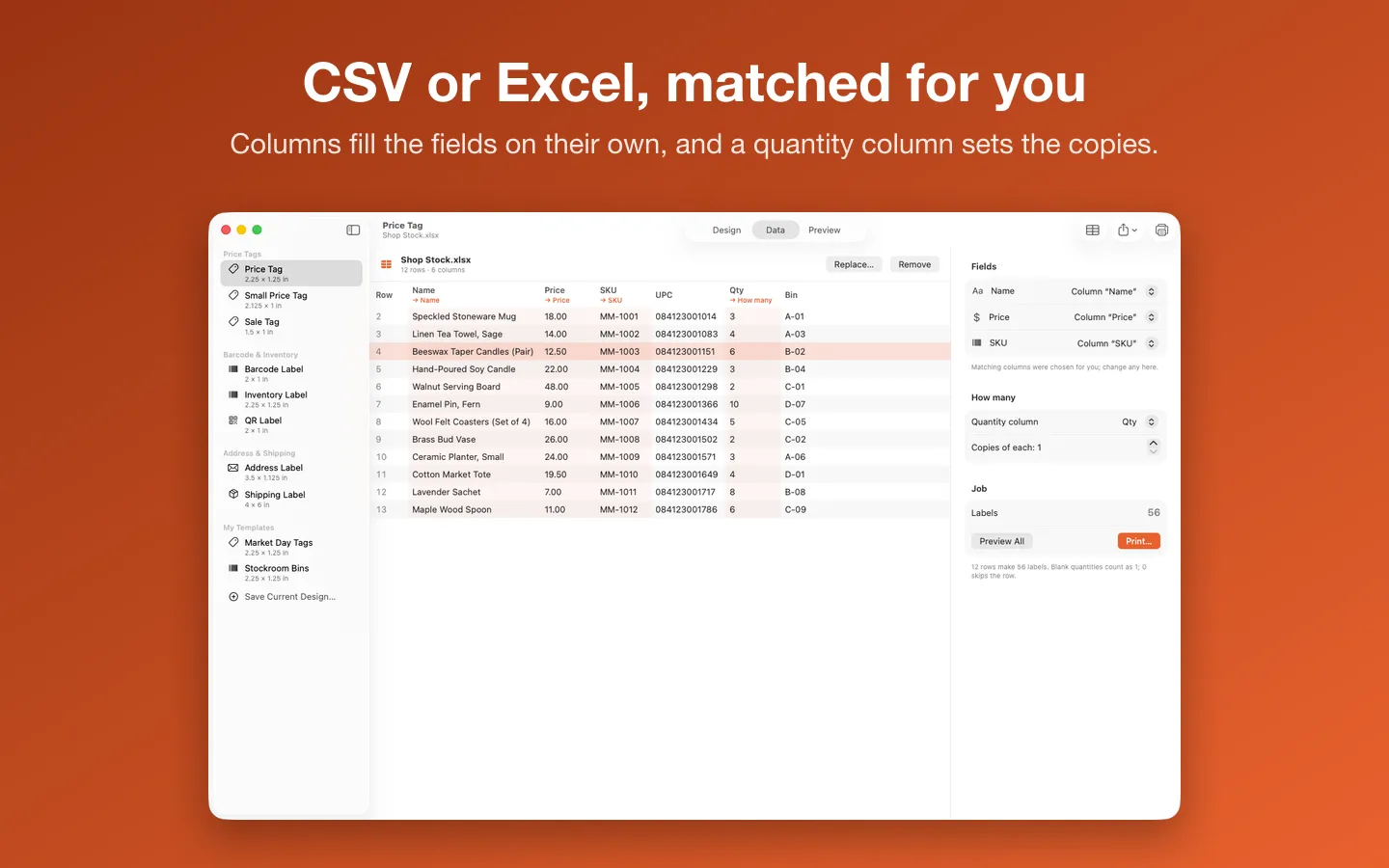
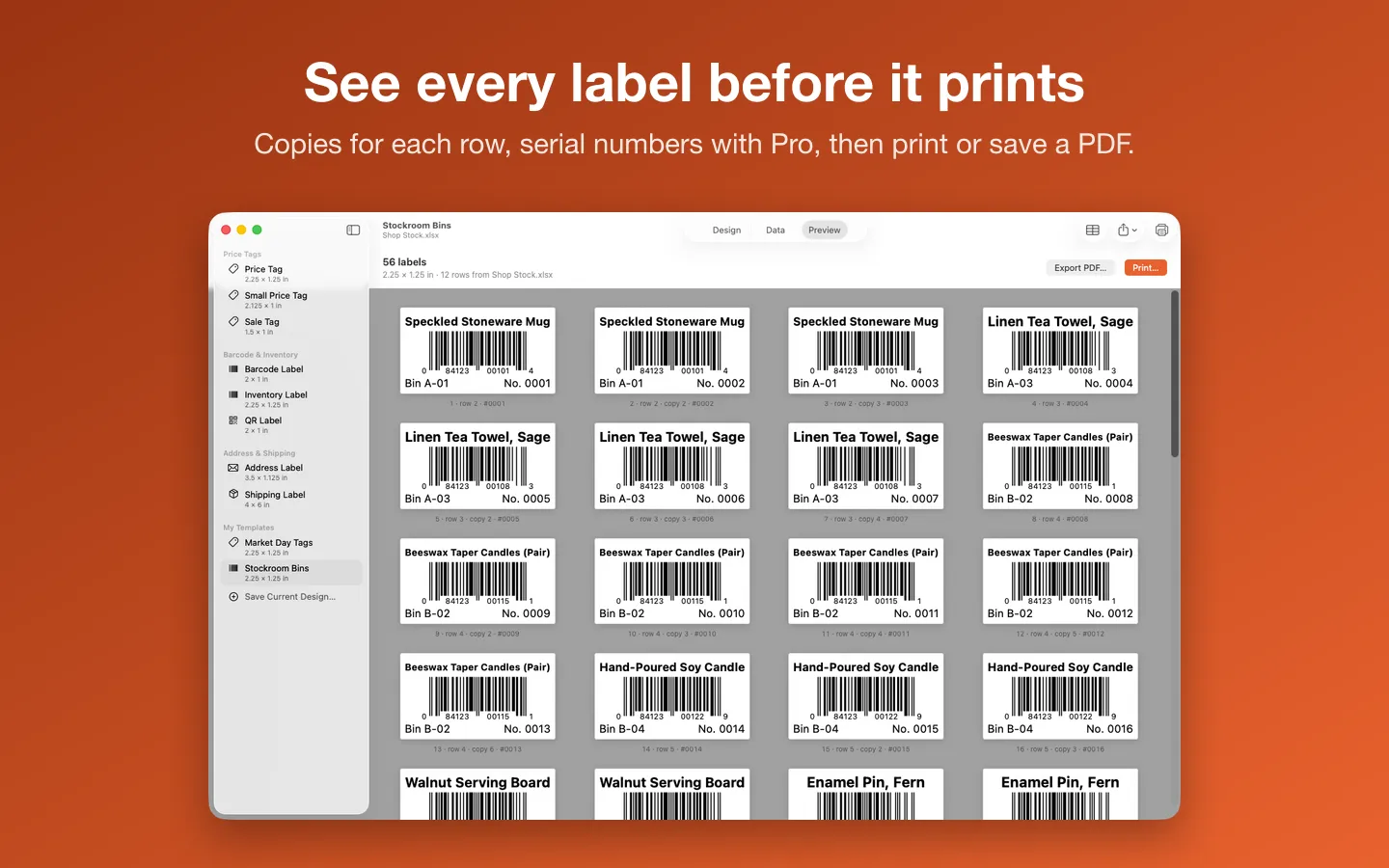
Free to use without a key: the label-roll templates and sizes, stickers, logos and borders, Printer Setup, spreadsheet import and a preview of every label; print or save up to 10 labels at a time with a small watermark, and convert 3 shipping labels a day.
$15.99 one-time for Pro, no subscription. Buy a license key to unlock Pro: whole spreadsheets in one job without the watermark, serial numbers, saved templates, Avery sheets, Code 39, GS1-128, ITF-14 and Data Matrix barcodes, the eBay, Etsy, Poshmark and FNSKU templates, and any number of 4 × 6 shipping labels with a Downloads watch.
macOS 14 Sonoma or later. Apple silicon and Intel. A label printer with a macOS driver from its maker (tested with a Rollo 4×6 thermal printer), or any printer for label sheets.
Questions
Which label printers work?
Any label printer with a macOS driver from its maker. Add it in System Settings › Printers & Scanners with that driver, and Label Printer Studio prints to it through the Mac's print dialog, one label per page. Print one label to check the size and position before a big job.
Why did my UPC codes get a 0 at the front?
Excel drops leading zeros from codes kept as numbers. Label Printer Studio puts the zero back only when the check digit proves it, and says so on the Data tab.
Can it print postage?
No, it doesn't buy postage. If you've bought a label from a carrier or marketplace and saved its PDF, the PDF to 4×6 tab turns it upright, fits it to a 4 × 6 label and checks its barcodes still read.
What can I do without buying it?
The label-roll templates and sizes, stickers, logos and borders, Printer Setup, spreadsheet import and a preview of every label; print or save up to 10 labels at a time with a small watermark, and convert 3 shipping labels a day.