How to choose a loudness target in LUFS: a cheat sheet from the official pages
UpdatedShort answer
Use the number from whoever you’re delivering to. Apple’s podcast guidance is about −16 LKFS with a ±1 dB tolerance and a true peak no higher than −1 dBFS. Spotify asks for music masters at −14 LUFS with peaks below −1 dBTP. European broadcast (EBU R 128) is −23 LUFS. LUFS and LKFS are the same unit. If nobody gave you a number, −16 for a podcast and −14 for music are what those two pages say; a client’s written spec always wins.
The targets
Only numbers printed on the service’s or standard’s own page, read November 22, 2026. Where a page gives no number, the table says so.
| Where it’s going | Loudness | Peak limit | Official page |
|---|---|---|---|
| Apple Podcasts | Around −16 LKFS, ±1 dB, before encoding | True peak not over −1 dBFS | Audio requirements |
| Spotify (music) | −14 LUFS integrated | Below −1 dBTP; below −2 dBTP if the master is louder than −14 | Loudness normalization |
| Spotify, what the listener can pick | Loud −11, Normal −14, Quiet −19 LUFS (Premium) | A limiter runs on Loud | Loudness normalization |
| Alexa skills and flash briefings | Average −14 LUFS; under −19 or over −9 may be rejected | True peak not over −2 dBFS | Amazon’s Alexa guidelines |
| European broadcast, EBU R 128 (November 2023) | −23.0 LUFS; ±1.0 LU only where the target isn’t practical, such as live | True peak not over −1 dBTP in production | EBU R 128 |
| Broadcasters’ own streams, EBU R 128 s2 (2023) | −23.0 LUFS unchanged, or raised to between −20 and −16 | See R 128 | EBU R 128 s2 |
| Apple Music Sound Check | With Sound Check on, files with loudness data play back at −16 dB; no mastering target given | No number on that page | Audio requirements, loudness metadata |
| YouTube | No number on its upload encoding page | No number | Upload encoding settings |
US television: ATSC’s A/85 is the reference document, and its page lists the current version as approved July 8, 2026. Networks often have their own delivery spec, so ask for it. TIDAL, SoundCloud and audiobook (ACX) pages couldn’t be read on this date, so they aren’t listed.
How to pick, and how to measure for free
Choose the number
- Is there a written spec from the client, network or distributor? Use it and stop here.
- Is it a podcast? Aim for the Apple Podcasts line.
- Is it music for streaming? The Spotify line is the one that publishes a master target. Louder masters are turned down on playback.
- Is it for broadcast? Use the broadcaster’s version of R 128 or A/85.
- Going to several places? Make one master at the quieter target, then raise copies only as far as the peak limit allows.
Free: measure what you have
ffmpeg is a free, open-source tool. Our podcast loudness guide, under See also, has the full steps.
- Install it with Homebrew:
brew install ffmpeg. - In Terminal, run the line below on your file.
- In the Summary, I is the integrated loudness in LUFS and Peak is the true peak. Compare both with the table.
ffmpeg -hide_banner -nostats -i episode.wav -af ebur128=peak=true -f null -What a cheat sheet can’t tell you
- Services change their pages. Follow the link in the last column before a paid delivery.
- A target isn’t a tolerance. Spotify gives a target and no tolerance; Apple gives ±1 dB.
- Raising a quiet file can push its peaks over the limit. Then it needs a limiter, not just gain.
- Broadcast rules measure the whole programme, and some long-form rules measure dialogue only. A single number from a meter may not be the number they check.
How LevelMark does it
LevelMark is a Mac app we make: loudness checks for every file, and a live scope and spectrum for your audio interface.
- Drop files or a folder on LevelMark and pick EBU R 128, Apple Podcasts, Spotify, YouTube or ATSC A/85. Each preset says where its numbers come from and warns when they aren’t the publisher’s own (YouTube and A/85).
- Every file gets a Pass or Fail with integrated loudness, loudness range and true peak. Its Spotify preset allows ±1 LU and its EBU R 128 preset ±0.5 LU; Spotify’s page gives no tolerance, so that one is ours.
- Free checks 3 files at a time. Pro checks whole folders and writes a CSV and a PDF report.
- Pro also makes fixed copies at the target: gain alone where that’s enough, a true-peak limiter where it isn’t, each measured again.
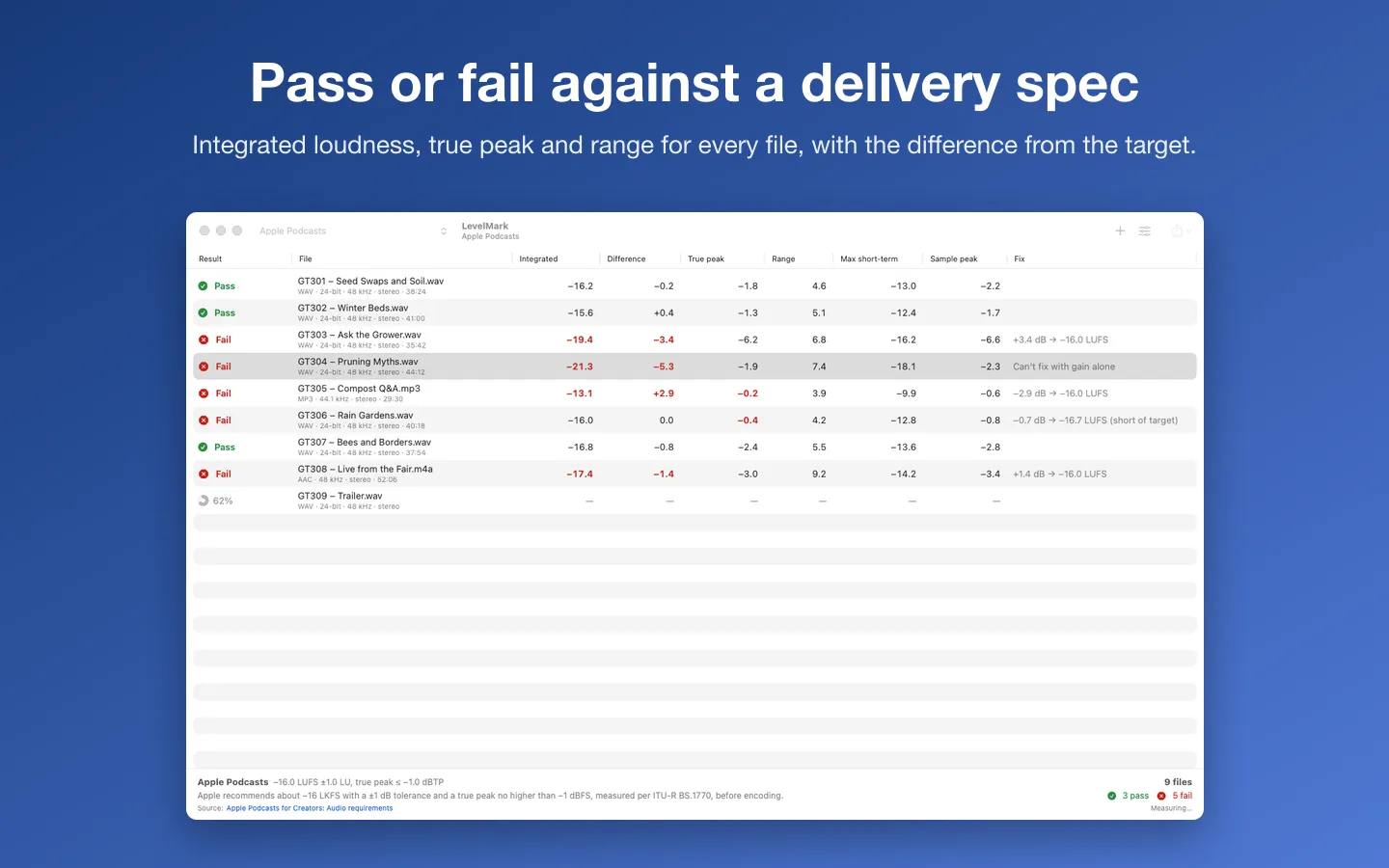
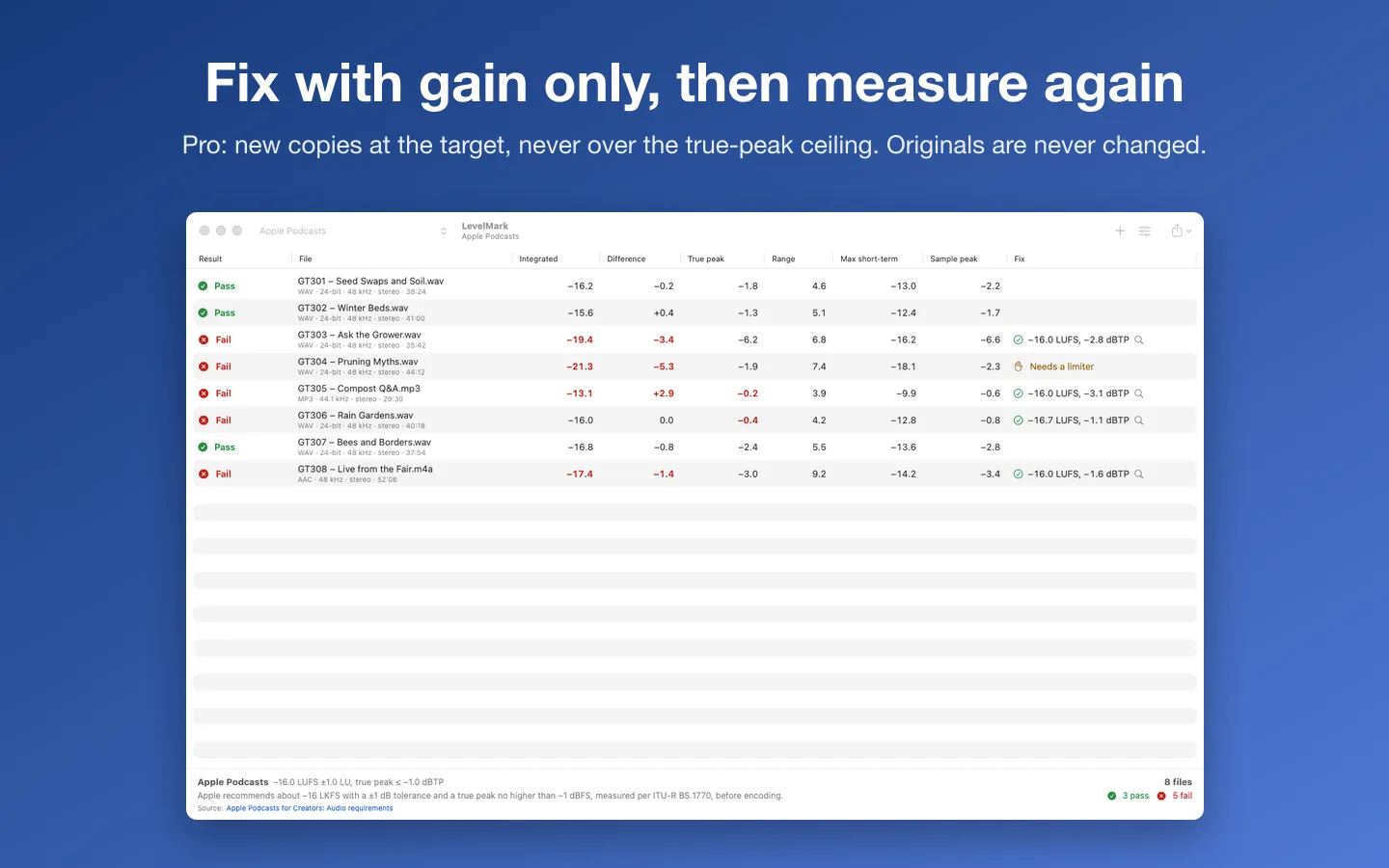
Free to use without a key: up to 3 files at a time against every preset, and the whole Live instrument (scope, triggers, cursors, calibration, spectrum, generator, XY, saved setups and the loudness meter).
$19.99 one-time for Pro, no subscription. Buy a license key to unlock Pro: whole folders and subfolders at once, CSV and PDF reports, fixed copies at the target (gain, with a true-peak limiter when a file needs one) that are measured again, and in Live mode the measurements table, Bode sweep, spectrogram, reference traces and CSV/PDF export.
macOS 14 Sonoma or later. Apple silicon and Intel. Reads WAV, AIFF, MP3, AAC/M4A, FLAC and CAF. Live mode: any Core Audio input; two channels need an audio interface. An audio-frequency instrument for line-level, AC-coupled inputs, not a lab oscilloscope: never connect mains or anything above your interface's rated input.
Questions
Is LUFS the same as LKFS?
Yes. EBU R 128 says the two are equivalent: LKFS is the name ITU-R BS.1770 uses and LUFS is the one the EBU uses.
What loudness does YouTube want?
Its upload encoding page doesn’t give a loudness number. Numbers you see quoted for YouTube come from measuring its playback, not from a published target, so this table leaves them out.
Does louder than −14 LUFS sound louder on Spotify?
Not with normalization on: Spotify’s page says it turns louder masters down to −14 LUFS. Its web player and some other devices don’t normalize, and Premium listeners can pick a louder or quieter setting.
Should I master separately for every service?
Usually not for music: the tables show services adjust playback themselves. For spoken word and broadcast, deliver to the spec you were given.
See also
Sources
- Apple Podcasts for Creators: audio requirements read
- Spotify for Artists: loudness normalization read
- Amazon Alexa: normalizing the loudness of audio content read
- EBU R 128 (November 2023) read
- EBU R 128 s2, Loudness in streaming (2023) read
- YouTube Help: recommended upload encoding settings read
- ATSC: A/85 read