Replacing Rewind on a Mac: what stopped and what Backframe does and doesn’t do
UpdatedShort answer
Rewind kept a searchable record of what you saw and heard on your Mac. Its maker, Limitless, was bought by Meta and says the latest Rewind update disables all screen and audio capture starting December 19, 2025. If you used it to find something you saw, Backframe does that part: encrypted screenshots and their text, searched on your Mac. It doesn’t record audio and has no AI answers. If you need those, look at Screenpipe. If the tool you have works for you, keep it.
How they compare
From each tool's own page, read on Nov 22, 2026. Things change: follow the link for the current details. Names are their owners' trademarks, used only to compare.
| Tool | What its own page says | Source |
|---|---|---|
| Rewind (Limitless) | “The Rewind app is sunsetting. The latest update disables all screen and audio capture starting December 19, 2025.” | Its page |
| Screenpipe | Keeps your screen, audio and app history so AI agents can search it; raw history stays local by default. macOS, Windows and Linux, source-available. | Its page |
| OpenRecall | Open source. Takes regular snapshots and makes their text and images searchable; data is stored on your device. Windows, macOS and Linux; installed with Python 3.11 and Git. | Its page |
| Backframe | Mac app, macOS 15 or later. Keeps an encrypted screenshot only when the screen changed, reads its text on the Mac and searches it by word, app and date, with a day timeline. Capture starts off. No audio, no AI answers. One-time price after a 7-day trial. | Our page |
Before you replace it: ways that need no new app
Find it again with what your Mac already keeps
If you only look back now and then, this may be enough, and nothing new records your screen.
- A web page: search your browser’s history (in Safari, History › Show All History).
- A file or a message: press ⌘Space and type a word from it. Spotlight looks inside many files, mail and messages.
- Something you copied or were sent: search the app it was in.
Keep only what you choose
- Press ⇧⌘5 and save a screenshot of the thing you will want later.
- Open it in Preview and select its text, or search for a word in Photos if you keep screenshots there: macOS reads text in pictures.
- Keep them in one folder named by month.
Try an open-source recorder
- Read OpenRecall’s page: it needs Python 3.11 and Git, and it starts from Terminal.
- Check where it stores its history and whether you want that folder encrypted; its page links a guide.
What Backframe does not do
- No audio: it doesn’t record or transcribe meetings, calls or anything you hear.
- No AI answers or summaries: search finds words that were on screen.
- It can’t import Rewind’s or Limitless’s history. It starts empty, and only sees what happens while capture is on.
- It looks at the display with the front window, every few seconds; something on screen for less than that can be missed, and pictures without text are found only by app and time.
- Private windows are skipped when the browser marks them in the window’s title (Firefox, Chrome, Edge, Brave, in English). Safari’s are not, so add Safari to the excluded apps or pause capture (⌃⌥⌘P).
- Skipping works by app, window title and active password fields, so it has gaps: a notification with a message in it, another app showing the same text, a bank page whose title has none of your excluded words, or a password shown as plain text can be saved.
- When frames were taken, how big they are and which came from the same app isn’t hidden; the pictures, their text, titles and app names are encrypted. Your settings file, with your excluded apps and words, isn’t.
How Backframe does it
Backframe is a Mac app we make: a private, searchable history of your screen.
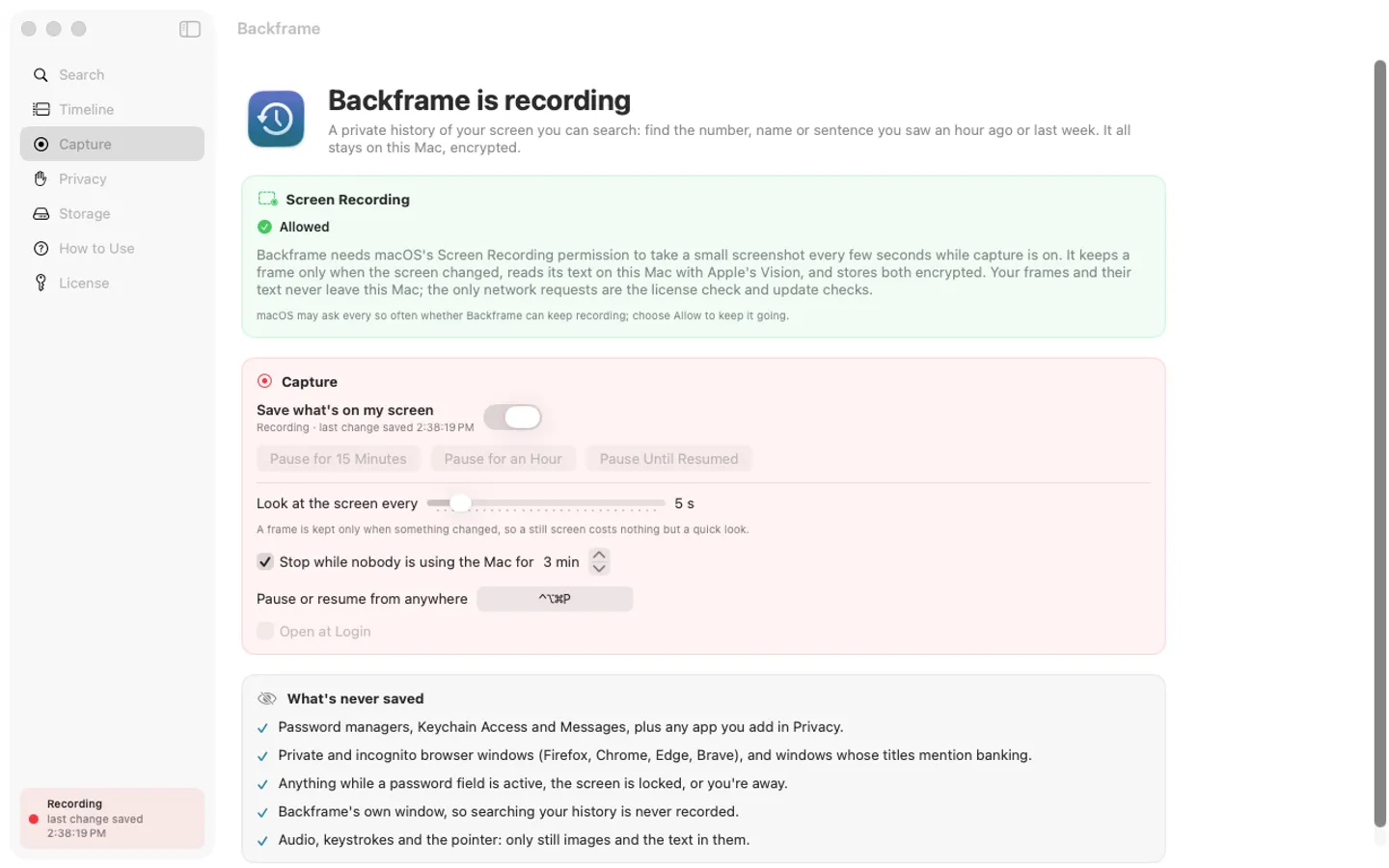
- Backframe opens with capture off. Until you switch it on it writes no history and doesn’t ask for Screen Recording.
- Switch capture on from the menu bar and allow Screen Recording in System Settings when macOS asks. macOS may ask again from time to time.
- Every few seconds it looks at the screen and keeps a small picture only when something changed. Apple’s Vision reads the text on your Mac.
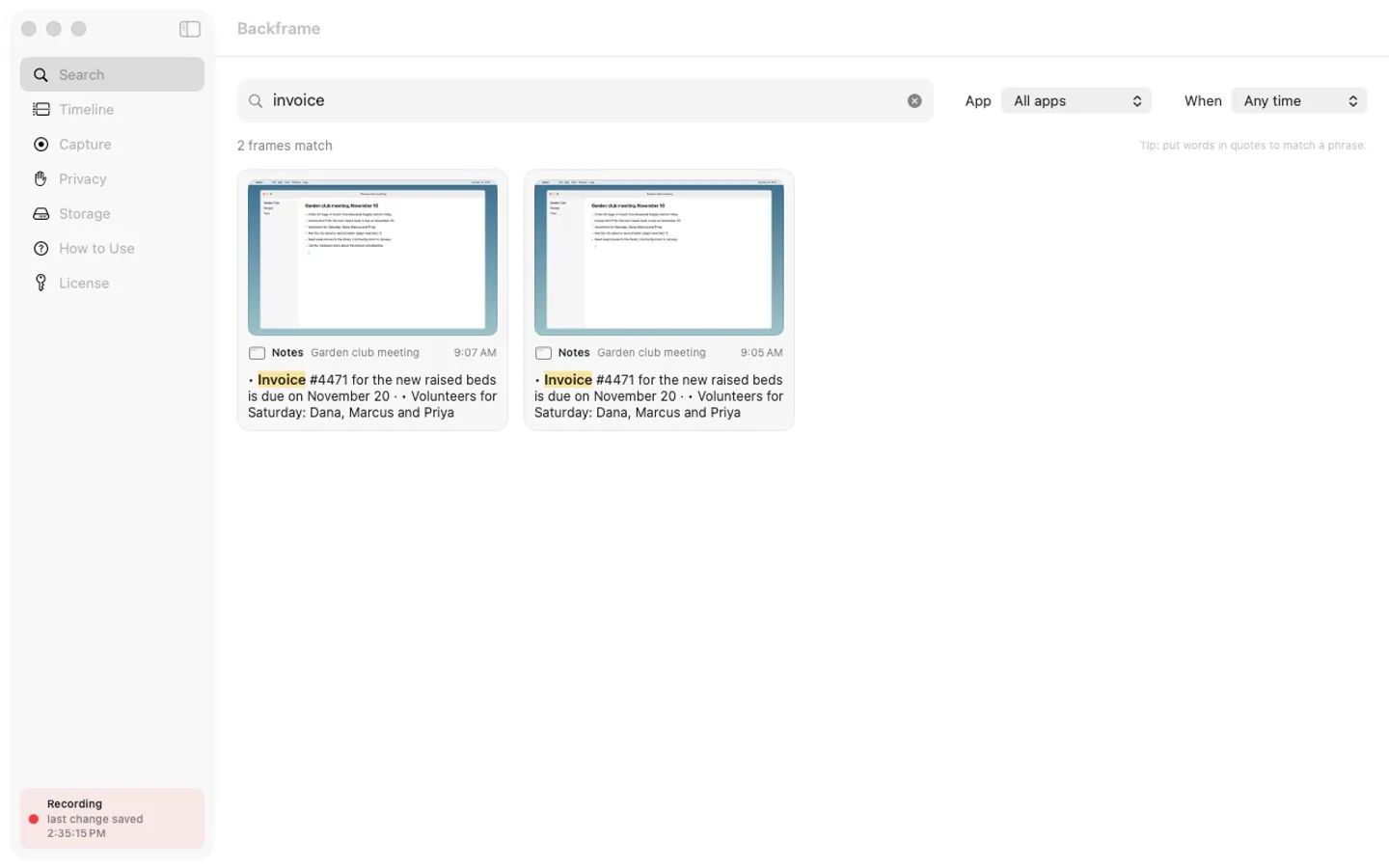
- Press the search shortcut, type a few words, and open the frame with the match outlined; or step through the day in the timeline.
- Each picture and its text are encrypted with AES-256-GCM on this Mac, and the key is kept in your login Keychain. Your history is not uploaded: the only internet requests are the license check (with Gumroad and our license page), update checks and the list of our other Mac apps.
- It skips the password managers on its list, Messages, windows with words such as “banking” or “credit union” in the title, and everything while a password field is active. Add your own apps and words. It keeps 30 days and up to 5 GB unless you change that, and you can delete the last 15 minutes, hour, day or everything.
Free for 7 days from the first time you open it: every feature, nothing held back.
$19.99 one-time for Pro, no subscription. Buy a license key to unlock saving new frames after the trial. Your saved history stays searchable, viewable and deletable with or without a key.
macOS 15 Sequoia or later. Apple silicon and Intel. Screen Recording permission, asked only after you switch capture on (the app explains it first).
Questions
Is the Rewind app still recording?
Its maker’s page says the latest update disables all screen and audio capture starting December 19, 2025. Read on Nov 22, 2026.
What happens to my old data?
Limitless’s page says you can export or delete your Limitless data and links its Help Center instructions. It says nothing there about reading old Rewind recordings in other apps, and Backframe can’t import them.
Does Backframe answer questions like an assistant?
No. You search for words you saw, filtered by app and date. There is no AI model and nothing is sent to one.
What stops working after the trial?
Saving new frames. What you saved stays searchable, viewable and deletable with or without a license key.
Is Backframe made by Rewind, Limitless or Meta?
No. We are a separate maker. Rewind, Limitless, Screenpipe and OpenRecall are named only to describe and compare them.