How to turn a shipping label PDF into a 4 x 6 label on a Mac
UpdatedShort answer
First see whether the site can give you a 4 x 6 label at all: eBay asks for the size before you buy the label, and Etsy can format its USPS labels for a label printer. If you already have a letter-size PDF, Preview can do it for free: select the label, crop the page to it, rotate it upright, and print on 4 x 6 paper with Scale to Fit. Scan the printed barcode with your phone before you stick it on. If you do this every day, Label Printer Studio finds the label, turns it upright, fits it and checks the barcode.
The free ways
Free: ask for a 4 x 6 label in the first place
Start here when it’s offered, because nothing has to be cropped or resized.
- On eBay, pick the label print format (8 x 11, 4 x 6, or 2 x 7 for USPS only) before you pay. eBay’s help says the size can only be changed before you buy the label.
- On Etsy, go to Shop Manager › Settings › Shipping settings › Shipping Label Options and, under Downloading labels, choose Label printers. Etsy’s help says only USPS labels can be formatted for 4 x 6 label printers.
- Already bought an Etsy label? Its help says you can download it as often as you need until its ship date.
- Anywhere else, look for a label size or printer setting before you buy, or for a reprint button afterward.
Free: crop it in Preview
Works on any label PDF that Preview can open and print. Work on a copy: cropping changes the file when it saves.
- In Finder, duplicate the PDF and open the copy in Preview.
- Show the Markup toolbar, click the rectangular selection tool and drag a box around the whole label, with a little white on every side. Keep the box out of the barcode’s bars.
- Click the crop button in the Markup toolbar. The rest of the page is hidden.
- If the label is sideways, click the rotate button until it’s upright.
- Choose File › Print and pick your label printer and a 4 x 6 paper size. If it isn’t listed, choose Manage Custom Sizes in the Paper Size menu and add one 4 by 6 inches.
- In the Preview section of the print window choose Scale to Fit and Print Entire Image, look at the picture on the left, and print one label.
- Scan the barcode with your phone’s camera or a barcode app. If it doesn’t read, print again with a tighter box, or print the original page on letter paper.
Preview hides what you crop; it doesn’t delete it. Someone you send the cropped PDF to can still get at the rest of the page, so send a printout or a picture if the other half is private.
Where the free ways stop
- Preview crops one page at a time by hand, and the box is slightly different each time.
- Nothing checks that the barcode still reads at your printer’s sharpness; you find out at the counter.
- A page with two or four labels, or a packing slip on the other half, needs a copy of the PDF for each piece.
- The site’s own rules come first. Etsy’s help says its other labels are for 8.5 x 11 paper or label sheets, and that a label has to be completely visible. Ask the carrier if you’re not sure.
How Label Printer Studio does it
Label Printer Studio is a Mac app we make: price tags, barcode and seller labels from your spreadsheet, printed through your Mac’s print dialog.
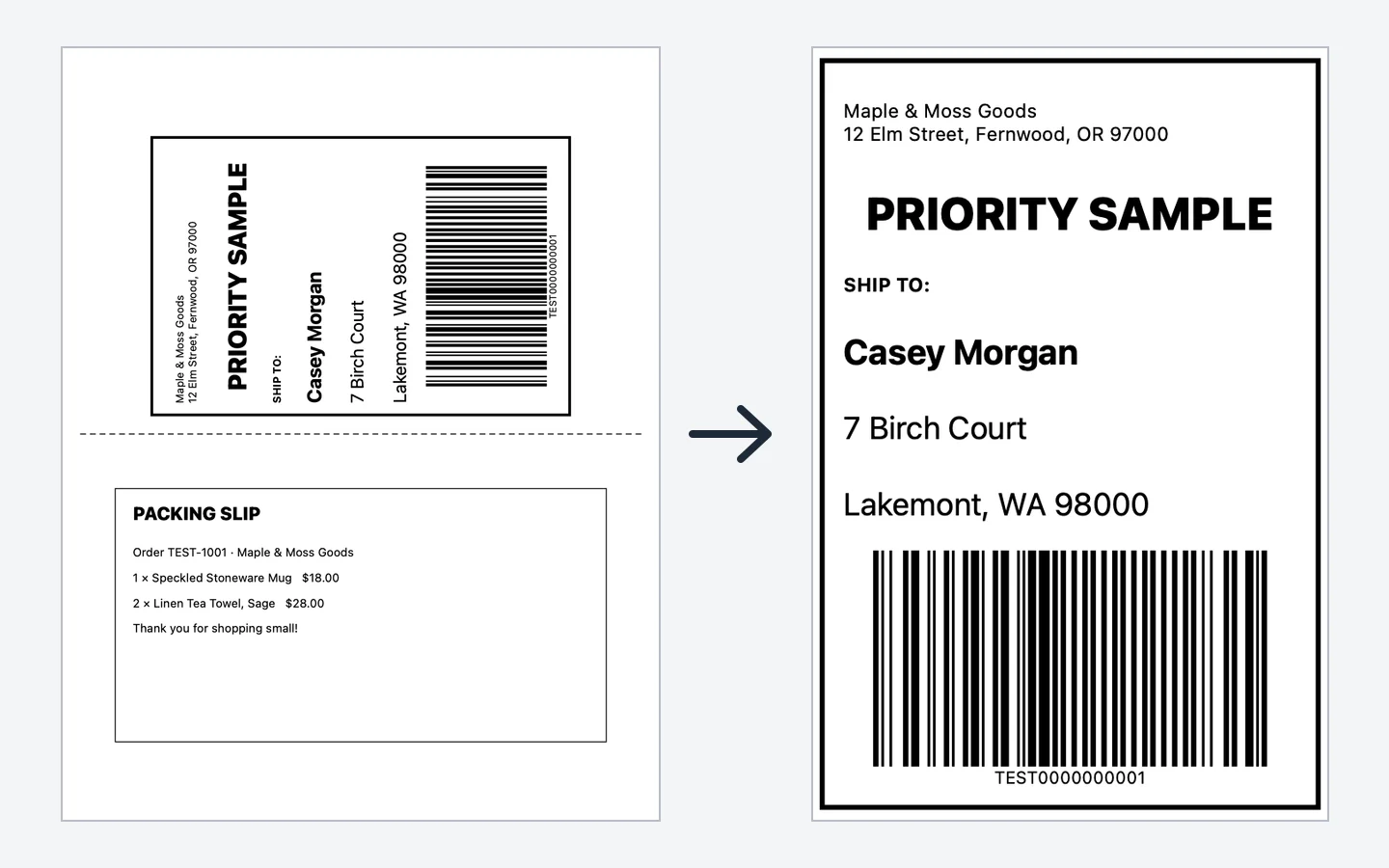
- Open the PDF to 4×6 tab and drop the label PDF on it. The app finds the label on the page, or you pick where your site puts it: top half, sideways, left half, top-left quarter or whole page.
- It turns the label upright and fits it to 4 x 6 inches (or 100 x 150 mm, or 4 x 4). Drag the box or its corners if it isn’t quite right; the fix is remembered for labels laid out the same way.
- Before printing, it reads each barcode on the PDF and again on the converted label at your printer’s dpi, and warns you if one is lost.
- Print through your printer’s own macOS driver, or save a 4 x 6 PDF. The packing slip can follow its label.
- Free converts 3 labels a day, one at a time. Pro converts whole PDFs, any number, and can watch your Downloads folder for new labels.
Free to use without a key: the label-roll templates and sizes, stickers, logos and borders, Printer Setup, spreadsheet import and a preview of every label; print or save up to 10 labels at a time with a small watermark, convert 3 shipping labels a day, print 5 envelopes a day, and make up to 10 packing slips at a time with the small watermark.
$12.99 one-time for Pro, no subscription. Buy a license key to unlock Pro: whole spreadsheets in one job without the watermark, serial numbers, saved templates, Avery sheets, Code 39, GS1-128, ITF-14 and Data Matrix barcodes, the eBay, Etsy, Poshmark and FNSKU templates, any number of 4 × 6 shipping labels with a Downloads watch, your whole envelope list, and any number of packing slips without the watermark.
macOS 14 Sonoma or later. Apple silicon and Intel. A label printer with a macOS driver from its maker (tested with a Rollo 4×6 thermal printer), or any printer for label sheets.
Questions
Why is my shipping label on a full page?
Many sites make one page that any home printer can print: the label on one half and a receipt or packing slip on the other. A 4 x 6 label printer needs just the label, so the page has to be cropped or the label downloaded again in the 4 x 6 size.
Can I just print the whole page on a 4 x 6 label?
Not if the label is only half of it. Scaling a letter page to 4 x 6 shrinks the barcode along with everything else, and a small barcode may not scan. Crop to the label first.
Which printers work?
Any 4 x 6 label printer with a macOS driver from its maker. Label Printer Studio prints through the Mac’s print window and has been tested with a Rollo 4 x 6 thermal printer.
Does the app buy postage?
No. It starts from a label you already bought and saved as a PDF. eBay, Etsy, USPS, UPS and FedEx are named here only to describe their labels; none of them makes or endorses this app.
See also
How to print labels from an Excel or CSV spreadsheet on a Mac