How to compare two Word documents or PDFs on a Mac
UpdatedShort answer
If you have Microsoft Word, its Compare Documents command makes a redline of two .docx files. Pages and Preview have no compare feature. For PDFs, or without Word, you can pull the text out and compare it in Terminal for free.
The free ways
Word: Review › Compare
- Open Word and choose Review › Compare › Compare Documents.
- Pick the original document and the revised one, then click OK.
- Word opens a new document showing the differences as tracked changes. Read them, or accept and reject them one by one.
Free: compare the text in Terminal
macOS's built-in textutil turns .docx files into plain text, and git shows the changes word by word. git comes with Apple's free Command Line Tools; macOS offers to install them the first time you type git.
- Open Terminal and go to the folder with the two files: type
cd(with a space), drag the folder onto the window and press Return. - Convert both files to text, then compare them with the lines below. Removed words show in [-brackets-] and added words in {+braces+}.
textutil -convert txt old.docx new.docx
git diff --no-index --word-diff old.txt new.txt
For PDFs, open each in Preview, choose Edit › Select All and Edit › Copy, and paste into a TextEdit document set to plain text (Format › Make Plain Text). Save both, then compare them the same way.
Where the free ways stop
- Word's Compare needs Word and works on Word files; a PDF has to be converted first, and the conversion often adds differences of its own.
- Text comparisons lose the layout: a changed line or page break shows up as a change, and tables turn into runs of text.
- A moved paragraph shows as a deletion in one place and an insertion in another.
- Long documents make long redlines, and nothing picks out the changes that matter most, such as numbers, dates and amounts.
- Adobe's Compare Files is part of the paid Acrobat Pro, not the free Acrobat Reader.
How Inkdelta does it
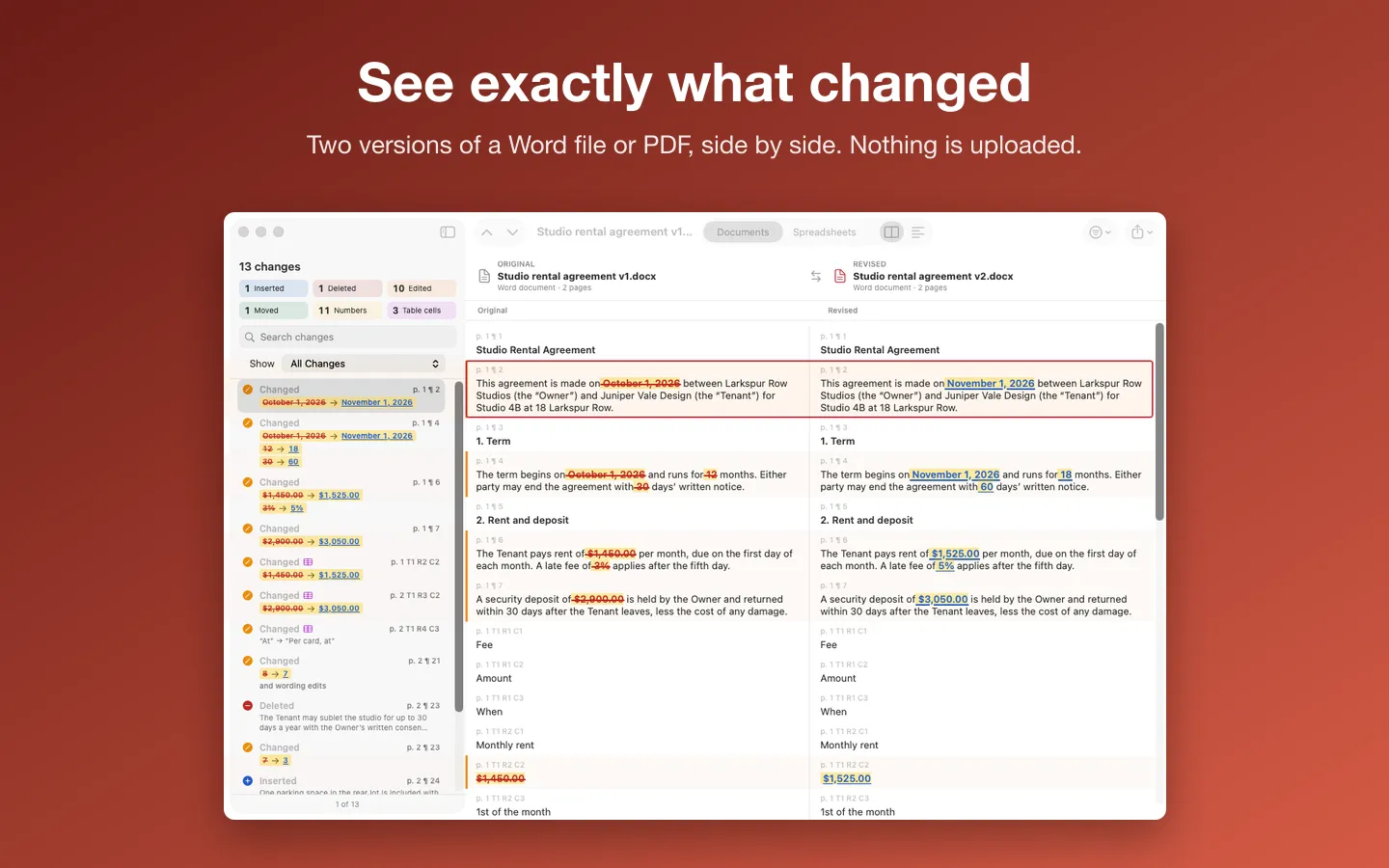
Inkdelta is a Mac app we make: compare two versions of a Word file, PDF or spreadsheet, on your Mac.
- Open the original and the revised file: .docx and PDF in any mix.
- Read them side by side, lined up paragraph by paragraph, or as an inline redline with word-level changes.
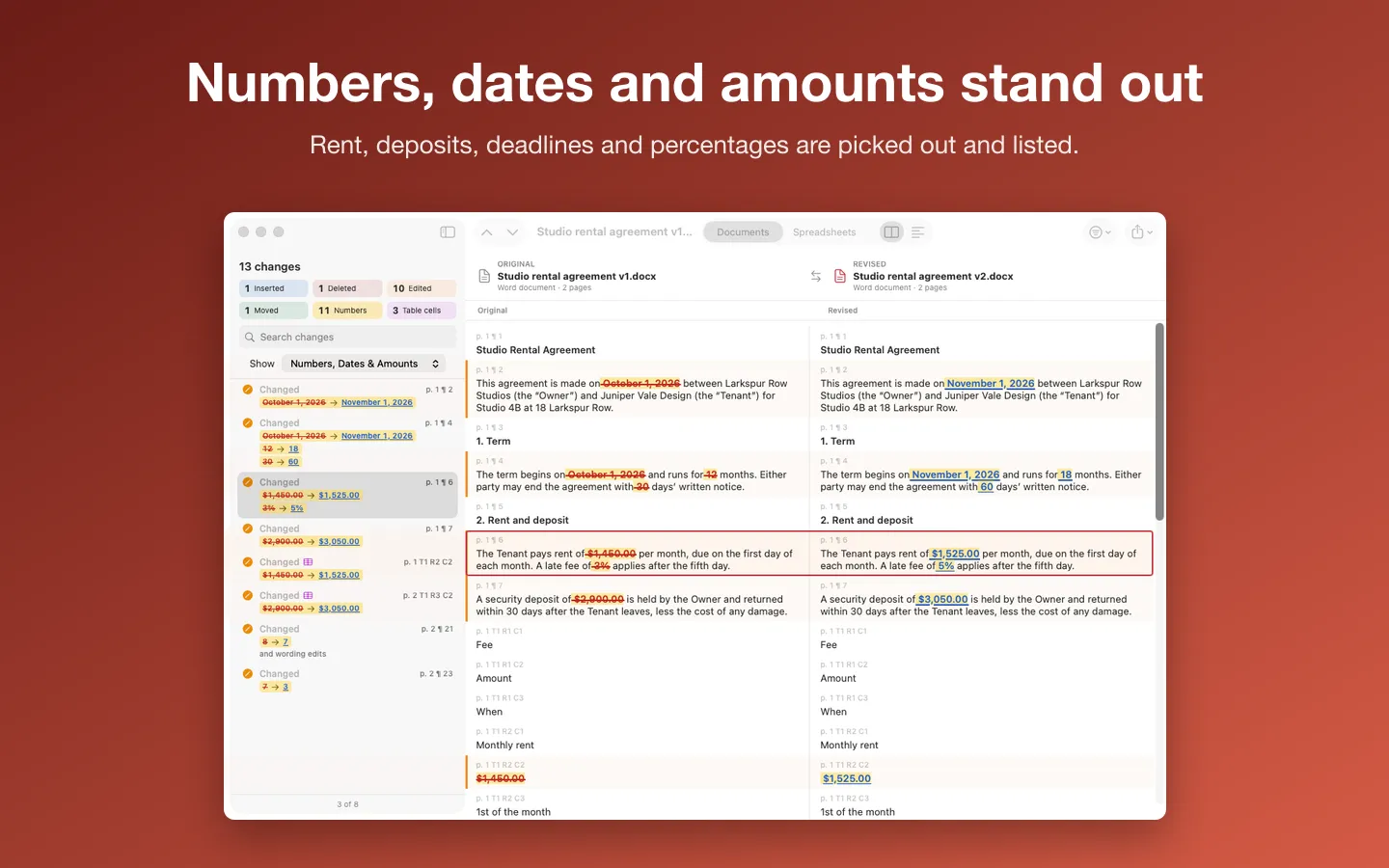
- Moved paragraphs show as moves, and changed numbers, dates and amounts are listed on their own.
- Save a change report PDF, or export the redline as HTML, RTF or a Word file.
Free to use without a key: every view, filter, export and the change report, for documents up to 5 pages each and spreadsheets up to 250 rows per sheet.
$29.99 one-time for Pro, no subscription. Buy a license key to unlock Pro: compare documents of any length and spreadsheets of any size.
macOS 14 Sonoma or later. Apple silicon and Intel. Compares the text of .docx files and PDFs; page layout, images and formatting aren't compared. Spreadsheets: .xlsx, CSV/TSV, and Numbers files when Numbers is installed; old .xls files need saving as .xlsx.
Questions
Can I compare a Word file with a PDF?
Most tools want both files in the same format, so you'd convert one first. Inkdelta compares .docx and PDF in any mix, by their text.
Are formatting changes shown?
Word's Compare can show formatting changes. Text comparisons, Inkdelta's included, compare the words and numbers: page layout, images and formatting aren't compared.
What about scanned PDFs?
A scan has no text until it's OCR'd. Inkdelta reads scanned pages with OCR and marks them so you can double-check them, since OCR can misread characters.
Can I compare two spreadsheets?
Inkdelta has a spreadsheet mode for Excel (.xlsx), CSV and Numbers files: cell by cell, with values and formulas compared separately.