How to split a plan set PDF into one file per sheet on a Mac
UpdatedShort answer
Any PDF can be split for free on a Mac: drag page thumbnails out of Preview's sidebar to make one-page PDFs, or use the free cpdf tool to split a whole set at once, named by its bookmarks if it has one per sheet. Neither reads the sheet number and title from the title block, so on a 200-sheet set, naming every file (A-101 - FIRST FLOOR PLAN.pdf) is the slow part.
The free ways
Free: Preview, a few sheets at a time
- Open the plan set in Preview and choose View › Thumbnails.
- Drag a page's thumbnail from the sidebar to a Finder window or the desktop: it becomes its own one-page PDF.
- Rename the new file from the sheet's title block, such as
A-101 - FIRST FLOOR PLAN.pdf. - Repeat for each sheet.
Free: cpdf, the whole set at once
cpdf is free, open-source (AGPL) PDF software; install it with Homebrew (brew install cpdf). It writes new files and leaves the set as it is.
- In Terminal, go to the folder with the set: type
cd(with a space), drag the folder onto the window and press Return. - Make a folder for the sheets and split the set one page per file with the first two lines below; each file is named by its page number.
- If the set has a bookmark for every sheet, the last line names each file from its bookmark instead.
- Check the names against the cover sheet's sheet index and rename what doesn't match.
mkdir sheets
cpdf -split plans.pdf -o "sheets/page @S.pdf"
cpdf -split-bookmarks 0 plans.pdf -o "sheets/@B.pdf"
Where the free ways stop
- Preview's drag works page by page, and every name is typed by hand from the title block.
- Bookmark names are only as good as the bookmarks: many sets have none, or bookmarks that don't match the sheet numbers.
- Neither notices a missing or duplicated sheet number, so a mistake shows only when someone goes looking for the sheet.
- Scanned sets, and title blocks drawn as lines, have no text to name from.
How Sheetbreak does it
Sheetbreak is a Mac app we make: split a plan set PDF into one named PDF per sheet.
- Drop the plan set PDF. Sheetbreak suggests the title-block box (or drag your own; lower right, right strip and bottom strip are one click) and remembers it for the set.
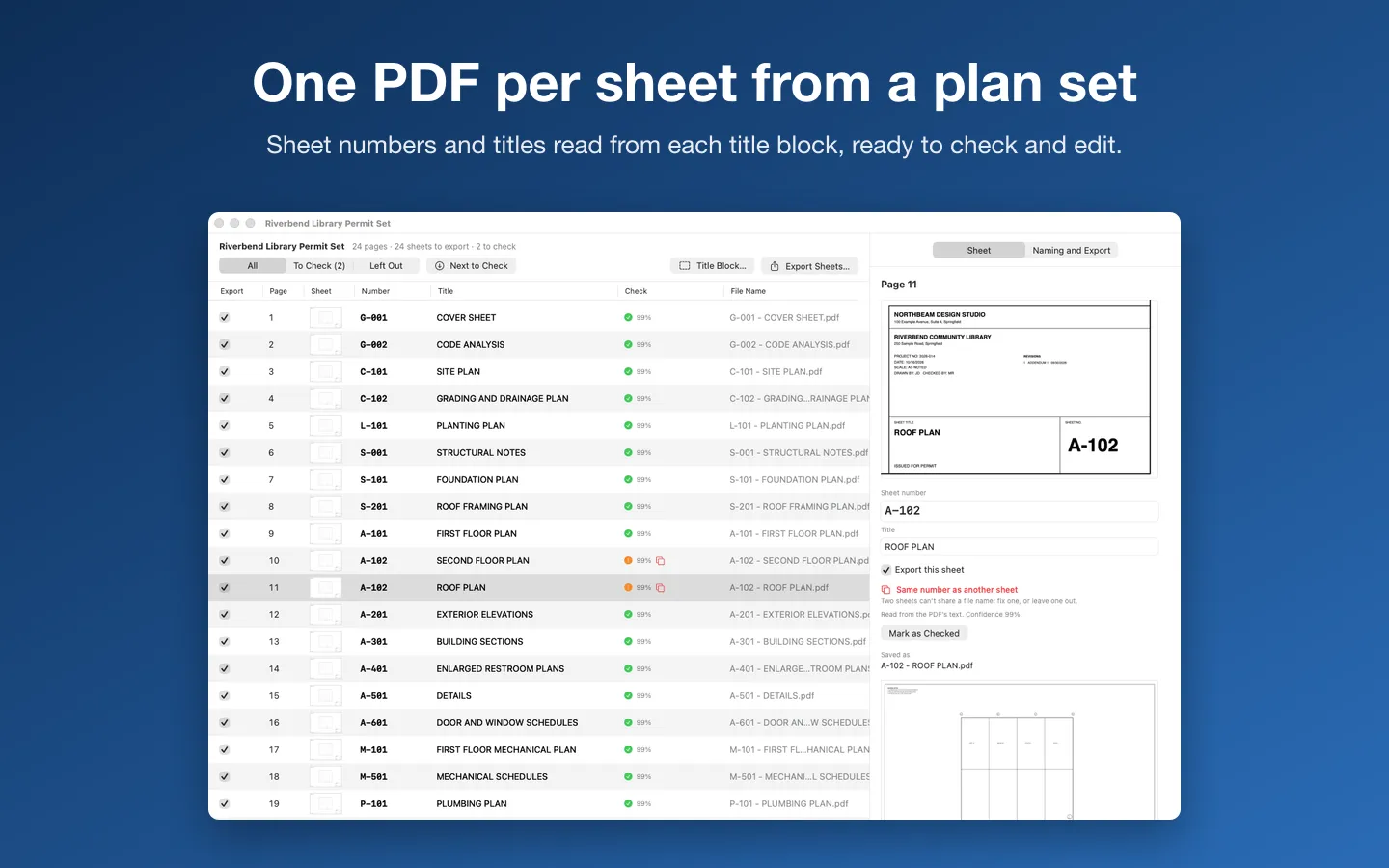
- It reads each sheet number and, where it can, the title: from the PDF's text first, and with text recognition on your Mac for scanned pages and title blocks drawn as lines or pictures.
- Check the review table: it flags missing numbers or titles, duplicates, unusual patterns and readings it isn't sure of. Edit anything before you export.
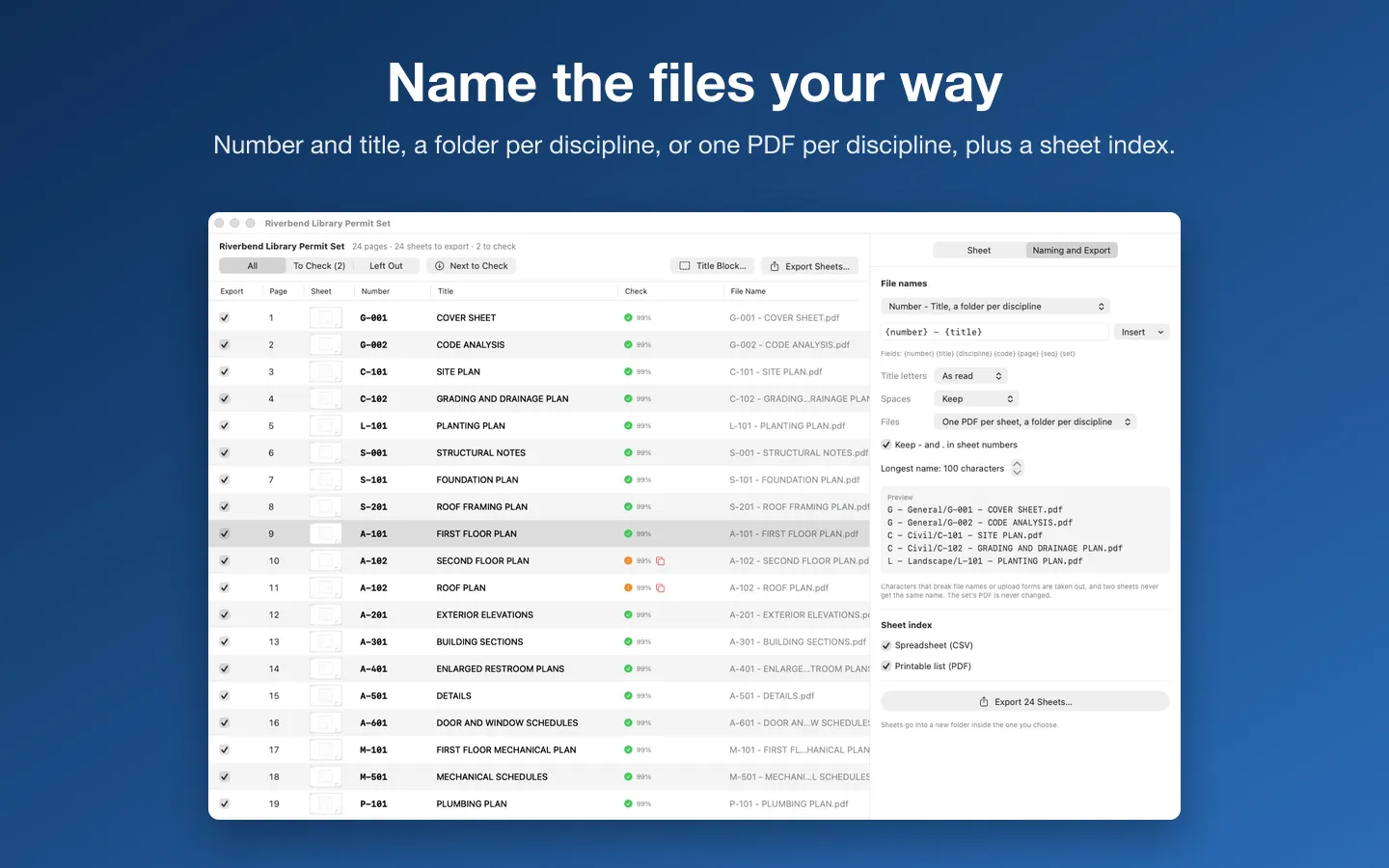
- Export one PDF per sheet, one per discipline or a folder per discipline, named like A-101 - FIRST FLOOR PLAN.pdf, plus a sheet index as CSV and PDF. The original set is never changed. Without a key every feature works for the first 25 sheets of a set.
Free to use without a key: every feature, exporting the first 25 sheets of a set; reading and reviewing have no limit.
$19.99 one-time for Pro, no subscription. Buy a license key to unlock Pro: export sets of any size.
macOS 14 Sonoma or later. Apple silicon and Intel. Opens plan set PDFs that aren’t encrypted. Some title blocks can’t be read automatically; type those in the review table. It copies what the title blocks say and doesn’t check plans against any code or rule.
Questions
Why do some permit portals want one file per sheet?
Some building departments ask for each sheet as its own file, named to match the title block or the sheet index, so reviewers can find and replace sheets. Check your jurisdiction’s submittal rules for the exact naming.
Can Sheetbreak read every title block?
No reading is perfect. Sheetbreak reads the PDF’s text first and uses text recognition when that doesn’t show the number, flags what it isn’t sure of, and lets you type in anything it couldn’t read before a file is saved.
Does splitting change the drawings?
No. Each sheet is an exact copy of its page, with the layers it uses, checked after it’s saved, and it goes into a new folder. The original set isn’t changed or moved.
Is the plan set uploaded anywhere?
No. Sheetbreak works on your Mac and the set is never uploaded.