How to update all the apps on your Mac at once
UpdatedShort answer
There's no single button that updates every app on a Mac. The App Store updates the apps you got from it, apps downloaded from the web update through their own Check for Updates menu item, and Homebrew upgrades the apps it installed in one command. Finding which apps are out of date across all three is the slow part, and MacUpdater, a paid app many people used for it, shut down on January 1, 2026.
The free ways
Free: the App Store, each app, and Homebrew
- App Store apps: open the App Store, click Updates in the sidebar, then Update All. (macOS itself updates in System Settings › General › Software Update.)
- Apps from the web: open each one and choose Check for Updates, usually in the app's own menu (the one named after the app) or its Help menu.
- Apps installed with Homebrew: in Terminal, list what’s out of date and upgrade it with the lines below.
--greedyincludes apps that normally update themselves. - Do it about once a month, and right away when an app announces a security fix.
brew update
brew outdated --cask --greedy
brew upgrade --cask --greedy
Where the free ways stop
- Apps from the web are checked one by one: nothing lists which of them are out of date.
- Homebrew only knows the apps it installed.
- Some apps have no updater of their own and only post new versions on their website or on GitHub.
- Nothing keeps a history of what was updated, or holds an app at a version you trust.
How Updatewright does it
Updatewright is a Mac app we make: every Mac app update in one place.
- Check once: Updatewright lists every app in Applications with where its updates come from (its own Sparkle feed, Homebrew, GitHub releases or the App Store), the version you have, the newest one and its release notes.
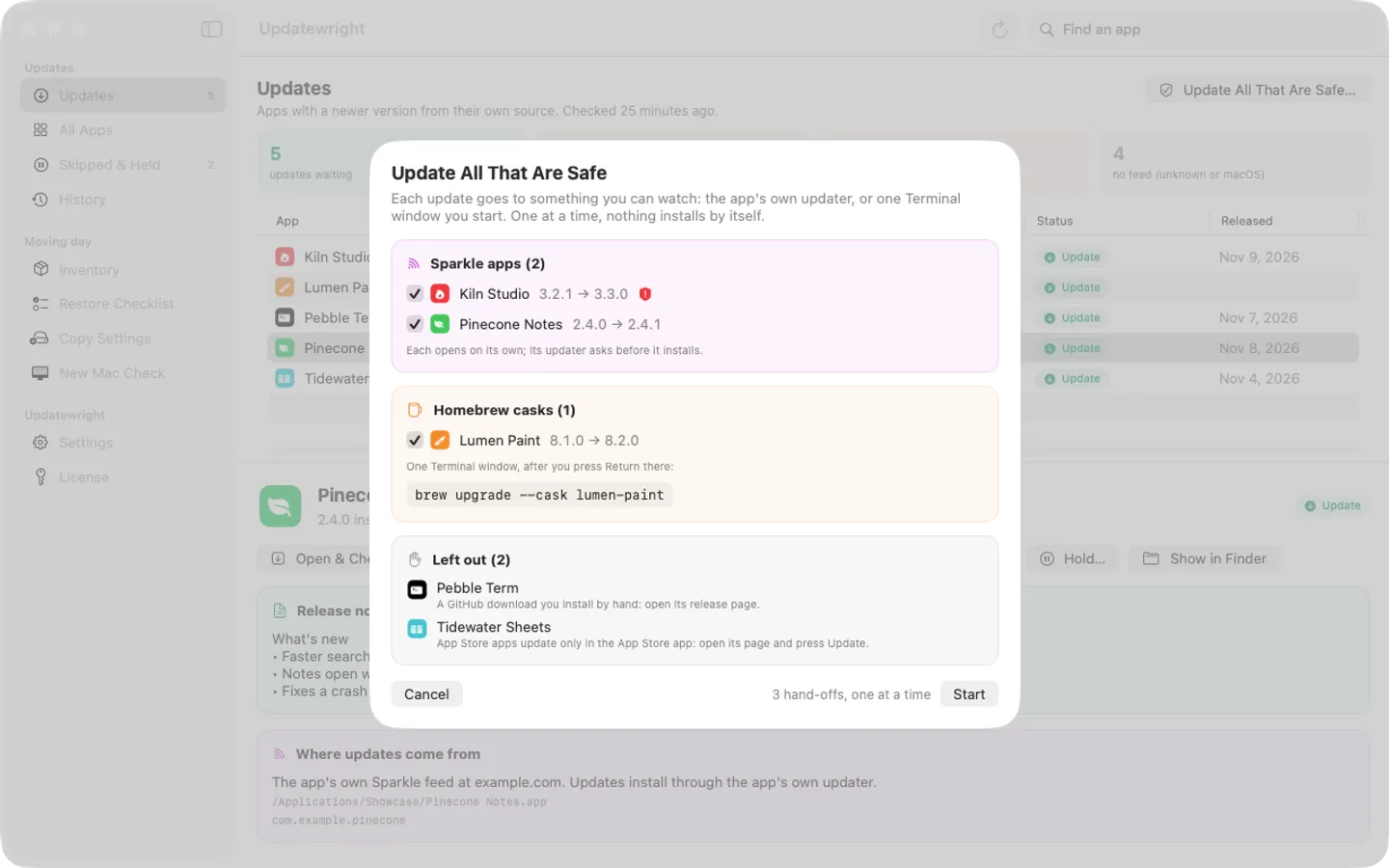
- Choose Update All That Are Safe: the Sparkle and Homebrew updates you tick are handed off one at a time, to the app’s own updater or one Terminal window you start. Nothing installs silently.
- Skip a version, hold an app with a note, and look back at the History of every update. A menu bar badge shows how many are waiting.
- Moving to a new Mac? Moving day makes an inventory of your apps and settings, copies settings to a drive and gives you a restore checklist. Every feature is free for 7 days from the first time you open it.
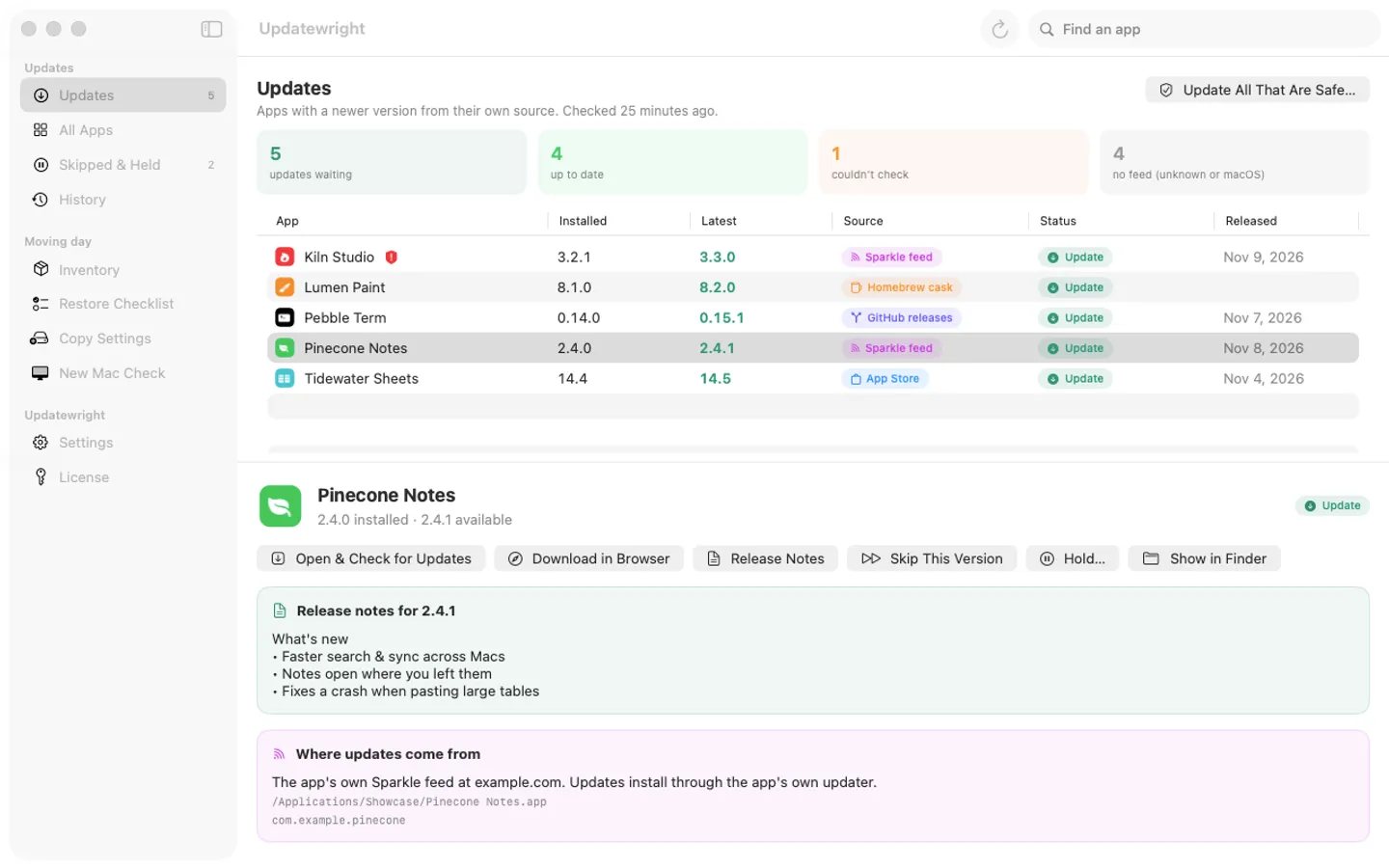
Free for 7 days from the first time you open it, with every feature.
$9.99 one-time for Pro, no subscription. Buy a license key to unlock checking for updates, Update All That Are Safe, Copy Settings and New Mac Check after the trial. Your last list, History, holds, Inventory and Restore Checklist always stay open.
macOS 15 Sequoia or later. Apple silicon and Intel. Homebrew optional.
Questions
Why doesn't the App Store update all my apps?
It only updates apps you got from the App Store. Apps downloaded from a website update through their own updater, and apps installed with Homebrew through Homebrew.
Does Updatewright install updates by itself?
No. Each update is handed to something you can watch: the app’s own updater, a Terminal window with the Homebrew line, or the App Store. Nothing installs silently.
Do I need Homebrew?
No, Homebrew is optional. Updatewright also reads apps’ own update feeds, GitHub releases and the App Store.
What happened to MacUpdater?
It shut down on January 1, 2026, so people who used it to see every app’s update in one list are looking for another way to do that.